
A URL slug is the user-friendly, readable part of a web address that comes right after your domain name. It’s the final piece of the URL that clearly tells both people and search engines what a specific page is about.
For instance, in the URL https://yourcompany.com/kansas-city-seo-services, the slug is /kansas-city-seo-services. It’s a clean, descriptive address that points to one exact location on your site.
Your Digital Address Explained
When you look at a full web address, it can seem like a jumble of characters. In reality, every piece has a specific job, and the slug is arguably the most important for human understanding and on-page SEO.
This is the part of the address you have complete control over. It’s custom text that directly communicates the page's content, making it instantly recognizable in search results, social media shares, and browser tabs.
A great URL slug serves two masters: the search engine that needs to index your content and the human user who needs to understand what they're clicking on. Getting it right is a small change with a big impact.
Breaking Down The URL Anatomy
To truly understand what a URL slug is, you have to see where it fits in the larger structure of a full web address. Each component has a role, from securing your connection to guiding users to the exact page they need. For a business owner in Kansas City, understanding this structure is the first step toward optimizing your site's digital footprint.
A clear URL provides a better user experience, building trust before a visitor even lands on your page. This foundational knowledge is crucial when you how to plan website structure for better navigation and SEO performance.
Let's break down a typical URL to see exactly where the slug lives.
The Anatomy of a Website URL
This table visually deconstructs a standard URL, showing how each part works together to get you where you need to go online.
| URL Component | Example | What It Means |
|---|---|---|
| Protocol | https:// |
The secure method your browser uses to connect to the website (HTTP vs. HTTPS). |
| Subdomain | blog. |
An optional prefix, often used to separate sections like a blog or shop. |
| Domain Name | yourwebsite.com |
Your unique, branded address on the internet. |
| Path/Directory | /services/ |
A folder or category that organizes site content, like /services/ or /locations/. |
| URL Slug | kansas-city-seo |
The specific, descriptive name of the individual page. This is the part you can optimize. |
As you can see, the slug is the final, descriptive piece of the puzzle that names the specific page you're visiting.
How URL Slugs Act as Your SEO Secret Weapon
A well-crafted URL slug is far more than just the tail end of a web address; it's a powerful signal you send directly to search engines like Google. For a local business in Kansas City, this small piece of text is an instant identifier, helping crawlers understand your page's topic with speed and accuracy. That clarity makes a real difference in how efficiently your site gets indexed.
When you strategically include your target keyword in the slug, you're telling Google which search queries your page is built to answer. This simple action can give you a noticeable edge over competitors using generic, auto-generated URLs that offer zero contextual clues.
Boosting Search Rankings and User Trust
The benefits of a clean slug extend beyond search bots. Imagine a potential customer in Kansas City scanning Google results. A clear, readable URL like /kansas-city-plumbing-repair instantly communicates relevance and builds trust. Conversely, a confusing slug like /p?id=8675309 can look unprofessional or even spammy, deterring clicks.
This is where the slug becomes a crucial part of your on-page SEO strategy. It directly influences user behavior. A descriptive slug encourages a higher click-through rate (CTR), which is a key ranking factor. Google interprets more clicks as a signal that your page is a valuable result for that search query. You can see how these pieces fit together in our guide on what is on-page optimization.
Turning Slugs into Traffic Drivers
Optimizing your URL slugs is a fundamental practice that translates directly into better business outcomes. Time and again, properly structured URLs have shown a significant contribution to higher search engine rankings.
In fact, the vast majority of top-ranking search results include relevant keywords right in their URL slugs. Businesses that nail this strategy, especially with long-tail keywords that match user intent, often see measurable improvements in organic traffic. For more on this, you can discover more insights about SEO URL best practices on storychief.io.
The URL is one of the first things a user sees in search results. A clean, keyword-focused slug not only helps Google understand your content but also convinces a human that your page has the answer they need.
Ultimately, a good slug bridges the gap between technical SEO and human psychology. It makes your content more accessible to search engines and more appealing to potential customers. Here are some practical examples for a Kansas City business:
- For a Service Page: A slug like
/kansas-city-roofing-contractorsis far superior to/service-1. It targets a specific keyword and location, immediately qualifying the page for relevant local searches. - For a Blog Post: Instead of a generic
/blog/post-123, using/how-to-prevent-basement-floodingtells both users and Google exactly what the article is about, improving its chances of ranking for that specific query. - For a Location Page: If you serve multiple areas,
/overland-park-landscapingis much more effective than/location-2for attracting geo-targeted traffic.
By treating your URL slugs as a core part of your SEO efforts, you transform a simple technical requirement into a weapon for driving targeted traffic and growing your online presence in Kansas City and beyond.
Crafting The Perfect URL Slug A Practical Guide
Now that you understand what a URL slug is and why it matters, let's get into the practical side of creating a great one. The good news is that this isn't guesswork. It's a simple, repeatable process built on a handful of core principles.
A perfectly crafted slug is clear, concise, and purposeful. Think of it as a tiny roadmap for both search engines and human visitors, making your content more discoverable and trustworthy from the start. Your goal is to eliminate ambiguity and add value with every character.
This diagram highlights how a great slug directly fuels your SEO, user experience, and ultimately, your business goals.
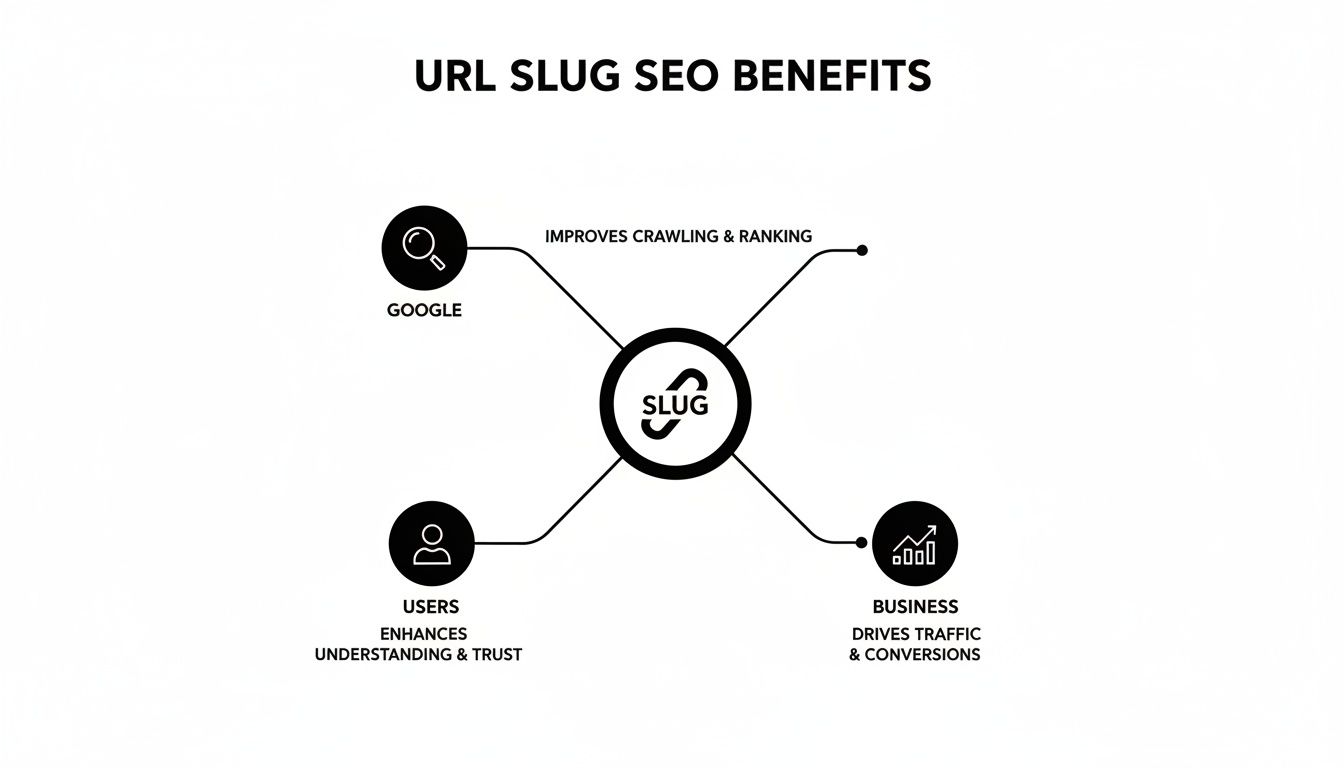
As you can see, a single, well-optimized slug does a lot of heavy lifting. It sends the right signals to Google for better indexing, builds instant trust with users so they're more likely to click, and drives more of the right traffic straight to your website.
Core Best Practices For Slugs
To get this right every time, stick to these proven rules. They are the foundation of a high-performing URL that works.
- Keep It Short and Descriptive: Aim for a slug that summarizes the page's content in just a few keywords. Be concise and eliminate fluff.
- Include Your Primary Keyword: Ensure your main target keyword appears, preferably near the beginning. This directly impacts your SEO.
- Use Hyphens to Separate Words: This is the standard for search engines and improves readability. Never use underscores, spaces, or other characters.
- Remove Stop Words: Ditch unnecessary words like "a," "an," "the," and "is." They add length without providing real SEO value. For example, change
/how-to-find-a-plumberto/how-to-find-plumber. - Stick to Lowercase Letters: Using uppercase letters can cause duplicate content issues or 404 errors on some servers. Keep it all lowercase to be safe.
Following these simple rules ensures your slugs are clean, easy for people to read, and perfectly optimized. This approach is a key part of creating the best URL structure for SEO and building a solid technical foundation for your site.
Slug Length And Its Impact
The length of your URL slug directly affects both user experience and search engine rankings. While most platforms have technical limits—usually between 3 and 250 characters—best practices call for something much shorter and more memorable.
Research shows that shorter URLs often perform better. URLs under 75 characters can see a 10-15% higher click-through rate in search results compared to longer, more complex ones.
The sweet spot for a slug is long enough to be descriptive but short enough to be easily typed, remembered, and shared. If a user can guess what your page is about just by glancing at the slug, you’ve done your job.
Good Slugs Vs Bad Slugs A Practical Comparison
Let’s see these rules in action. It's one thing to talk about theory, but a side-by-side comparison makes the difference clear.
This table shows how to transform a poorly constructed slug into an SEO-friendly one for a typical Kansas City business.
| Page Type | Poor URL Slug Example | Optimized URL Slug Example | Why It's Better |
|---|---|---|---|
| Blog Post | /our-newest-blog-post-about-seo-in-kansas-city-123 |
/kansas-city-seo-tips |
It's short, keyword-focused, removes stop words and numbers, and is easy to read. |
| Product Page | /products/item?id=B07XYN5C2Q_blue_shirt |
/mens-performance-t-shirt |
It's descriptive, uses relevant keywords, and avoids confusing parameters. |
| Service Page | /page-id-2-service-web_design_for_small_business |
/small-business-web-design |
It uses hyphens correctly, includes the primary keyword, and removes generic page IDs. |
Notice how the optimized versions are immediately easier to understand? That clarity is exactly what you're aiming for. It’s a small detail that packs a huge punch for your SEO and the overall professionalism of your site.
Common URL Slug Mistakes That Sabotage Your Rankings

While creating a good URL slug is straightforward, it’s alarmingly easy to make small mistakes that quietly sabotage your SEO. Many businesses create slugs that confuse search engines, turn off users, and slowly chip away at their rankings over time.
These aren't just minor cosmetic issues; they're significant missed opportunities. Understanding these common pitfalls is the first step to ensuring every URL on your site is working for you, not against you.
Using Auto-Generated or Non-Descriptive Slugs
One of the most frequent mistakes is simply accepting the default slug your website platform generates. These often look like /p=123 or /blog-post-title-with-date, which are meaningless to users and search engines.
This is a massive missed chance to target your keywords. A clean slug like /kansas-city-seo-agency is a crystal-clear signal to Google. In contrast, /page?id=45 provides zero context, forcing search engines to work harder to understand your content.
The Problem With Including Dates
Putting a year or a full date in your blog post slugs might seem like a good idea for timely content, but it's a critical mistake for evergreen articles. A slug like /best-seo-tips-2023 immediately gives your content an expiration date.
Once the calendar flips, that URL looks dated and less relevant to searchers, harming its long-term ranking potential. SEO research shows that evergreen content with timeless slugs often achieves 15-25% higher long-term rankings compared to URLs with the year included.
By removing dates from your slugs, you give your content a timeless quality. This allows you to update the page's content year after year while the URL remains a stable, authoritative address that continually accumulates value.
Changing Slugs Without Proper Redirects
This is arguably the most damaging mistake of all: changing an existing URL slug without setting up a proper 301 redirect. When you change a slug, you're creating a brand-new address for your page.
Without a redirect, any backlinks pointing to the old URL are now broken. Search engines lose the page's history, and any user trying to visit gets a frustrating 404 "not found" error. This instantly kills your traffic and can cause a dramatic drop in your search rankings.
A 301 redirect acts as a permanent forwarding address. It tells browsers and search engines that the page has moved for good, preserving most of its SEO value. It’s also important to understand how redirects and slugs relate to your site's main identifier; learn more about what is a canonical URL in our article. Getting this right ensures Google sees one authoritative version of your page, which is critical for avoiding duplicate content issues.
How to Change a URL Slug in WordPress Without Breaking Your SEO
For the millions of businesses running on WordPress, editing a URL slug is a common task. Whether you’re fine-tuning a new draft or updating an old post, the platform makes it simple to change this crucial piece of your page’s address.
But here’s the catch: changing a slug on a page that’s already live is like changing the street address of an established shop. If you don’t leave a forwarding address, customers (and search engines) will get lost. This is where many businesses accidentally torpedo their own SEO, creating a mess of broken links and losing valuable traffic.
How to Edit Your Slug in WordPress
In WordPress, the URL slug is part of the permalink. Finding and tweaking it is a straightforward process, whether you're using the modern Block Editor or the Classic Editor.
With the Block Editor (the current standard), the setting is easy to find:
- Open the post or page you want to edit.
- In the right-hand sidebar, ensure you’re on the "Post" or "Page" tab.
- Expand the "Summary" section, and you'll find the "URL" field.
- Type your new, optimized slug directly into that field.
This screenshot shows you exactly where to find the URL slug field inside the WordPress Block Editor's settings panel.
As you can see, it's clearly labeled and ready for you to type in your new, keyword-focused text.
Protecting Your SEO with 301 Redirects
Editing the slug is the easy part. The critical next step is protecting your SEO. Whenever you change the URL of a published page, you must create a 301 redirect.
A 301 redirect is a permanent instruction that forwards the old URL to the new one. This action is non-negotiable for several reasons:
- It preserves link equity: Any backlinks pointing to your old URL will pass their authority to the new one.
- It ensures a smooth user experience: Visitors who bookmarked the old page or click an old link will be seamlessly sent to the correct place.
- It prevents 404 errors: It stops users and search engine crawlers from hitting a "Page Not Found" error, which can harm your rankings.
A 301 redirect is the only way to tell Google, "Hey, this page has moved for good." It's the non-negotiable step that ensures you don't lose the ranking power you've already worked so hard to build.
Thankfully, you don’t need to be a developer to handle this. Free plugins like Rank Math or Redirection can automatically create a 301 redirect for you the moment you update a slug. They detect the change and take care of the technical heavy lifting, making the process safe and worry-free.
After updating any URLs, it's always a good idea to monitor their performance. You can find detailed instructions in our guide on how to set up Google Search Console to track their indexing status and make sure the transition goes smoothly.
Frequently Asked Questions About URL Slugs
Even after mastering the basics, a few specific questions often come up when managing a website. Here are the most common ones we hear from business owners, reinforcing the key ideas we've covered.
Does Changing a URL Slug Affect My SEO?
Yes, absolutely. Changing a URL slug can seriously hurt your SEO if you are not careful. When you alter the slug, you change the page's entire address. This means any backlinks you've earned that point to the old URL will break, and you'll lose their ranking power.
To avoid this, you must set up a 301 redirect from the old URL to the new one. A 301 redirect is a permanent signal that tells search engines the page has moved, passing along most of its SEO authority and ensuring visitors don't land on a 404 error page.
What Is the Difference Between a URL Slug and a Permalink?
People often use these terms interchangeably, especially in the WordPress community, but they are not the same thing.
A permalink is the entire, permanent URL for a page, like
https://yourshop.com/services/web-design. The URL slug is just the final, editable piece of that permalink—in this case,web-design.
Think of it this way: you edit the slug within the permalink to define that specific page's unique address. The slug is just one part of the whole.
Should I Include Numbers in My URL Slugs?
It depends on the context. As a general rule, it's best to avoid numbers, especially random ID numbers generated by your CMS or dates that can make your content look outdated. They don't add descriptive value for users or search engines.
However, if a number is a core part of your page's title and topic, it's perfectly fine to include it. For a blog post titled "7 Local SEO Tips for Kansas City Businesses," an optimized slug would be /7-local-seo-tips-kansas-city.
The key is to ensure every part of your slug serves a clear purpose. If the number adds clarity and helps the user understand what they're about to read, keep it. If it's just clutter, remove it for a cleaner, more powerful URL.
Ready to turn your website into a powerful lead-generation tool with perfectly optimized URLs? The experts at Website Services-Kansas City build and refine websites that get results. We offer comprehensive SEO audits and development services to ensure every part of your site, right down to the slugs, is working to grow your business. Learn more about our services and get your 100% money-back guarantee today.