
Breadcrumb navigation is a simple text-based trail, usually sitting right at the top of a page, that shows you exactly where you are on a website. It’s a secondary navigation system that acts as a digital signpost, providing a clickable path all the way back to the homepage. For any business, from a local Kansas City service provider to a national e-commerce store, it's a small feature with a huge impact on both user experience and search engine optimization.
Unpacking Breadcrumb Navigation

Think about the last time you were in a huge supermarket. You probably started in the "Produce" section, walked down the "Canned Goods" aisle, and ended up in front of the "Soup." The signs hanging from the ceiling that guided your journey are a perfect real-world example of breadcrumb navigation. They give you a clear, logical path showing where you are in relation to the rest of the store.
The name itself comes straight from the classic "Hansel and Gretel" fairytale, where the kids left a trail of breadcrumbs to find their way back home. On a website, this trail does the exact same thing: it stops visitors from feeling lost, especially on large, complex sites like e-commerce stores or sprawling blogs with hundreds of pages.
The Anatomy of a Breadcrumb Trail
A breadcrumb trail is typically just a horizontal line of text links, often separated by a ">" symbol. It visually lays out the site's hierarchy, starting from the broadest category and drilling down to the specific page you're currently on.
Let's imagine you're shopping on a local Kansas City clothing website. A typical breadcrumb trail might look like this:
Home > Men's Apparel > Shirts > T-Shirts
Each part of that path—except for the current page you're on, "T-Shirts"—is a clickable link. This lets you instantly jump back to the main "Shirts" category or even the broader "Men's Apparel" department with a single click, saving you from hitting your browser's back button over and over.
Here's a quick breakdown of what you'll typically find in a breadcrumb trail.
Breadcrumb Navigation at a Glance
This table offers a quick summary of the core components that make up a standard breadcrumb trail.
| Component | What It Represents | Example |
|---|---|---|
| Homepage Link | The starting point of the trail, leading back to the site's main page. | Home |
| Category Links | The intermediate levels of the site's hierarchy that the current page sits under. | > Men's Apparel > Shirts |
| Current Page | The final, non-clickable part of the trail, indicating the user's current location. | > T-Shirts |
| Separator | The symbol (like ">" or "/") used to visually separate each level of the hierarchy. | > |
These simple elements work together to create a powerful, intuitive navigation aid.
Breadcrumbs are a simple yet powerful feature. They act as a secondary navigation system that improves user orientation, reduces clicks, and enhances the overall user experience by providing clear contextual awareness.
This small tool makes websites feel instantly more intuitive. By giving visitors a clear map of their journey, you empower them to explore your site with confidence, knowing they can easily retrace their steps at any time. It's a minor addition that can significantly cut down on user frustration and make even the most complex websites feel effortless to navigate.
Why Breadcrumbs Are Essential for SEO and User Experience
Breadcrumb navigation is one of those small details that packs a surprisingly big punch. It’s far more than a minor design element; it’s a powerful tool that works on two critical fronts at the same time, boosting both your search engine optimization (SEO) and your website’s user experience (UX).
These two benefits are deeply connected. A better experience for your visitors sends positive signals to search engines, which in turn can lead to higher rankings.
For search engines like Google, breadcrumbs are like a neatly drawn map of your website. They provide clear, structural context that helps crawlers understand how all your pages relate to one another. This logical hierarchy makes it easier for search engines to index your content and can even help you score those enhanced, more attractive listings in search results.
Boosting Visitor Engagement and Reducing Bounce Rates
From a user's perspective, breadcrumbs are a lifeline.
Imagine a shopper on a Kansas City e-commerce site. They land directly on a product page from a Google search, but the product isn't quite what they wanted. What happens next is critical. Without breadcrumbs, their easiest option is to hit the "back" button and leave your site for good.
But with a clear trail like Home > Women's Apparel > Dresses, they can instantly jump back to the main "Dresses" category with a single click. This simple navigation keeps them on your site, encourages them to keep exploring, and can slash your bounce rate.
By providing an easy escape route to higher-level categories, breadcrumbs prevent users from feeling trapped on a single page. This small feature empowers them to explore your offerings more broadly, turning a potential bounce into a continued shopping journey.
The Proven Impact on Business Outcomes
The positive effects of breadcrumbs aren't just theory—they're backed by solid data. A 2023 Nielsen Norman Group study revealed that 94% of top e-commerce sites use breadcrumbs. Why? Because they can slash bounce rates by up to 25% on category pages by giving users a way to navigate without hitting the browser's back button.
For Kansas City business owners, this translates to huge wins. Implementing path-based breadcrumbs can boost time-on-site by 15-20%, sending great UX signals to Google and driving more organic traffic. On the flip side, 62% of users will simply abandon complex sites that don't have this feature, potentially costing a new business thousands in lost sales.
To really get why breadcrumbs are so essential for user satisfaction, it helps to understand the core principles of User Experience (UX) design. This foundation clarifies how small navigational aids contribute to a seamless journey for every visitor. By focusing on a strong website user experience design, you build a site that not only ranks well but also turns visitors into loyal customers.
Exploring the Three Types of Breadcrumb Navigation
Not all breadcrumbs are created equal. Just like a map can show different kinds of information—like roads, terrain, or points of interest—breadcrumb navigation comes in a few distinct flavors. Getting a handle on these variations is the key to picking the perfect fit for your website's structure and goals.
Each type serves a unique purpose, guiding users in a specific way. Choosing the right one all comes down to what kind of journey you want your visitors to have. The three main types you'll run into are hierarchy-based, attribute-based, and history-based breadcrumbs.
Hierarchy-Based Breadcrumbs
This is the one you see most often—it's the classic breadcrumb. Also known as location-based breadcrumbs, they show users exactly where they are within your site's structural hierarchy. Think of it like a clear organizational chart, starting from the homepage and drilling down to the current page.
For instance, a local Kansas City law firm might have a path for a blog post that looks like this:
Home > Practice Areas > Family Law > Child Custody in Missouri
This trail instantly tells them that the current article lives under the "Family Law" practice area, reinforcing the site's structure and making it incredibly easy for users to navigate up to broader topics. A well-organized trail like this is a cornerstone of a solid site plan. If you want to learn more, check out our guide on how to plan website structure.
Attribute-Based Breadcrumbs
Attribute-based breadcrumbs are the secret weapon for e-commerce sites or any website with complex filtering options. Instead of showing the page's location in the site hierarchy, they display the specific attributes or filters a user has selected to get to their current view.
Imagine you're shopping for running shoes on a Shopify store. After you've applied a few filters, your breadcrumb trail might look something like this:
Home > Running Shoes > Men's > Size 11 > Nike > Under $100
This type of breadcrumb is a huge win for user experience. It confirms the user's selections and, more importantly, allows them to easily remove a single filter—like "Under $100"—without having to start their entire search from scratch. It’s dynamic feedback that makes finding the right product so much more efficient.
History-Based Breadcrumbs
Finally, we have history-based breadcrumbs, sometimes called path-based breadcrumbs. These show a user's specific journey step-by-step, no matter what the site's structure is. It basically works like a smarter, more specific version of your browser's back button.
History-based breadcrumbs act like a dynamic, chronological log of a user's session. They trace the actual pages visited, providing a personalized trail back through their recent activity on your site.
Path-based breadcrumbs first showed up in the early 2000s but have become pretty rare, used on under 10% of sites today because the browser's back button handles most of the job. However, they can be invaluable for complex e-commerce flows where a user might filter for jeans by size, then color, then price. These crumbs let users leap back to a previous filtered view without resetting all their choices, which can preserve a 30% higher conversion rate.
This infographic illustrates how all these breadcrumb types come together to support both SEO and the user's experience.
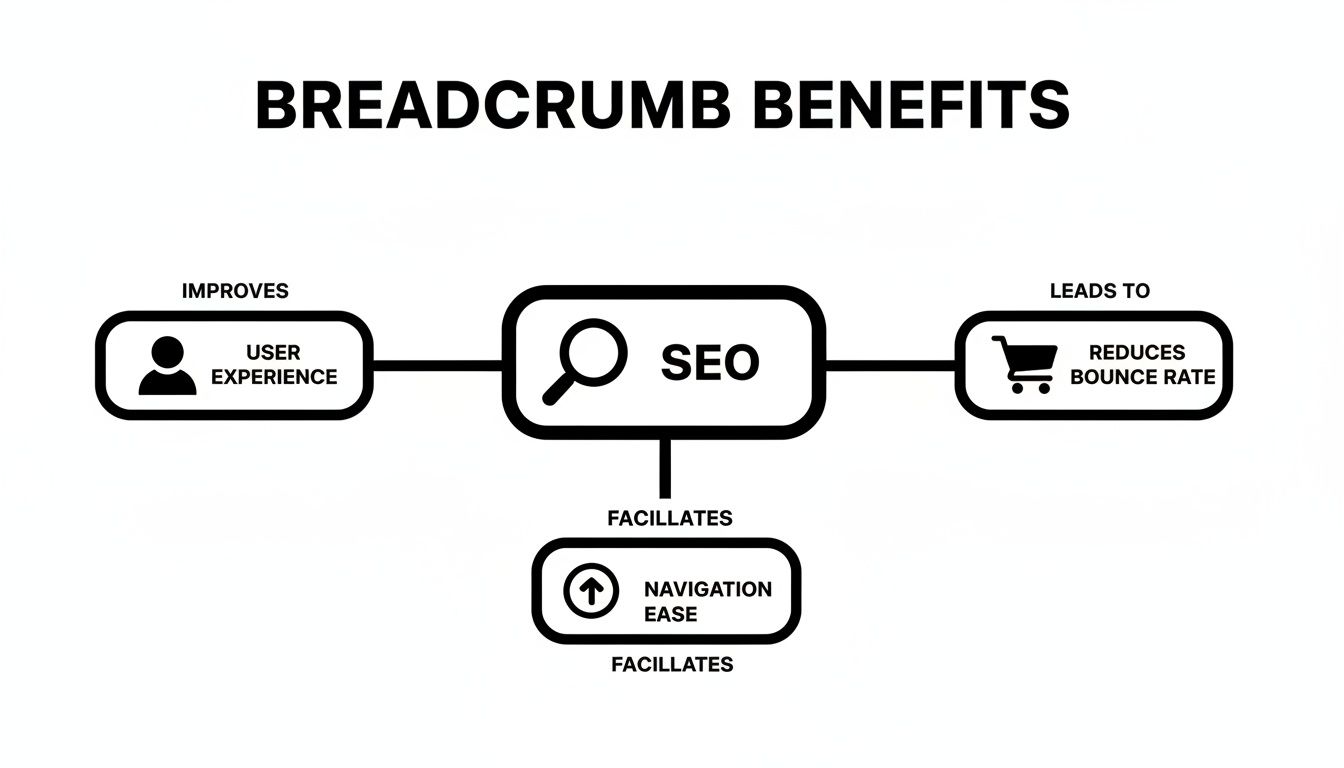
As the visual shows, improving your site's structure for SEO and creating a better journey for your users are really two sides of the same coin.
How to Add Breadcrumbs to Your Website
Here’s the good news: adding breadcrumb navigation to your site is one of the easiest, highest-impact updates you can make. You really don't need to be a developer to pull this off. For most Kansas City business owners using a platform like WordPress or Shopify, you can get this done in just a few minutes.
The secret is using the right tools, which handle all the technical heavy lifting behind the scenes. This lets you reap all the user experience benefits without ever having to touch a line of code.
Enabling Breadcrumbs in WordPress with SEO Plugins
If your website is built on WordPress, you’re in luck. The two biggest names in the SEO plugin world, Yoast SEO and Rank Math, both have breadcrumb functionality baked right in. You can flip them on with just a few clicks.
Using Rank Math:
- From your WordPress dashboard, head over to Rank Math SEO > General Settings.
- Click on the Breadcrumbs tab.
- Just toggle the switch to enable the breadcrumbs function. It’s that simple.
Once you’ve enabled them, Rank Math gives you a shortcode you can drop into your theme's files. But honestly, most modern themes are built to work with Rank Math right out of the box, so you can often just activate them in the theme customizer without any code at all.
You can see in Rank Math's settings how easy it is to customize everything from the separator character to the homepage link and labels for your archive pages.
Using Yoast SEO:
- In your WordPress dashboard, navigate to Yoast SEO > Settings.
- Look for the Advanced section and click on Breadcrumbs.
- Scroll down to "Enable breadcrumbs for your theme" and flick the switch on.
Much like Rank Math, Yoast will give you a little code snippet and instructions for where to put it. Again, a huge number of themes already have this integration built-in, making it even easier. Getting breadcrumbs set up correctly works hand-in-hand with other technical SEO tasks, much like when you learn how to create an XML sitemap to help Google map out your site's structure.
Checking for Breadcrumbs on a Shopify Store
For those running a Shopify store, the process is a little different. Breadcrumb navigation isn’t a core Shopify feature; it’s almost always controlled by your store's theme. Many premium themes—and even a lot of the free ones—include them by default because they’re so crucial for a good e-commerce experience.
Before you start messing with code or installing apps, always check your theme’s settings first. Go into your theme customizer and look for sections labeled "Product Pages," "Collection Pages," or "Navigation." You might find a simple checkbox to enable breadcrumbs right there.
If your theme doesn't have a built-in option, you have two clear paths forward:
- Edit Your Theme Code: If you’re comfortable with some light code editing, you can find tons of tutorials on Shopify's help forums. These will show you how to add a breadcrumb code snippet to your
theme.liquidfile or another page template. - Use a Shopify App: This is often the safest and fastest route for non-technical store owners. The Shopify App Store has several apps designed specifically to add breadcrumbs to any theme, no coding required.
Breadcrumb Best Practices and Common Mistakes
Putting breadcrumbs on your site is the easy part. Making them truly effective, however, requires a bit of finesse. To squeeze every ounce of SEO and UX value out of them, you need to stick to some tried-and-true best practices and steer clear of the common mistakes that can trip up both users and search engines.
Think of these guidelines as the final polish on your navigation. They’re what make your breadcrumb trail a clean, intuitive, and genuinely helpful tool that guides people without getting in their way.
Key Do's for Effective Breadcrumbs
Getting breadcrumbs right is all about clarity and consistency. The goal is to make the trail so intuitive that people don’t even have to think about using it—it’s just there when they need it.
Here’s what you need to nail down:
- Keep Separators Simple: Stick with the greater-than symbol (
>) as your separator. It’s universally recognized by users and search engines, clearly showing the hierarchy without adding any visual clutter. - Start with the Homepage: Every single breadcrumb trail should begin with a link back to your homepage. This gives users a constant, reliable anchor point for their entire journey.
- Make the Last Item Inactive: The final item in the breadcrumb trail is the user’s current page. This text should be bolded to stand out, but it should not be a clickable link. Linking to the page someone is already on is redundant and just adds confusion.
- Ensure Mobile Responsiveness: Your breadcrumbs have to look good and work flawlessly on small screens. They should never wrap onto multiple lines or become so tiny that they’re impossible to tap.
The best breadcrumb navigation is one that users barely notice—it's just there when they need it, working exactly as expected. Its value lies in its silent, seamless support of the user's journey.
While these tips are breadcrumb-specific, they fit into a much bigger picture of site structure. For a deeper look at how users navigate your site as a whole, it’s worth reading up on general website navigation best practices.
Common Mistakes to Avoid
Just as important as knowing what to do is knowing what not to do. A poorly implemented breadcrumb trail can do more harm than good, creating a confusing experience that hurts both your user experience and your SEO.
Make sure you steer clear of these common blunders:
- Replacing the Main Menu: Breadcrumbs are a secondary navigation aid, period. They should never, ever replace your primary navigation menu, which is meant to highlight your site’s most important sections.
- Cluttering the Path: Avoid adding extra, unnecessary words like "You are here:" to the trail. A clean design should make the path's purpose obvious without needing extra text to explain it.
- Creating Broken Links: Every single link in your breadcrumb trail has to work. Broken links create a terrible user experience and can lead to crawling errors for search engines. This is especially important for your overall internal linking, which helps you avoid things like orphan pages in your SEO strategy.
Common Questions About Breadcrumb Navigation
Even after you've got the basics down, a few practical questions always pop up when it's time to actually implement breadcrumbs. Let's tackle the most common ones I hear from business owners so you can move forward with confidence and avoid any of those lingering "what ifs."
Are Breadcrumbs Still Relevant for SEO?
Absolutely. If anything, breadcrumbs are more important to modern SEO than ever before. They give search engines like Google powerful contextual clues about your site’s hierarchy, helping them understand how all your content fits together. A clear structure makes your site easier for them to crawl and index, which can lead to better rankings.
Better yet, when you pair breadcrumbs with structured data (Schema markup), you can earn those valuable rich snippets in the search results. You’ve seen them—they show the navigation path right there under your page title. This makes your link far more enticing, often giving a nice bump to your click-through rates. Plus, they help improve user engagement signals like bounce rate, which Google definitely pays attention to.
Think of breadcrumbs as an internal linking superpower. Each link in the trail passes authority up the chain, reinforcing the importance of your main category pages and helping search engines see them as foundational pillars of your content.
This relationship between different pages and a single "master" version is a core concept in technical SEO. To really get a handle on it, it’s worth learning what a canonical URL is and how it works alongside features like breadcrumbs to keep duplicate content issues at bay.
Can Breadcrumbs Replace My Main Navigation Menu?
Nope. You should never, ever use breadcrumbs as a substitute for your primary navigation. They serve two completely different purposes and are designed to work together, not in place of one another.
- Main Navigation: Its job is to showcase the most important, high-level sections of your website. It lets users jump between key areas (like "Services," "About Us," or "Shop") from absolutely any page.
- Breadcrumbs: Their purpose is to orient users within a specific section. They show someone where they are and offer a simple, linear path back to where they just came from.
Relying only on breadcrumbs would be incredibly frustrating for anyone trying to explore other parts of your site. You'd essentially be trapping them in one content silo. Always treat breadcrumbs as a secondary, supporting navigation tool.
Does My Small Website Really Need Breadcrumbs?
That really depends on your site's structure. If you have a super simple, flat website—say, a 5-page site where every single page is linked directly from the homepage—then breadcrumbs are probably overkill. They wouldn't add much value in that scenario.
However, the second your site has more than one level of depth, they become incredibly useful. If you have any kind of structure like Home > Services > Specific Service, breadcrumbs are a must. They’re essential for:
- Blogs with different categories
- E-commerce stores with product collections
- Any business site where users navigate deeper than just the homepage
Honestly, it’s just a smart habit to implement them early on. They are a completely scalable feature that will support your site's growth as you add more content and pages down the road.
How Do Breadcrumbs Impact Mobile Users?
On mobile devices, where every pixel of screen space is precious, breadcrumbs are a total game-changer for usability. A compact breadcrumb trail gives users a clear, linear way to understand their location and navigate backward without having to hunt for and open a clunky hamburger menu. It’s a simple feature that dramatically reduces friction and keeps mobile visitors from getting frustrated.
The key, however, is making sure your breadcrumbs are mobile-responsive. They should never wrap onto multiple lines, become too tiny to tap with a finger, or clutter the top of the screen. When designed correctly, they provide immense value in a very small footprint.
At Website Services-Kansas City, we specialize in building websites with clean, effective navigation that improves user experience and boosts your search rankings. Contact us today for a free SEO audit!