
When you're weighing Shopify vs WordPress for your e-commerce store, the decision really comes down to a simple trade-off: Shopify is an all-in-one, incredibly user-friendly solution built for speed and simplicity. On the other hand, WordPress paired with WooCommerce gives you total customization and ownership, but you have to be willing to handle the technical side.
The right platform for you depends entirely on whether you value convenience more than you value control.
Shopify vs WordPress an Executive Summary
Picking the right e-commerce platform is one of the most important decisions you'll make for your online business. It's the foundation for everything—from your day-to-day operations and marketing muscle to your ability to grow down the line. This isn't just about comparing feature lists; it's about matching a platform's entire philosophy to your business model, your comfort with technology, and your vision for the future.
Before diving deep, it helps to get a quick feel for the core strengths and weaknesses of each platform. You can get a solid overview of the key considerations in this breakdown of the current Shopify Pros and Cons. This context is a great starting point for the more detailed comparison that follows.
Quick Decision Matrix Shopify vs WordPress (WooCommerce)
I've put together this table to give you a high-level summary. It’s designed to help you quickly see which platform is a better fit for your immediate needs without getting bogged down in the details just yet.
| Decision Factor | Shopify (The All-in-One Solution) | WordPress with WooCommerce (The Customizable Powerhouse) |
|---|---|---|
| Ideal For | Beginners, dropshippers, DTC brands, and businesses wanting a quick, hassle-free launch. | Content-heavy businesses, developers, and brands needing unique functionality or full ownership. |
| Ease of Use | Extremely user-friendly with a guided setup. No coding or technical skills required to start. | Steeper learning curve. Requires managing hosting, plugins, and security updates yourself. |
| Total Cost | Predictable monthly fees (starts at $29/mo) plus app costs and transaction fees. | Lower initial software cost (WooCommerce is free) but variable costs for hosting, themes, and plugins. |
| SEO Ceiling | Strong out-of-the-box SEO but has some structural limitations (e.g., URL hierarchy). | Unmatched SEO potential with complete control over every technical aspect via plugins like Rank Math. |
| Scalability | Effortless. Handles massive traffic spikes without user intervention, especially with Shopify Plus. | Highly scalable, but requires proactive management of hosting and performance optimization. |
Looking at this matrix, you can see how the choice boils down to what you prioritize. Do you want a system that just works out of the box, or do you need the power to build something truly unique?
Shopify’s market position really drives home its appeal for most entrepreneurs. It holds a commanding 26.2% share of the overall e-commerce market as of 2025, pulling ahead of WooCommerce's 20.1%. A big reason for its dominance is the hosted model, which bundles hosting, security, and updates into one predictable fee—a huge advantage over the self-hosted nature of WordPress.
The flowchart below visualizes the two main paths an e-commerce entrepreneur can take.
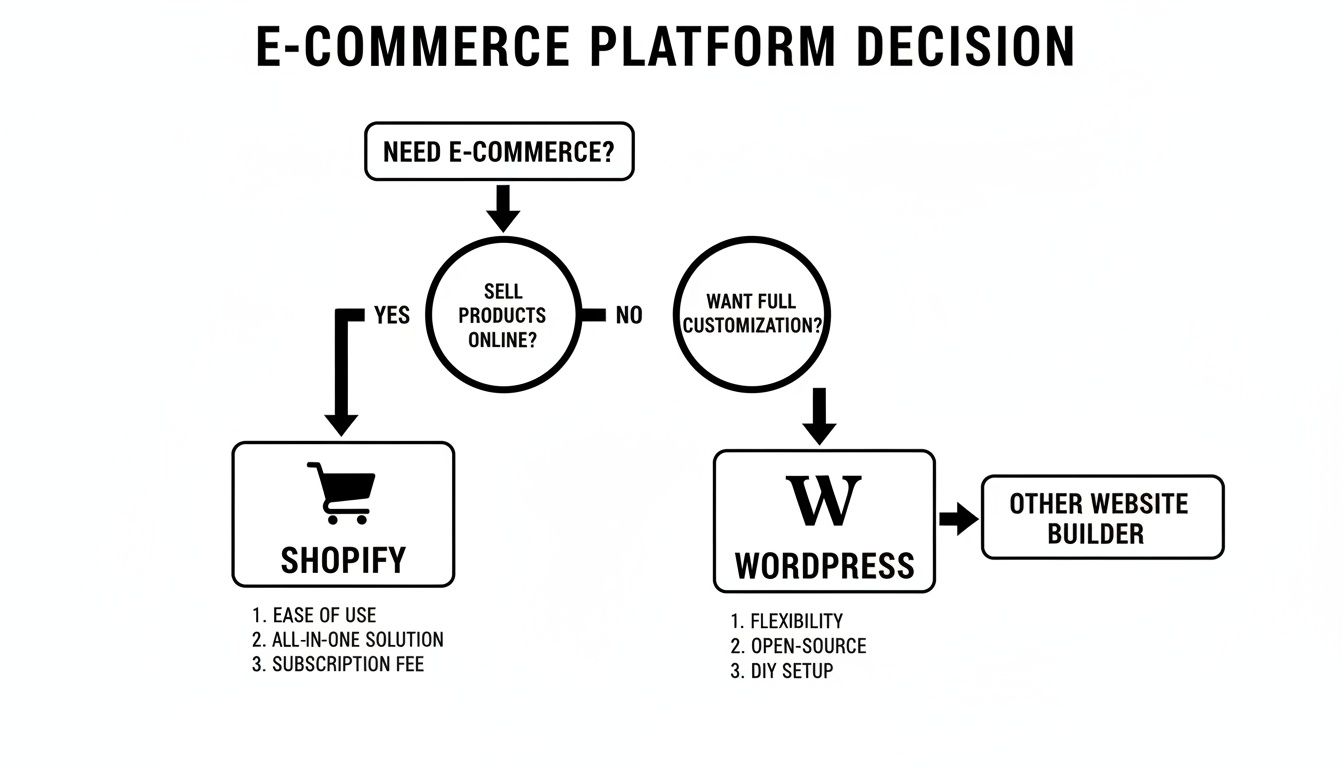
This map simplifies the choice perfectly: if your main goal is to sell products with as little technical headache as possible, the path leads straight to Shopify. But if your mission is to build a one-of-a-kind, content-driven brand experience, WordPress is the way to go. Grasping this core difference is the first step in learning how to create a business website that truly fits the way you want to work.
Calculating the True Cost of Your Online Store
When you’re weighing Shopify against WordPress for your store, the price tag is easily the most confusing piece of the puzzle. One platform pitches you on simple monthly plans, while the other is built on “free” open-source software. But the numbers on the surface almost never tell the whole story. The real cost of ownership only comes into focus when you account for hidden fees, essential add-ons, and the price of keeping everything running smoothly.
Shopify’s pricing is all about predictability. You pay a flat monthly subscription that bundles your hosting, security, and customer support into one neat package. This makes budgeting a lot simpler, especially for new businesses in places like Kansas City that need to keep a close eye on cash flow.
But that subscription is just the starting line.
Shopify: The Predictable but Layered Costs
Shopify’s tiered plans—Basic, Shopify, and Advanced—are the foundation of your expenses. While the entry-level plan starts at a decent price, you have to factor in transaction fees. If you decide not to use Shopify Payments and instead opt for a third-party gateway like PayPal or Stripe, Shopify will charge you an extra fee of up to 2% per transaction. Over time, that can take a serious bite out of your margins.
Beyond the subscription and transaction fees, you’ll inevitably wander into the Shopify App Store. While the platform has all the core ecommerce features baked in, you'll almost certainly need premium apps for more advanced functions like email marketing automation, subscription services, or complex product options. These apps typically run on their own monthly subscriptions, and it’s not unusual for a growing store to spend an extra $50 to $250 per month just on these essential tools.
Key Insight: Shopify's cost structure is built for operational simplicity. You're paying a premium for a managed ecosystem where hosting, security, and updates are handled for you, letting you focus entirely on selling.
Let’s run the numbers for a hypothetical first-year cost for a new Kansas City boutique:
- Shopify 'Basic' Plan: $29/month (paid annually) = $348/year
- Essential Apps: (Email, Reviews, SEO) approx. $70/month = $840/year
- Premium Theme: One-time cost of $250
- Estimated First-Year Cost: Approximately $1,438 (before transaction fees)
WordPress and WooCommerce: The 'Free' Platform with Variable Expenses
The core WooCommerce plugin is free to download, but let’s be clear: running a professional ecommerce store on WordPress is anything but. The "free" software means you’re on the hook for buying all the necessary infrastructure yourself. This creates a highly variable cost structure that can end up being either way cheaper or far more expensive than Shopify, all depending on the choices you make.
Your biggest recurring cost will be hosting. Sure, cheap shared hosting is out there, but it’s a terrible fit for ecommerce because of its slow performance and major security risks. Quality managed WordPress hosting, which is non-negotiable for a fast and secure online store, will typically run you anywhere from $15 to $50 per month, and often much more. When you’re trying to figure out the real cost of a WordPress store, a crucial factor is choosing from the many available options, including the best managed WordPress hosting providers.
On top of hosting, you’ll need to budget for a few other pieces of the puzzle:
- Domain Name: Around $15 per year.
- SSL Certificate: This is often included with good hosting plans, but sometimes it's an extra cost.
- Premium Theme: A well-designed, reliable theme will usually set you back $60 or more.
- Essential Paid Plugins: While there are tons of free plugins, you’ll often need premium extensions for payment gateways, advanced shipping rules, and security, which can easily add up to hundreds of dollars.
A poorly planned WooCommerce build can quickly turn into a money pit. If you run into a technical problem you can’t fix on your own, hiring a developer to troubleshoot can cost $75-$150 per hour. This is where WooCommerce’s costs can spiral out of control, easily blowing past Shopify's predictable monthly bill. Understanding the different layers of hosting is a crucial first step, and you can learn more about https://websiteservices.io/what-is-wordpress-hosting/ in our detailed guide.
Ease of Setup vs. Unmatched Customization
When you're weighing Shopify against WordPress, the very first thing you’ll notice is how different the setup experience is. It perfectly reveals the core philosophy of each platform. One is laser-focused on getting you from zero to selling as fast as possible. The other asks for more work upfront but gives you the keys to build absolutely anything you can imagine.
Shopify is built for speed. The entire process is guided and streamlined, making it possible for someone with zero technical skills to launch a fully functioning store in a single weekend. You sign up, pick a theme, and land in an intuitive dashboard where all the essential tools are laid out for you.
This lightning-fast launch is possible because Shopify is a hosted solution. You don't have to think about finding a web host, installing software, or managing security certificates. It's all neatly bundled into your monthly plan, removing some major technical headaches right from the start.

The Streamlined Shopify Onboarding
From the second you create an account, Shopify's onboarding wizard takes you by the hand and walks you through the critical first steps. It prompts you to add your first product, hook up payment processing, and sort out your shipping rates. Time-savers like the built-in Shopify Payments mean you can start accepting credit cards almost instantly, without the hassle of setting up a separate merchant account.
This all-in-one approach is Shopify's biggest advantage for beginners. It lets you pour your energy into product photos and marketing copy instead of wrestling with server configurations and plugin conflicts. The entire system is designed to minimize friction and get your products in front of customers ASAP.
The Multi-Stage WordPress and WooCommerce Setup
On the other hand, setting up a store with WordPress and WooCommerce is more of a project. This initial complexity is the direct trade-off for the complete freedom the platform offers. While the core software itself is free, you're responsible for building the entire foundation your store sits on.
The process breaks down into a few distinct steps:
- Sourcing a reliable web host. You have to research and buy a hosting plan that's powerful enough for ecommerce, which needs more juice than a standard blog.
- Installing the WordPress software. Most good hosts offer a one-click install, but it’s still an extra task you have to manage.
- Choosing and installing a theme. The sheer volume of theme options can be paralyzing. As you weigh your options, it helps to understand how to choose a WordPress theme that is both fast and secure.
- Installing and configuring WooCommerce. After you activate the plugin, you’ll need to go through its setup wizard to configure your store details, payment gateways, and shipping zones.
This hands-on process requires a bigger investment of your time and a real willingness to learn. You become the system administrator, which means every decision—from your hosting provider to your security plugins—is yours to make.
Key Takeaway: Shopify is built to get you selling immediately by removing as many technical decisions as possible. WordPress is built to let you create anything imaginable, but it requires you to make all the technical decisions yourself.
Think of it this way: a local Kansas City t-shirt business could start on Shopify on a Friday night and be live and taking orders by Saturday afternoon. That same business using WordPress might spend the first weekend just getting their hosting configured and a basic theme installed, with all the product entry and payment setup still on the to-do list.
Ultimately, your choice here comes down to your priorities. If your main goal is to test a product idea and start making money with the least amount of delay, Shopify's frictionless onboarding is the clear winner. But if your vision demands a deeply customized user experience and you want total control over every line of code, the initial effort WordPress requires is just the price of admission for that kind of freedom.
SEO and Content Marketing Capabilities
This is where the battle lines are truly drawn. When you're looking at Shopify versus WordPress for ecommerce, SEO and content marketing is the area with the most dramatic difference. While both can get you ranking on Google, their entire philosophies are worlds apart, creating very different ceilings for your organic growth. The right choice here often comes down to how you plan to win over customers in the long run.
Shopify gives you a solid SEO foundation right out of the box. Its whole system is built for speed, every plan comes with an SSL certificate, and it spits out clean code that search engines have no trouble crawling. For a new business, this is great—it handles the technical basics so you can focus on your products.
But as your marketing gets more sophisticated, you’ll start to bump into some walls. The most common frustration is Shopify’s rigid URL structure. Your product pages are forever locked into a /products/ folder, and blog posts live in /blogs/news/. That lack of control can make it a real headache to create the clean, keyword-rich URL structures that SEO pros love.
The WordPress Advantage in Content-Driven SEO
This is where WordPress with WooCommerce becomes the undisputed champ. Its very DNA is in content management, which means you get total, granular control over every last piece of your site's SEO. You can tweak URL slugs, build out complex content hubs, and create a powerful internal linking network that screams authority to Google.
Plugins are your secret weapon here. Tools like Rank Math or Yoast SEO provide a level of control that simply doesn't exist natively on Shopify. You can fine-tune meta descriptions, manage complex redirects, and roll out advanced schema markup without touching a single line of code.

This really gets to the heart of the debate: Shopify is built for speed and simplicity, while WordPress is built for absolute control. The image highlights that core trade-off, especially when it comes to SEO and content where that control is paramount.
The numbers don't lie. WordPress with WooCommerce is a powerhouse, projected to run about 37% of the world's online stores by 2026. A big reason for that dominance is its killer combination of content features and SEO tools. For sites that rely heavily on content, having that fine-tuned control can boost Google rankings by as much as 30%—a massive edge in a tough market.
Making Shopify's SEO Work for You
Even with its limitations, a Shopify store can absolutely win at SEO. You just need the right game plan. It’s all about working within the platform's constraints and using the available tools to punch above your weight. A smart, well-executed how to create a content strategy is non-negotiable here.
Here are a few ways to squeeze every drop of SEO juice out of Shopify:
- Optimize Collection Pages: Start treating your collection pages like cornerstone content. Beef them up with detailed, keyword-rich descriptions and use them as the primary landing pages for your product categories. For instance, a Kansas City apparel store should create an in-depth "Kansas City Chiefs Gear" collection page that includes not just products, but also a history of the team's colors and logos to attract search traffic.
- Lean on SEO Apps: The Shopify App Store has some seriously powerful SEO tools that help close the gap. Apps can handle things like schema markup, image optimization, and hunting down broken links for you.
- Upgrade the Blog Interface: Let’s be honest, Shopify's built-in blog is basic. But apps can add critical features like related posts, author bios, and better category management to make it a much more effective content marketing tool.
Expert Takeaway: WordPress offers an unlimited SEO ceiling, perfect for businesses where content and organic search are the main growth engine. Shopify provides strong, reliable SEO basics that are ideal for stores focused on paid ads, social media sales, or for owners who just want a hands-off technical setup.
At the end of the day, it all comes down to your business model. If your brand relies on blogging and deep informational guides to attract customers, the sheer flexibility of WordPress is tough to beat. But if your strategy is more about a streamlined product catalog and direct marketing, Shopify’s built-in SEO horsepower is more than enough to get the job done.
How Each Platform Handles Growth and Scale
The ability to grow with your business is a massive factor in the Shopify vs. WordPress debate. A platform that runs smoothly with ten orders a day might completely fall apart during a Black Friday rush or after a viral product launch. The way each platform handles scalability gets right to the heart of their core philosophies.
Shopify is built from the ground up for effortless scaling. Because it’s a fully hosted, software-as-a-service (SaaS) platform, the entire infrastructure is designed to handle huge, unexpected traffic surges without you lifting a finger. Your store runs on the same powerful servers that support some of the biggest brands in the world, giving you rock-solid uptime when it matters most.
Shopify: The Hands-Off Scaling Solution
Picture this: your product gets a surprise feature on a major morning show. Within minutes, tens of thousands of potential customers flood your website. On Shopify, this is just business as usual. The platform's infrastructure automatically shifts resources to handle the spike, keeping your site fast and your checkout process seamless. You won’t be frantically calling a developer or scrambling to upgrade your hosting plan; it just works.
This built-in reliability is a core piece of Shopify's appeal. For high-volume businesses, Shopify Plus takes things even further. It's an enterprise-level solution that offers unlimited bandwidth, dedicated support, and advanced features designed for merchants who process thousands of orders per minute.
The Bottom Line: Shopify’s scalability is baked in. You’re paying for the peace of mind that your store can handle success without any technical intervention on your part, letting you focus on marketing and fulfillment during peak sales periods.
Shopify's approach has cemented its place as the go-to for fast-growing stores. Projections show it will command 26% of the hosted ecommerce CMS market share by 2026, largely because its infrastructure handles traffic spikes automatically—a perfect fit for new websites that suddenly take off. This is a stark contrast to WooCommerce, where a sudden surge on a cheap server can lead to emergency fixes costing upwards of $5,000. For Kansas City entrepreneurs scaling past the $1M mark, Shopify Plus (at around $2,000/mo) can reduce operational overhead by as much as 40% by managing all the technical heavy lifting. You can find more 2026 ecommerce market share insights on coalitiontechnologies.com.
WooCommerce: Scalability Is Your Responsibility
With a WooCommerce store, scalability is a direct reflection of your hosting environment and technical know-how. While WordPress is absolutely capable of powering massive, high-traffic stores, it doesn't happen on its own. Growth requires proactive—and often technical—management.
As your WooCommerce store grows, you become the one responsible for upgrading its foundation. This usually involves a clear progression of tasks:
- Moving from shared hosting to a managed WordPress host to get dedicated resources and better performance. A local KC business seeing consistent growth should budget for this transition within their first year to avoid performance bottlenecks.
- Integrating a Content Delivery Network (CDN) to distribute your site's assets globally and slash load times for international customers.
- Optimizing your database to ensure queries run efficiently as your catalog of products and orders expands.
- Implementing caching solutions to serve pages faster and reduce the strain on your server.
This hands-on approach offers incredible control, but it also comes with risk. If that same morning show feature sends a tidal wave of traffic to a WooCommerce site running on cheap, shared hosting, the outcome is predictable: a crash. That downtime translates directly into lost revenue, a damaged brand, and frantic, expensive calls to a developer for emergency help. While you can build an absolute fortress with WooCommerce, you’re the one who has to lay every stone. Regular performance checks are vital, and our guide on website performance benchmarking provides a solid framework for this process.
Making Your Final Decision
So, we've pulled apart Shopify and WordPress, and now it’s time to land the plane. The whole Shopify vs. WordPress debate boils down to a single, critical question: which platform’s philosophy matches your business reality? This isn't about finding the "best" platform—it’s about finding the best one for you.
To cut through the noise, let's break this down into clear business profiles and a few hard questions you need to ask yourself.
This choice is all about honestly assessing your resources—your time, technical skills, and budget—and picking the platform that plays to your strengths, not your weaknesses.
Choose Shopify If You Are a…
- Direct-to-Consumer (DTC) Brand: You need to get to market yesterday. Your focus is on killer marketing campaigns and efficient inventory management, not fiddling with server configurations. Shopify’s all-in-one system is practically built for this kind of speed and simplicity.
- Dropshipper or Small Business: Your main goal is to test a product idea without sinking a ton of cash or getting bogged down in technical details. Shopify's predictable monthly fees and dead-simple interface are perfect for this.
- Brick-and-Mortar Retailer: You need a point-of-sale (POS) system that works flawlessly with your online store. Shopify’s tightly integrated hardware and software are the gold standard here, making it a breeze to sync your in-person and online sales.
Choose WordPress with WooCommerce If You Are a…
- Content-Heavy Brand: Your entire growth strategy hinges on a powerful blog, comprehensive guides, and dominating organic search. For this, WordPress is in a league of its own, offering unmatched content management and SEO flexibility.
- Business with Complex Products: You’re selling items with tons of variations, custom add-ons, or unique purchasing rules that just don't fit into a standard product template. The open-source nature of WooCommerce lets you build literally anything you can imagine.
- Developer-Led or Agency-Supported Business: You have the in-house tech talent or the budget for an agency to build a completely bespoke ecommerce experience. You demand total control over every pixel and line of code, and that's exactly what WordPress delivers.
Your choice isn't just a technical one; it's a strategic business decision. Shopify prioritizes operational ease, letting you focus on selling. WordPress prioritizes total control, letting you build a unique digital asset.
An Actionable Decision Checklist
Get honest with yourself. Answering these questions will point you straight to the right platform:
- What’s your real budget for ongoing technical maintenance? Can you comfortably pay a developer for updates, troubleshooting, and security, or does a predictable monthly fee sound a lot safer?
- How critical is a fast launch? Do you need to be selling products by next week (Shopify), or can you afford to invest a few weeks or more into a more involved setup process (WordPress)?
- Is your primary growth engine SEO and blogging? If the answer is a resounding yes, the superior content tools baked into WordPress will give you a massive long-term advantage.
- How much control do you really need over your site’s design and functionality? Be brutally honest. Do you truly need a one-of-a-kind feature, or will a professionally designed theme and a few well-chosen apps get the job done?
Of course. Here is the rewritten section, crafted to sound like it was written by an experienced human expert, following all your specified requirements.
Quick Answers to Tough Questions
Even after a side-by-side comparison, a few specific questions always seem to pop up. Let's tackle some of the most common sticking points people run into when choosing between Shopify and WordPress.
Can I Just Switch from Shopify to WordPress Later On?
The short answer is yes, you can migrate from Shopify to WordPress, but it’s never a simple copy-and-paste job. It’s a full-blown project. The process involves pulling all your data—products, customers, order history—out of Shopify and importing it into a fresh WooCommerce installation. While there are automated tools that promise a smooth transition, they’re rarely perfect.
You should prepare for a complex undertaking that often requires hiring a developer to handle the inevitable hiccups, like:
- Data Mapping: Making sure every product variation, customer detail, and order note transfers over correctly without getting jumbled.
- URL Redirects: Manually creating 301 redirects for every single product and page to protect the SEO rankings you’ve worked so hard to build.
- Design Reconstruction: Your Shopify theme won't come with you. You'll be rebuilding your store's entire look and feel from the ground up in WordPress.
Actionable Insight: If you have a strong feeling you'll eventually need the power and flexibility of WordPress, it's almost always cheaper to start there. A migration can easily run into thousands of dollars in development costs, often dwarfing what it would have cost to build on WooCommerce from day one.
Which Platform Is Actually Better for Selling Digital Products?
Both platforms can handle digital products, but WooCommerce has the edge right out of the box. Its core system was built to manage both physical and digital goods from the start, giving you direct control over file downloads, access rules, and licensing without needing to bolt on paid extras for basic features.
Shopify, on the other hand, relies on third-party apps like "Digital Downloads" or SendOwl to sell digital goods. These apps are generally easy to use, but they tack on another monthly subscription fee to your operating costs. This makes WordPress a more integrated and budget-friendly choice if your business is primarily focused on selling digital products.
How Different Is Security Management?
The way these two platforms handle security reflects a fundamental difference in their philosophies. With Shopify, security is almost entirely done for you. As a hosted SaaS platform, Shopify takes care of all server security, PCI compliance for payments, and software updates, shielding your store from threats without you having to lift a finger.
With WordPress and WooCommerce, you are in the driver's seat for security. This means you’re personally responsible for:
- Choosing a rock-solid, secure hosting provider.
- Keeping the WordPress core, your theme, and all of your plugins constantly updated.
- Installing security plugins to fend off malware and brute-force attacks.
- Making sure your store is PCI compliant.
While this gives you ultimate control, it also introduces risk. The single most common reason I see WooCommerce sites get breached is simple neglect of routine updates.
At Website Services-Kansas City, we specialize in building and optimizing secure, high-performance WordPress websites. If the unmatched control and SEO potential of WooCommerce is the right fit for your business, we can help you build a powerful online store. Learn how our expert development services can bring your vision to life.