
To get a domain name for your business, you'll need to come up with a memorable name, pick a Top-Level Domain (TLD) like .com, choose a solid registrar, and then make the purchase. This whole process is your first real step toward building a professional online identity and locking down your brand's unique digital address.
Your First Step in Claiming a Digital Address
Registering a domain name is so much more than a technical chore; it's the moment you plant your flag and claim your brand's home on the internet. For any business owner, this is the foundational block you'll build your entire online presence on. A strong domain name directly impacts how well customers remember you, how much they trust you, and even how you show up in local searches.

This guide is here to demystify the process and give you a clear roadmap for launching a new site. We'll walk through the key actions needed to secure your digital address, making sure you start on solid ground.
Why Your Domain Matters
Think of your domain as your digital storefront in a ridiculously crowded marketplace. It's the first thing potential customers see and the main way they find you online. For a local business in a competitive market like Kansas City, a strong, relevant domain like kcroofingpros.com isn't just an address—it's an SEO asset that immediately signals location and service to both Google and potential customers.
Just to give you some perspective, by the end of Q4 2025, the global domain name industry had already hit a staggering 386.9 million registrations across all top-level domains. That number reflects a year-over-year growth of 6.2%, showing just how fast businesses are staking their claims online. This surge makes it crystal clear: new businesses need to grab a relevant domain before it's gone.
The Core Components of Registration
Getting your domain registered successfully involves a few key decisions. Nailing these elements from the start will pay off for your brand in the long run.
- Brainstorming a Brandable Name: Your name should be short, easy to remember, and actually reflect what your business is about. Try to avoid hyphens and numbers—they just confuse people.
- Choosing the Right TLD: While
.comis still the gold standard, other extensions like.shop,.io, or even local TLDs can be really effective, depending on your niche and who you're trying to reach. - Selecting a Trustworthy Registrar: This is the company that manages your domain reservation. Things like price, security features, and customer support are critical here.
- Completing the Purchase: The final step is providing your contact information and payment details to lock in the domain for a specific term, which is usually one to three years.
To get a better handle on the fundamentals, it's worth learning more about what is domain name registration and how the whole system works behind the scenes.
A great domain name is an investment in your brand's future. It builds credibility, improves marketing efforts, and provides a permanent, professional home for your business.
To get you started on the right foot, here's a quick checklist summarizing the essential steps.
Domain Registration Quick Start Checklist
This table breaks down the core actions you'll take when registering your first domain name.
| Action Item | Key Consideration | Pro Tip |
|---|---|---|
| Brainstorm Name & TLD | Is it short, memorable, and brandable? Is the best TLD available? | Say it out loud. If it's hard to say, it's hard to remember. Stick with .com if you can. |
| Check Availability | Is your desired name already taken? What are the alternatives? | Use a domain checker tool. Be prepared with a few backup names to avoid frustration. |
| Choose a Registrar | What are the initial costs vs. renewal fees? Do they offer privacy? | Look for registrars with transparent pricing and included WHOIS privacy to protect your info. |
| Complete Registration | Have you provided accurate contact info? Is auto-renew on? | Always enable auto-renew. Letting a good domain expire by mistake is a costly headache. |
Following these steps will ensure a smooth process and help you secure a domain that serves your business well for years to come.
Once your domain is officially yours, the next phase of your digital journey begins. Check out our guide on how to create a business website to learn how to turn that new domain into a fully functional online presence.
How to Choose a Memorable Domain Name and TLD
Your domain name is your digital handshake—it's often the very first impression you make. Nailing this part is about more than just picking something that sounds good; it's about crafting a name that's memorable, brandable, and SEO-friendly. This isn't just about following generic advice, but about digging into practical strategies that will actually connect with your specific audience.
The best names are short, easy to say, and almost impossible to misspell. A great gut check is to say it out loud. If you have to spell it out for someone over the phone, it’s probably too complicated.
Brainstorming Your Perfect Domain
Start by just getting ideas on paper. List out words related to your business, your industry, and the value you bring to customers. Don't filter anything at this stage; just let the ideas flow.
Once you have a solid list, you can plug those keywords into a business name generator to spark some fresh options. These tools are surprisingly good at combining your terms in ways you might not have considered. If you’re a local business, weaving in your location is a very smart move.
- Example for a Local Business: A plumber based in Kansas City could try something like
kcplumbingsolutions.comorplumbingkcmo.com. These instantly tell local searchers where you operate, giving you a serious edge in local search results. - Example for an E-commerce Store: A Shopify store selling handmade leather goods could explore names like
artisanleatherco.comorcraftedhide.shop. The names themselves communicate quality and craftsmanship.
Key Takeaway: A great domain should instantly communicate what you do. Aim for clarity over cleverness. If a potential customer can guess your business type from the domain alone, you've created a powerful branding tool.
After you've picked a name, it's a good idea to make sure it's legally unique, especially if you're also setting up a formal business entity. For example, in Canada, you would need to perform a NUANS name search to steer clear of trademark conflicts. This step is a crucial part of protecting your brand both online and offline.
Navigating the World of TLDs
The part of your domain after the dot is the Top-Level Domain, or TLD. While .com is still the undisputed king, the options have exploded in recent years. The right one really depends on your brand and who you're trying to reach.
The .com extension carries a legacy of trust and authority. Most people instinctively type .com when they’re looking for a website, which makes it the safest and most desirable choice. If the .com you want is available, grab it. It's almost always the best move.
But let's be realistic—a lot of the good .com domains are long gone. That's where the alternatives come in.
- .co: A very popular substitute for
.com, especially with startups and tech companies. - .net: Originally meant for network providers, but it's now a solid general-purpose option.
- .org: Still primarily associated with non-profit organizations.
- Niche TLDs: Extensions like
.shop,.store,.io, or.appcan work incredibly well if they align with your business. For instance,coolgadgets.techis far more descriptive thancoolgadgetsonline.net.
It’s also helpful to think about how your domain name fits into your site's overall organization. For a deeper look at this, you can learn more about crafting the best URL structure for SEO in our detailed guide.
Common Mistakes to Avoid
Picking a domain is exciting, but it’s easy to make a small mistake that causes big headaches later. Here’s a quick list of traps to watch out for.
- Using Hyphens and Numbers: A domain like
kansas-city-seo-1.comis clumsy and hard to communicate. Just stick to letters. - Choosing a Name That's Hard to Spell or Pronounce: Avoid slang, funky misspellings, or overly complex words. If it’s not intuitive, you'll lose people.
- Picking a Name Too Similar to a Competitor: This is a recipe for brand confusion and could even get you into legal trouble.
- Ignoring Trademark Issues: Always do a quick search to make sure your name isn't already a registered trademark.
By keeping these guidelines in mind, you can pick a domain name and TLD that not only represents your brand perfectly but also sets you up for success from day one.
Finding the Right Domain Registrar for Your Business
Okay, you've landed on the perfect domain name. Now for the next big step: choosing where to actually register it. A domain registrar is an ICANN-accredited company that manages the reservation of your domain. Think of them as the official clerks for your digital address—and just like any service, the quality and value you get can vary wildly.
Picking a registrar isn't a one-off transaction; it's more like starting a long-term partnership. The decision you make now will affect everything from your budget and security to how easily you can manage your website down the line. It’s all about looking past the flashy ads and finding a reliable partner with transparent practices.
Look Beyond the Initial Price Tag
Here’s the most common trap people fall into: picking a registrar just because they see the lowest price. A $0.99 deal for the first year looks amazing on the surface, but the real cost is almost always hiding in the renewal fees, which can skyrocket after that honeymoon period is over.
You have to compare the renewal price, not just the first-year sticker price. A registrar selling a domain for $12 the first year and $15 to renew is often a much smarter deal than one offering it for $1 upfront and then jacking the price up to $25 every year after. This kind of transparency is a huge indicator of a trustworthy company.
The Non-Negotiable Feature: WHOIS Privacy
When you register a domain, your personal details—name, address, email, phone number—are automatically added to a public database called WHOIS. Without any protection, this info is a goldmine for spammers, scammers, and aggressive marketers. It's an open invitation for junk mail and unwanted calls.
This is where WHOIS privacy saves the day. It's a service that swaps your personal information with the registrar’s generic contact details, keeping you anonymous. A few years back, this was a paid add-on, but now, any reputable registrar offers it for free.
Expert Tip: If a registrar tries to charge you for WHOIS privacy today, consider it a massive red flag. This is an essential security feature that should be included with your domain at no extra cost, period.
The need for solid, reliable registrars has never been greater. For instance, in Q2 2025 alone, newly registered domains shot up to over 26 million worldwide, an 11% jump from the previous quarter. This boom was led by the big players like GoDaddy, which held a 13.5% market share, followed by Namecheap at 9.6% and Dynadot at 4.9%, which really underscores the importance of choosing an established company. If you're curious about these trends, you can find in-depth global domain activity insights on circleid.com.
Comparing Top Domain Registrars
To make an informed choice, you need to see how the top players stack up. Each one has its own strengths, whether you're a small business in Kansas City or a growing online store.
This table breaks down some of the most popular options to help you figure out which one is the right fit for you.
Comparing Top Domain Registrars
| Registrar | Typical .com Price (Year 1) | Renewal Price | Free WHOIS Privacy | Best For |
|---|---|---|---|---|
| GoDaddy | Often low ($1-$12) | Higher (~$22/year) | Yes | Businesses looking for an all-in-one solution with hosting and marketing tools. |
| Namecheap | Competitive (~$10) | Lower (~$16/year) | Yes | Budget-conscious users who value transparent pricing and free privacy. |
| Dynadot | Competitive (~$10) | Competitive (~$11/year) | Yes | Users who value a clean interface and straightforward, no-fuss domain management. |
| Google Domains | Flat Rate (~$12) | Same (~$12/year) | Yes | Users comfortable in the Google ecosystem seeking simple, predictable pricing. |
While registrars often push bundled services like web hosting, it's not always the best idea to get everything from the same provider. In fact, keeping your domain registration separate from your hosting often gives you more freedom and flexibility in the long run. You can learn more about how to choose web hosting in our dedicated guide.
Other Key Factors to Consider
Price and privacy are the big ones, but a few other details can make or break your experience with a registrar.
- Ease of Use: Your registrar's dashboard should be clean and intuitive. You shouldn't have to hunt for basic settings like DNS management or renewal options. A clunky interface is a recipe for frustration.
- Customer Support: When something eventually goes wrong (and it will), you need help you can count on. Look for registrars that offer 24/7 support through live chat or phone, not just slow-moving email tickets.
- Transfer Policy: Read the fine print. Make sure the registrar has a clear and fair domain transfer policy. You should be able to move your domain to another provider without dealing with unnecessary roadblocks or hidden fees.
Ultimately, picking the right registrar is about finding the right balance of cost, security, and convenience. By prioritizing transparent renewal fees and free WHOIS privacy, you can lock in a partner that will help protect and manage your online identity for years to come.
A Practical Walkthrough of the Registration Process
Alright, you've landed on the perfect name and picked a registrar you trust. Now it's time to make it official. This part is pretty straightforward, but the details really matter if you want to avoid headaches down the road. I'll walk you through the typical flow, explaining each step and pointing out the common upsells you can confidently ignore.
First things first, head to your chosen registrar's site and use their search bar one last time. This is just to confirm your domain is still available. Once you get that green light, you'll add it to your cart, just like you're buying something online. This is where the real registration begins.
Setting Up Your Account and Contact Information
Before you can pay, you’ll need to create an account with the registrar. Think of this account as your command center for everything related to your domain. Use a primary email address you check all the time, because this is where renewal reminders and critical security alerts will land.
Next, the system will ask for your contact information to go on the public WHOIS record. This includes your name, address, email, and phone number. It is absolutely critical that this information is accurate. This is your official proof of ownership. Don't stress about your privacy—like we talked about, any good registrar will automatically swap your details with their own for free.
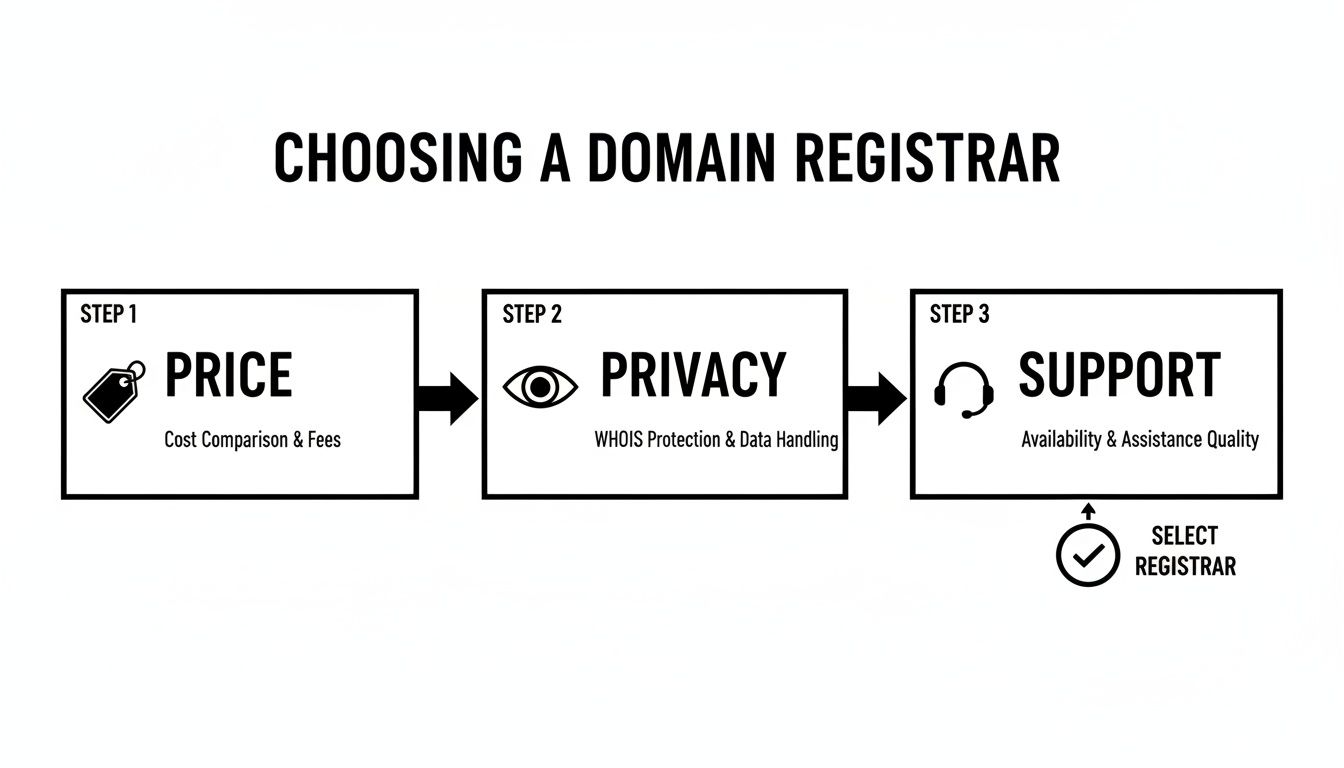
As this graphic shows, the decision really boils down to those three pillars: Price, Privacy, and Support. Getting these right is the foundation of a good relationship with your registrar, ensuring you get a fair deal while keeping your personal info safe.
Navigating the Checkout and Sidestepping Upsells
The checkout page is where registrars really try to pad your bill with extra services. It's important to know what you actually need versus what you can skip.
- Registration Length: You'll be asked to pick a registration term, usually from one to ten years. Grabbing a multi-year term can sometimes save you a few bucks and signals a longer-term commitment to search engines. That said, a one-year registration is perfectly fine when you're just starting out.
- Domain Privacy: This should be free. If you see a line item with a charge for it, make sure the free option is selected or seriously reconsider your choice of registrar.
- Email Hosting: A custom email address (like
you@yourdomain.com) is a great move for professionalism, but you don't have to buy it from your domain registrar. Most web hosting providers include this service with their plans. - Website Builders and Hosting: Same deal here. You can almost always find better performance and pricing by purchasing your hosting separately.
Your only goal at checkout is to register the domain and get privacy protection. That's it. Almost every other add-on is just designed to increase the sale, and you can always buy them later if you find you actually need them.
Finalizing Your Purchase
Once you've dodged all the upsells, you're ready to check out. Give your cart one last look to make sure you're only paying for the domain registration for the term you selected. Pop in your payment information and hit confirm.
You should get a confirmation email almost instantly. This is your receipt and proof of registration. But keep an eye out for a second, even more important email: one that requires you to verify your contact information. You have to click the link in this email to activate your new domain. If you forget this step, your domain could be suspended.
With the purchase complete, the domain is officially yours. The next logical step is to point it to your website. You can learn all about that in our guide on how to connect a domain to your website, which breaks down the essential DNS settings you'll need to configure.
What to Do After You Register Your Domain
Alright, you’ve secured your domain name. That’s a fantastic first step, but it’s really just the beginning of the journey. Think of it like buying a plot of land—now you have to actually build something on it and connect it to the grid. The actions you take right after registration are what will transform your new domain from a simple name into a functional, professional online presence.

This involves a few technical-sounding but surprisingly straightforward steps. We'll break down concepts like DNS and nameservers in plain language, showing you exactly how to get your website live and start building a brand that looks credible from day one.
Connect Your Domain to Your Website or Hosting
Right now, your domain is just an address; your website's actual files—all the text, images, and code—live on a server. That server is provided by a web host or a platform like Shopify or WordPress.com. To make your domain point to those files, you need to update its nameservers.
Think of nameservers as the primary signposts that tell the internet where to find your website's more detailed directions, which are stored in its DNS records.
- For Web Hosting: If you bought hosting from a company like Bluehost or SiteGround, they will provide you with two or more nameservers. They’ll look something like
ns1.yourhost.comandns2.yourhost.com. You'll just need to log into your domain registrar, find the DNS management area, and swap the default nameservers with the ones your host gave you. - For Website Builders: Platforms like Shopify, Wix, or Squarespace make this even simpler. They typically provide easy, step-by-step instructions to connect your domain, which often just involves logging into your registrar and authorizing the connection.
This change isn't instant. It can take anywhere from a few hours up to 48 hours to take full effect across the globe. This waiting period is called propagation, and it's just the time it takes for the new directions to spread across the internet.
A crucial part of this process is ensuring your website is secure. Once your domain is connected and live, one of your very next steps should be installing an SSL certificate. An SSL certificate encrypts the data between your site and its visitors, which is non-negotiable for security, trust, and even SEO. Check out our guide on how to install an SSL certificate to get this done right.
Enable Auto-Renewal to Protect Your Asset
Letting your domain expire by accident is one of the most painful—and completely avoidable—mistakes you can make. If you forget to renew, your website goes down, your custom emails stop working, and after a short grace period, your domain could be scooped up by someone else. That includes a competitor.
The simplest fix is to find and enable auto-renewal inside your registrar's dashboard. This small step ensures your domain is automatically renewed before it expires, protecting your digital asset without you having to add another reminder to your calendar.
Set Up Your Professional Email Address
Nothing undermines credibility faster than seeing a business owner using a generic email like mycoolshop@gmail.com. Now that you own mycoolshop.com, you can create a much more professional address, like contact@mycoolshop.com or yourname@mycoolshop.com.
Most web hosting plans include email hosting for free. You can typically create new email accounts directly from your hosting control panel in just a few minutes. This is a small detail that has a massive impact on how potential customers perceive your brand's legitimacy.
This is your entry ticket to the booming digital economy. Whether you're a new LLC founder or a Shopify store owner, a registered domain makes you a real player. By Q4 2025, the .com TLD alone hit 161 million registrations, making up 42% of the roughly 386.9 million domains worldwide. Even with market fluctuations, overall domain registrations grew 6.2% year-over-year, showing a persistent demand for unique online identities. By taking these post-registration steps, you're not just securing a name; you're building a brand that can compete.
Got Questions About Domain Registration? We've Got Answers.
Jumping into the world of domains for the first time can feel a little confusing, and it's totally normal to have a few questions. Getting straight answers is the best way to move forward with confidence and sidestep those common beginner mistakes.
Here, we're tackling the most frequent queries that pop up for new site owners. We'll cut through the jargon and give you the practical insights you need to get your new digital address locked in.
What Happens If the Domain Name I Want Is Already Taken?
It’s a frustrating moment, but a super common one. With millions of domains already registered, finding your first choice is unavailable is practically a rite of passage. Don't worry, you've got plenty of options. The trick is to find an alternative that's still memorable and true to your brand.
First, try a few simple tweaks. Could you add a verb like "get" or "go" to the start? For a local Kansas City business, adding "kc" or "kcmo" is a great move that can make the name available and give your local SEO a little boost. For instance, if kccustoms.com is gone, maybe getkccustoms.com is free.
Next up, explore different Top-Level Domains (TLDs). If yourbrand.com isn't available, see if yourbrand.co or yourbrand.shop is. A .shop TLD is a perfect, clear signal for an e-commerce store, telling customers exactly what you do.
- Backorder Services: Some registrars will offer to try and grab a domain for you if it expires. Honestly, this is a long shot and usually not worth the time or money.
- Domain Generators: Fire up a domain name generator. These tools can spit out some creative, brandable ideas you probably wouldn't have thought of on your own.
How Long Does It Take to Register a Domain Name?
The actual registration part is almost instant. Seriously. From the moment you find a name to typing in your credit card details and hitting "confirm," the whole thing usually takes less than 10 minutes. Once that payment goes through, the domain is officially yours.
But there's a second piece to the puzzle called DNS propagation. This is just the fancy term for the time it takes the entire internet to update with your new domain's information. While it can technically take up to 48 hours, you'll often find your domain is live and ready to connect to a website in just a couple of hours.
Can I Register a Domain Name Without Building a Website?
Yes, absolutely! In fact, I highly recommend it. Grabbing your domain name as soon as you have a solid business idea is one of the smartest things you can do to protect your brand, even if you're months (or years) away from actually building a website.
This is often called "domain parking." By securing the name now, you stop anyone else—especially a competitor—from snagging it. You can just let the domain sit "parked" with your registrar, which usually means it will show a simple "Coming Soon" page until you're ready to get to work. It ensures your perfect domain is waiting for you when the time is right.
Securing your domain name early is one of the most cost-effective brand protection strategies you can implement. It's a small investment that reserves your future digital real estate.
What Is WHOIS Privacy and Do I Really Need It?
When you register a domain, regulations from ICANN require your personal info—name, address, email, phone number—to be listed in a public database called WHOIS. Without any privacy protection, this information is out there for anyone to see, making you an instant target for spammers, junk mail, and scammers.
WHOIS privacy is a service that swaps your personal details with the generic contact info of your registrar, effectively masking your identity. So, do you really need it? Yes, 100%. It is the single best way to protect your personal information and dramatically cut down on the spammy calls and emails you'll get. Luckily, almost every reputable registrar now includes this essential feature for free with your registration.
Ready to build a powerful online presence that drives results? At Website Services-Kansas City, we specialize in creating professional WordPress websites and implementing SEO strategies that get you noticed. Contact us today for a free consultation and see how we can help your business thrive.
