
Choosing the right WordPress theme is about a lot more than just picking a pretty design. It's a strategic decision that digs deep into performance, responsiveness, and SEO-friendliness. The smartest move you can make is to find a lightweight, well-coded theme that lines up with your website's goals from day one. This sets a rock-solid foundation for speed and a great user experience right from the start.
Why Your WordPress Theme Is Your Most Important Decision
Before you fall down the rabbit hole of browsing endless theme galleries, you need to understand a core truth: your WordPress theme is so much more than a design template. It’s the architectural blueprint for your entire website, and it directly impacts its speed, how users interact with it, and ultimately, your search engine rankings.
I like to think of it like building a house. A weak foundation is going to cause structural problems down the road, no matter how beautiful the interior design is. In the same way, a bloated, poorly coded theme can sabotage your SEO efforts before you even publish a single post, while a well-built one gives you a serious head start.
The Foundation of Your Digital Presence
A lightweight, optimized theme is critical for climbing the Google rankings and keeping visitors from bouncing. It ensures your site loads fast, which is a massive ranking factor and a cornerstone of a positive user experience. A slow site just frustrates people, sending them straight for the back button and signaling to search engines that your site isn't worth their time.
The market for WordPress themes has absolutely exploded, giving creators an incredible amount of choice. As of 2025, there are over 13,000 free themes on WordPress.org alone, plus another 15,000+ premium options on marketplaces like ThemeForest. This variety is a direct result of WordPress powering 43.6% of all websites, a fact that makes your theme selection a truly defining moment for your site's future. You can check out more of these wild WordPress statistics on Diviflash.
To help you cut through the noise, here's a quick checklist summarizing the key criteria.
Quick Theme Selection Checklist
This table breaks down the core areas to evaluate when you're sizing up any WordPress theme. It helps you stay focused on what truly matters for long-term success.
| Evaluation Area | Key Question to Ask | Why It Matters |
|---|---|---|
| Performance | Is the theme lightweight and built for speed? | Fast load times are a major Google ranking factor and keep users engaged. |
| Design & UX | Does the layout feel intuitive and look professional? | A good user experience guides visitors and makes their journey frustration-free. |
| Responsiveness | Does it adapt flawlessly to all screen sizes, from mobile to desktop? | With over half of web traffic on mobile, a mobile-friendly design is non-negotiable. |
| Security | Is the theme actively maintained and updated by its developers? | Regular updates protect your site from vulnerabilities and security threats. |
| Support | Is there reliable documentation and developer support available? | When things go wrong, good support can be a lifesaver. |
By keeping these five pillars in mind, you can confidently choose a theme that supports your goals.
The Five Pillars of a Great Theme
To make a smart choice that supports your long-term business goals, you need a clear framework for evaluation. Don't get hypnotized by flashy demos. Instead, zero in on the five pillars that define a high-quality WordPress theme:
- Performance: Is the theme lightweight and optimized for speed? A fast website is non-negotiable for both SEO and keeping users happy.
- Design and UX: Does it offer an intuitive layout and a clean, professional look? Good design guides visitors and improves their journey. You can learn more about crafting an effective website user experience design in our guide.
- Responsiveness: Does it adapt perfectly to every screen size, from giant desktops to tiny smartphones? Mobile-friendliness is an absolute must-have today.
- Security: Is the theme actively maintained by its developers to patch vulnerabilities? Outdated themes are a huge security risk.
- Support: When you inevitably run into a problem, is there reliable documentation and developer support to help you out?
By prioritizing these core elements over trendy designs that might be gone tomorrow, you set your website up for success from day one. A solid theme is a direct investment in your site's future performance and scalability.
Defining Your Website’s Core Needs and Goals
Before you get lost in a sea of beautiful theme demos, we need to take a crucial first step that most people skip. Don’t start by looking at designs; start by figuring out what your website actually needs to do.
It's a classic mistake. You find a theme that looks incredible, only to realize later it can’t handle the one feature your business truly needs. The perfect, visually stunning theme for an e-commerce brand is a terrible choice for a local service business or a content-heavy blog.
Thinking about functionality first is the secret to making the right choice. It lets you instantly filter out 90% of themes that just don't fit, saving you hours of frustration down the road.
Identify Your Essential Features
Your website is a business tool, and every tool needs the right features to get the job done. Let's ground this in a real-world scenario.
Imagine you’re building a site for a local Kansas City plumber. A flashy portfolio theme is useless. What you really need is a theme that seamlessly integrates with an appointment booking system and prominently displays customer testimonials and contact info.
This process is all about creating a non-negotiable "must-have" list.
- For a local service business (e.g., a plumber or an attorney): You'll need features like online appointment scheduling, a clear "Request a Quote" form, and Google Maps integration. For a Kansas City law firm, for example, the theme must support a "Practice Areas" section and attorney profile pages.
- For a creative professional (e.g., a photographer or web designer): A filterable portfolio is key. You need a theme that showcases your work in a visually compelling way, maybe with different gallery layouts.
- For an e-commerce store: Your list must include robust product pages, a streamlined checkout process, and compatibility with plugins like WooCommerce.
By creating this checklist, you’re no longer just browsing—you’re strategically vetting themes against your core requirements. The entire process of how you build a business website starts with this foundational clarity. For a deeper dive, you can explore our guide on how to create a business website which walks through these initial planning stages.
Niche-Specific vs. Multipurpose Themes
With your "must-have" list in hand, you’ll face a major decision: should you go with a theme built for your specific industry or a flexible, multipurpose one? Each has its pros and cons.
A niche-specific theme is designed with a particular industry in mind. A theme built for restaurants, for instance, will come with pre-designed menu pages and a reservation system out of the box. The main benefit is that it requires less setup. The downside? It can be rigid if your business model ever changes.
In contrast, a multipurpose theme is like a Swiss Army knife. Themes like Astra, GeneratePress, or Kadence are lightweight, flexible foundations designed to be customized with page builders. They give you complete creative control but require more work to set up.
Key Takeaway: A niche theme is faster to launch if it perfectly matches your needs. A multipurpose theme offers greater long-term flexibility and is often the better choice for businesses that plan to evolve. For most businesses, especially service providers in competitive markets like Kansas City, a multipurpose theme offers the adaptability needed to stand out.
Putting It All Together
Let's consider two distinct examples to make this choice crystal clear.
A photographer launching a portfolio site would benefit immensely from a gallery-focused theme like 'PhotoReel.' It comes with all the built-in layouts they need to display their work beautifully without any fuss.
However, a digital marketing agency in Kansas City would be better served by a multipurpose theme like 'Astra' paired with a page builder like Elementor. This combination allows them to create unique landing pages for different services, integrate lead-capture forms, and build a completely custom layout that reflects their brand identity.
By the end of this exercise, you should have a clear, documented list of your website's goals and required features. This isn't just a suggestion—it's the most effective strategy for choosing a WordPress theme that will serve as a powerful asset for your business.
Analyzing a Theme’s Design and User Experience
A theme demo is a sales pitch, plain and simple. It’s engineered to look perfect, often using flawless stock photos and perfectly balanced layouts that can be a nightmare to replicate with your own, real-world content. To really know if a theme is right for you, you have to learn to see past that showroom shine and evaluate its true design flexibility and user experience (UX).
The mission is to figure out if the theme is genuinely functional or just pretty on the surface. That means digging into its core structure, typography, and customization options to see if it gives you a solid foundation you can actually build on.
Look Beyond the Pretty Pictures
When you’re looking at a demo, the first thing to do is mentally swap out their perfect images and placeholder text with your own content. Will your logo fit cleanly in the header? Do your service photos have that same professional sheen? A theme that looks incredible with a minimalist aesthetic can quickly become a cluttered mess once you add your own, more detailed content.
Pay close attention to the fundamental design principles at work. Good design isn’t just about looks; it’s about clarity.
- Layout and Structure: Does the theme offer different layouts for key pages, like your services, about, and contact pages? A rigid, one-size-fits-all structure will hamstring your ability to present information effectively.
- Typography: Are the fonts readable and professional? A theme should offer easy-to-read body text and clear headings that create a strong visual hierarchy, guiding your visitor’s eye down the page.
- White Space: Notice how the theme uses negative space. A well-designed theme uses white space strategically to keep pages from feeling cramped and overwhelming, which makes a huge difference in readability.
A great theme gives you a strong starting point, not a restrictive final product. It should feel like a well-organized canvas, ready for your brand's unique colors and content, rather than a finished painting you can't alter.
Customization Flexibility The WordPress Way
This is where a lot of people get tripped up. How you customize a theme is just as important as what you can customize. The big question to ask is: does the theme integrate with the native WordPress Customizer, or does it force you into a proprietary, non-standard options panel?
Themes that use the WordPress Customizer are almost always a better bet for long-term stability and ease of use. You can see your changes—like adjusting colors, fonts, and layouts—in a live preview before you hit publish. This is the standard, user-friendly approach.
For instance, a modern theme like Astra gives you deep, intuitive controls right inside the familiar WordPress interface. You can tweak just about every element without ever leaving the Customizer, which makes the whole process seamless.
In contrast, some themes, especially older ones from marketplaces like ThemeForest, rely on their own complex theme options panels and proprietary page builders. A classic example is Avada and its Fusion Builder. While it’s powerful, this approach creates lock-in. If you ever decide to switch themes, untangling your content from its custom shortcodes can be a massive headache.
Putting the User Experience to the Test
Finally, click through the demo as if you were a first-time visitor. Don’t just look at it—interact with it. The goal is to get a feel for the user journey. Is the navigation menu logical and easy to follow? Can you find the contact info in a couple of clicks?
Trace the path from the homepage to a conversion point, like filling out a form or viewing a key service. A theme with a clear, intuitive journey is essential for keeping visitors engaged. This is a critical factor in your site’s performance and directly impacts your ability to generate leads or sales. Understanding how to structure these paths is key, and you can learn more about how to improve website conversion rates to see how these design choices influence user actions.
By scrutinizing a theme’s demo for its underlying structure, customization methods, and user flow, you can make a choice based on real-world functionality. This ensures the theme you pick is a powerful asset that helps you achieve your business goals, not just a pretty face that causes problems down the line.
How to Test a Theme for Speed and Responsiveness
Let’s be brutally honest: a slow or clunky theme isn't just a minor annoyance anymore—it's an SEO death sentence. With over 95% of people now using a mobile device to get online, a beautiful design means nothing if it doesn't load instantly and adapt perfectly to every screen. If it's slow, you're losing visitors and torpedoing your ranking potential before you even get started.
This is exactly why you can never, ever trust a theme's demo at face value. You have to put it through its paces yourself. This hands-on, tool-based approach is the only way to be sure you’re choosing a WordPress theme that’s fast, lightweight, and built for the modern, mobile-first web.
Putting Theme Demos to the Speed Test
First thing's first: grab the URL from the theme’s live demo. Don't just click around and admire the design; you’re going to run a full performance audit on that link. We’ll use two free, industry-standard tools for this: Google PageSpeed Insights and GTmetrix.
Using Google PageSpeed Insights (PSI)
Head over to PageSpeed Insights and paste in the demo URL. This tool gives you a performance score from 0-100 for both mobile and desktop. Here's a pro tip: ignore the desktop score. Focus all your attention on the mobile score—it's what Google prioritizes, and it's a much tougher test to pass.
When the results load, don't get overwhelmed. Just look for these key metrics:
- Performance Score: You’re aiming for a score of 90 or above. Anything below 80 is a huge red flag, suggesting the theme is bloated with junk code.
- Core Web Vitals: Make sure it passes the LCP (Largest Contentful Paint), INP (Interaction to Next Paint), and CLS (Cumulative Layout Shift) assessments. A theme that fails these basic tests will struggle to rank, period.
- Total Page Size: A good demo page should be under 1.5MB. A bigger page size means more data for users to download, which kills loading times on mobile networks.
Analyzing with GTmetrix
Next, run that same demo URL through GTmetrix. This tool gives you a more technical breakdown of what's happening under the hood. Here’s what matters:
- GTmetrix Grade: You want to see an 'A'. Simple as that. It means the theme has a healthy, optimized structure.
- Total Page Requests: This is the number of individual files (CSS, scripts, images) the browser has to fetch. A well-coded theme should have fewer than 70 requests. A high number here is a classic sign of poor optimization.
Running these tests moves you from guesswork to a data-driven decision. A theme that performs well in its demo state—before you’ve added your own content and plugins—is built on a solid foundation.
Simulating a True Mobile Experience
Simply resizing your browser window on your desktop is not a real responsiveness test. It’s a common mistake. That little trick doesn't replicate the touch interactions, screen resolutions, or rendering quirks of actual mobile devices.
To do it right, you need to use your browser's built-in developer tools.
Here’s how to do it in Google Chrome (the process is almost identical in other browsers):
- Go to the theme’s demo page.
- Right-click anywhere on the page and hit "Inspect".
- In the panel that pops up, click the little icon that looks like a phone and tablet (Toggle device toolbar).
Just like that, your view will switch to a simulated mobile screen. Now the real testing begins.
What to Check in Mobile View
With the mobile simulator fired up, you can use the dropdown menu to test how the theme looks on specific devices, like an iPhone 14 Pro or a Google Pixel 7. This is your chance to see exactly what your future visitors will experience.
Look for these deal-breakers:
- Touch-Friendly Navigation: Can you easily tap the menu items with your thumb? Are the buttons and links spaced far enough apart to avoid mis-clicks? A menu that’s a pain to use on a touchscreen is a UX disaster.
- Readable Fonts: The text should scale automatically to be legible. If you have to pinch and zoom just to read a paragraph, the theme has failed.
- Properly Scaled Images: Do all the images resize correctly to fit the screen, or are they getting awkwardly cropped or overflowing their containers?
- No Horizontal Scrolling: The entire site must fit within the screen's width. If you find yourself having to scroll side-to-side, the theme is not truly responsive.
Testing a theme this way gives you a realistic preview of its performance on the devices that matter most. For a deeper look into how these metrics affect your site's success, our complete guide to website performance benchmarking offers some valuable insights. Taking these extra steps ensures the theme you choose is truly engineered for the mobile world we live in.
Checking for SEO Features, Security, and Developer Support
A gorgeous theme is a great start, but it's completely useless if it’s built on a shaky foundation. I’ve seen it happen too many times: a business picks a theme for its looks, only to find out it’s an SEO nightmare, riddled with security holes, or abandoned by its developer.
This is where we look under the hood. Choosing a theme is an investment in your site's future technical health. You need to vet it like a business partner—you want someone reliable, secure, and ready to back you up when things get weird.
Essential On-Page SEO Foundations
Your theme's code is the literal bedrock of your on-page SEO. If it's not built right, Google will struggle to understand and rank your content, no matter how brilliant your articles are.
The first thing I always check is the heading structure. A properly coded theme will use a single, unique H1 tag on every page and post, almost always for the main title. Multiple H1s are a red flag that can confuse search engines about the page's main topic. You can quickly check this on the theme demo: just right-click the page title and hit "Inspect" to see if it’s wrapped in <h1> tags.
Equally important is plugin compatibility. Your theme absolutely must play nice with essential SEO plugins like Yoast SEO or Rank Math. These tools do the heavy lifting for things like XML sitemaps and meta descriptions. A theme that conflicts with them will sabotage your optimization efforts before you even begin.
Key Takeaway: Look for themes that proudly call themselves "SEO-friendly" or "SEO-optimized" and specifically mention compatibility with the big SEO plugins. It’s a clear sign the developer actually thought about search engines during the build process.
Built-in Schema Markup a Major Plus
Here's a feature that can give you a real edge: built-in schema markup (also called structured data). This is a special type of code that gives search engines extra context about your content. It’s what tells Google, "Hey, this page is a recipe," or "This is a product review with a 5-star rating."
When a theme has this baked in, it helps you earn "rich snippets" in the search results—those eye-catching listings with star ratings, prices, or event details. These can seriously boost your click-through rate. While you can add schema with plugins, having it cleanly integrated from the start is a definite win. Getting schema right is crucial for visibility, just like the foundational steps you take when you first set up Google Search Console for your website.
Security Through Active Maintenance
A theme is a piece of software. And just like any software, it needs regular updates to patch security holes. An outdated or abandoned theme is one of the most common backdoors for hackers to get into a WordPress site.
The best way to vet a theme’s history is to hunt down its update log or changelog. Reputable developers on marketplaces like ThemeForest or on their own sites will always make this public.
You’re looking for a few key signals:
- Update Frequency: Is the theme updated at least every few months? Regular updates prove the developer is still actively working on it.
- Compatibility Notes: Do the updates mention being compatible with the latest version of WordPress? This is non-negotiable for keeping your site stable and secure.
- Security Patches: Have there been updates specifically to fix security vulnerabilities? That's the mark of a responsible developer.
This is more critical than ever, given how dominant WordPress has become. The platform's market share has exploded, growing from 27.3% in 2017 to 43.5% by August 2024. Today, WordPress Version 6 powers 85% of all installations, making it essential to choose a theme that’s actively kept up-to-date for modern versions. You can read more about WordPress's dominant market share on Mobiloud.
Evaluating Developer Support Systems
Finally, never, ever underestimate the value of good support. When something breaks—and trust me, eventually something will—you need a reliable way to get help. The quality of support is often the single biggest difference between a free theme and a premium one.
Before you buy, figure out what kind of support system they have:
- Community Forum: This is typical for free themes. While you might find an answer, you're mostly relying on the goodwill of other users. Help can be slow, or it might never come.
- Dedicated Ticketing System: This is the standard for any premium theme worth its salt. You submit a private ticket and get a response from a paid support agent.
Dig through user reviews and look for specific mentions of support. What’s the average response time? Are the agents helpful and knowledgeable, or do they just send back generic, unhelpful replies? Paying for a premium theme from a well-known shop like StudioPress, GeneratePress, or Kadence isn't just about getting cool features—it’s an investment in peace of mind, knowing a professional has your back when you need it.
Finalizing Your Choice and Moving Forward
Alright, you’ve put in the work. You’ve analyzed designs, run speed tests, and kicked the tires on developer support. Now it’s time to make a confident decision that will set your business up for success for years to come.
Choosing a WordPress theme isn't just about picking a pretty design; it’s about laying a solid foundation for your website’s long-term health, performance, and growth.
Always remember to prioritize clean code, a truly responsive design, and active support over flashy trends that will be forgotten by next year. Think of your theme as the engine of your site. A well-built one ensures everything runs smoothly and securely, and that you're ready to scale when the time comes.
This infographic breaks down the final checkpoints to run through before you make the call.
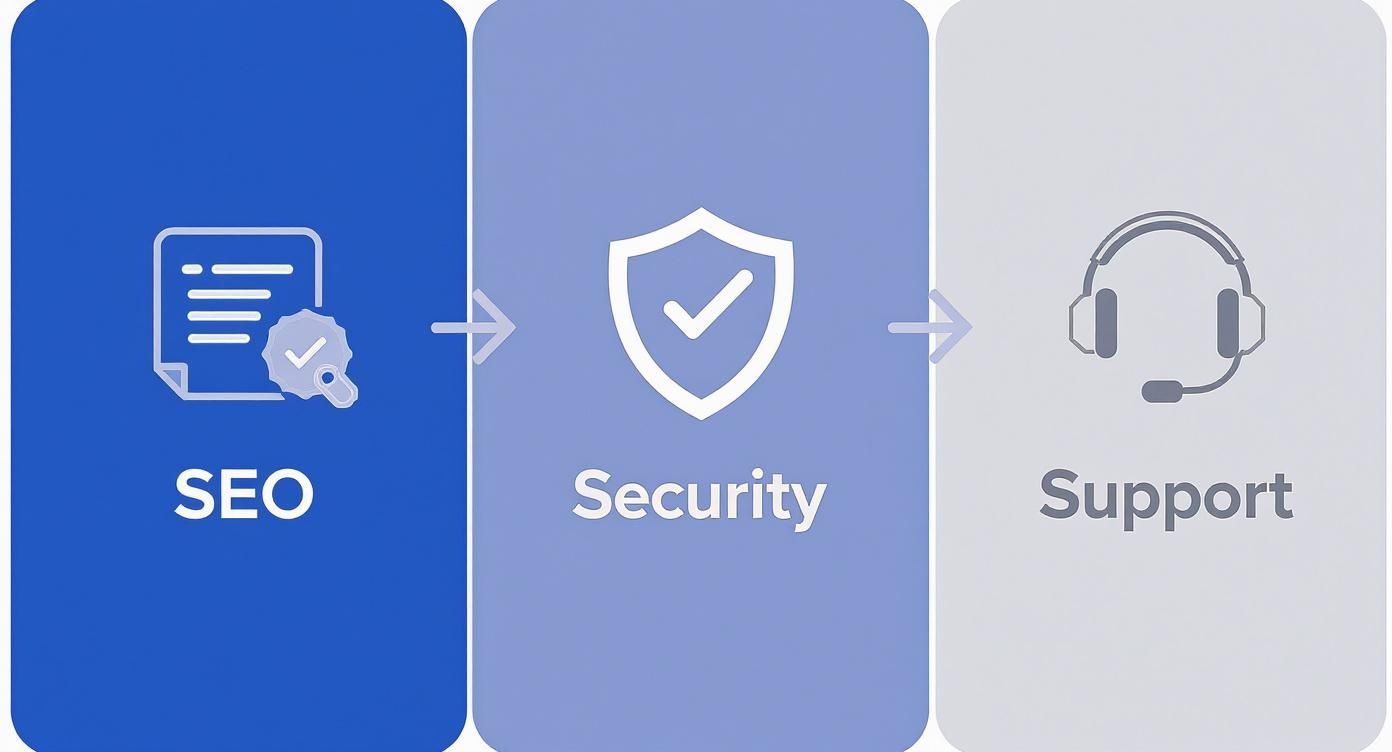
This simple flow—checking for SEO-friendly code, validating security updates, and confirming reliable support—is your final filter. It helps you weed out the risky options and select a true winner.
A Quick Final Checklist
Before you hit that "buy" button, run through this list one last time. It’s a simple gut check to confirm your choice is solid from every angle and you haven’t missed anything crucial.
- Performance Score: Did the demo score 90+ on Google PageSpeed Insights for mobile? This is non-negotiable.
- Responsiveness: Does it deliver a flawless experience on both phones and tablets? Test it yourself.
- Plugin Compatibility: Is it fully compatible with your must-have plugins like Yoast, Rank Math, or WooCommerce?
- Developer Reputation: Does the developer have a solid track record of frequent updates and glowing user reviews?
- Clear Documentation: Is there detailed, easy-to-understand documentation to guide you through setup and customization?
Common Questions About Choosing a WordPress Theme
Navigating the world of WordPress themes can feel a bit overwhelming, and a few common questions always seem to pop up. Let's clear the air and tackle some of the most frequent ones I hear from clients. Getting these answers straight can make the whole process much smoother.
Should I Use a Free or a Premium WordPress Theme?
For any serious business, a premium theme is a worthwhile investment. I get it, "free" is tempting. Free themes on WordPress.org are security-vetted and can work fine for a personal blog or a super simple site. But they almost always lack advanced features and, more importantly, dedicated developer support.
Premium themes, which usually run a one-time fee of around $59, offer far better customization, consistent security updates, and professional support. That last part is huge. When you hit a technical snag that’s over your head, that support is your lifeline. Think of it as buying a small insurance policy for your website's entire foundation.
What Is the Difference Between a Theme and a Page Builder?
This is a frequent point of confusion, so let's break it down. A theme controls the global design of your site—the header, the footer, the layout for your blog posts, and the default fonts and color palettes. It's the overall architectural style of your digital home.
A page builder, on the other hand, is a plugin like Elementor or Beaver Builder. It gives you a drag-and-drop interface to design the content area of individual pages. Many of the best modern themes, like Astra or GeneratePress, are intentionally built to be lightweight foundations that work perfectly with page builders. This gives you the best of both worlds: a stable global design with total creative freedom on each page.
How Do I Spot a Bloated or Poorly Coded Theme?
The fastest and most reliable way to check is to take the theme's live demo and run it through a tool like Google PageSpeed Insights. A low mobile score (anything below 80) or a total page size over 1.5MB are major red flags.
Another dead giveaway is a ridiculously long feature list that promises hundreds of things you'll never actually use, like dozens of different sliders or animation styles. All those extras add unnecessary code—or "bloat"—that will inevitably slow your site down.
Pro Tip: Always lean toward themes marketed as "lightweight" or "performance-focused." Clean code and speed will always be more valuable for your SEO and user experience than a theme packed with flashy but useless features.
Ready to build a website with a powerful, fast, and secure theme? Website Services-Kansas City specializes in WordPress development and SEO, ensuring your site is built on a solid foundation from day one. Let our experts help you choose and implement the perfect theme for your business.
Learn more and get started at https://websiteservices.io.