
Staring at a crowded Google search page can feel like trying to be heard in a packed stadium. Your meta tags are your megaphone—they’re the short snippets of text that summarize your page's content for search engines, and more importantly, for the real people using them. Learning how to generate meta tags is a non-negotiable skill for any business owner looking to capture attention and drive clicks.
Why Your Meta Tags Matter More Than Ever

Meta tags are your first handshake with a potential customer on Google. They're a critical piece of on-page optimization, but their job isn't just to tell search engines what your page is about; it's to convince a human that your page has the answers they're looking for. A well-crafted tag can be the reason someone clicks your link, even when you're not in the number one spot.
Think of it this way: your title tag is the headline, and your meta description is the ad copy. Together, they create a tiny, powerful preview that can either draw a user in or make them scroll right past. For a local business in Kansas City, this is the difference between a new lead and a missed opportunity. This combo also sends strong quality signals to Google, showing that your page is relevant and valuable.
The Evolution from Ranking Factor to Click Magnet
The role of meta tags has changed dramatically. Back in the wild west of the early internet—the 1990s and early 2000s—the meta keywords tag was a direct ranking factor, which led to a ton of spam and keyword stuffing. By 2009, Google officially announced it no longer used the meta keywords tag for ranking.
This shifted the focus entirely to title tags and meta descriptions. While not direct ranking factors themselves, they have a massive impact on click-through rates (CTR). It’s no longer about tricking an algorithm; it’s about appealing to human psychology. For a deeper dive into the nuts and bolts, it's worth understanding the technical implementation of meta tags.
Your meta tags are your digital storefront window on the SERP. They must be clean, inviting, and clearly communicate the value waiting inside. Ignoring them is like boarding up your windows and hoping customers will still walk in.
Modern Impact in a Crowded SERP
Today, with AI overviews and rich results hogging so much real estate on search pages, the space for traditional organic listings is more competitive than ever. This makes your meta tags even more vital. An optimized tag helps you:
- Improve Click-Through Rate (CTR): A compelling description encourages more searchers to choose your link over the competition's.
- Enhance User Experience: Clear tags set accurate expectations, which helps reduce bounce rates when users land on your page.
- Boost Brand Visibility: Consistently well-written tags reinforce your brand's message across all your search listings.
Ultimately, learning to generate effective meta tags is a foundational skill in any modern SEO strategy. If this is new territory for you, I recommend reading our complete guide on what is on-page optimization to see how meta tags fit into the bigger picture.
The 4 Essential Meta Tags That Actually Drive Results
When you first start digging into meta tags, it's easy to feel like you're drowning in technical jargon. Let’s cut through all that noise and focus on the four tags that actually move the needle.
Think of them as a team working together. The Title Tag is your headline, the Meta Description is your ad copy, the Meta Robots tag is the bouncer at the door, and Open Graph tags are your social media passport. Each one has a unique job, but they all work together to control how your business shows up on search engines and social feeds.
Title Tag: The Digital Headline
The title tag is, without a doubt, the most important meta tag for SEO. It’s that blue, clickable headline you see in search results and the text that appears in your browser tab. It’s the most direct way to tell both people and search engines what your page is all about.
A great title tag has to be compelling and crystal clear. Its primary job is to grab a searcher's attention and scream, "This is the result you're looking for!"
- Optimal Length: Keep it under 60 characters. Anything longer will likely get cut off in the search results.
- Keyword Placement: Get your main keyword as close to the beginning as you can. It helps signal relevance immediately.
- Actionable Advice: If you're a plumber in Kansas City, a title like "Emergency Plumber Kansas City | 24/7 Service & Fast Repairs" is worlds better than just "Plumbing Services." It speaks directly to a user's urgent need.
Meta Description: The Persuasive Pitch
While the title tag hooks their attention, the meta description is what persuades them to click. This is the short snippet of text—usually around 155 characters—that sits right under the title in search results. While it doesn't directly influence your rankings, it has a massive impact on your click-through rate (CTR).
This is your chance to write some killer ad copy. Use an active voice, show off a unique selling point, and slip in a subtle call to action. You need to tell the user why they should choose your page over all the others.
A great meta description answers the user's unspoken question—"What's in it for me?"—before they even click. It bridges the gap between their problem and your solution.
Meta Robots: The Search Engine Bouncer
Look, not every page on your website is meant for the public. The meta robots tag is your way of telling search engines how to handle your content. It’s a simple set of instructions that tells crawlers whether to index a page (show it in search results) or follow the links on it.
For instance, you might use noindex, follow on a "thank you" page after someone makes a purchase. You want Google to follow the links on that page to discover other parts of your site, but you definitely don't want the thank you page itself popping up in search results. This tag is also a key player in managing duplicate content, which can sometimes be handled with a canonical URL. For more on that, you can check out our guide on what is a canonical URL.
Open Graph Tags: The Social Media Passport
Finally, we have Open Graph (OG) tags. These tags control how your content looks when it gets shared on social media platforms like Facebook, X, and LinkedIn. That neat preview you see with a custom title, image, and description when you paste a link? That’s OG tags doing their job.
Without them, social platforms just take a wild guess at what to display, often pulling a random image or a clunky bit of text from the page. By setting specific OG tags for the title, description, and image, you make sure every share looks professional and on-brand, maximizing its chance to drive engagement and bring people back to your site.
Essential Meta Tags At a Glance
Here’s a quick-reference table to keep these core meta tags straight. Think of it as your cheat sheet for controlling how your site appears online.
| Meta Tag Type | Primary Function | Optimal Length | Key SEO Tip |
|---|---|---|---|
| Title Tag | The main clickable headline in search results. | Under 60 characters | Place your primary keyword near the beginning for maximum impact. |
| Meta Description | A short summary to persuade users to click. | Around 155 characters | Write compelling copy with a clear call to action to boost CTR. |
| Meta Robots | Instructs search engines on crawling and indexing. | N/A | Use noindex for thin or private pages to keep them out of search results. |
| Open Graph | Controls how content previews look on social media. | Varies by platform | Always set a custom OG image to make your shares visually appealing. |
Mastering these four tags gives you a foundational level of control over your digital presence, ensuring your content makes the best possible first impression, no matter where it’s discovered.
A Step-by-Step Guide to Generating Meta Tags in WordPress
Right, so you've got the theory down. But let's be honest, theory is one thing—actually putting it into practice is what gets results. For the millions of businesses running on WordPress, the good news is that you don't need to be a coding wizard to generate meta tags. Powerful SEO plugins have done all the heavy lifting for you.
We're going to focus on Rank Math, a seriously robust tool that turns these technical tasks into a few simple, user-friendly fields. Once you have a plugin like this installed, it integrates right into your page and post editor. No more digging through code. SEO becomes a natural part of your content workflow.
Finding the Meta Tag Editor
To get started, just open up any page or post in your WordPress dashboard. You'll see the Rank Math SEO panel either below the main content area or in the sidebar, depending on your setup. This little box is your command center for on-page SEO.
Inside, you'll find clean, distinct fields for the most important meta tags:
- Title: This is where you'll craft your SEO title tag.
- Permalink: This controls your URL slug.
- Description: This is where you'll write your meta description.
The layout is designed to be intuitive, putting everything you need right at your fingertips. If you're looking for a more detailed setup guide, our article on completing an SEO tune-up with Rank Math will walk you through it step-by-step.
The whole process to generate meta tags should flow in a logical order: craft the headline, write the description, set any rules for crawlers, and then get it ready for social sharing.
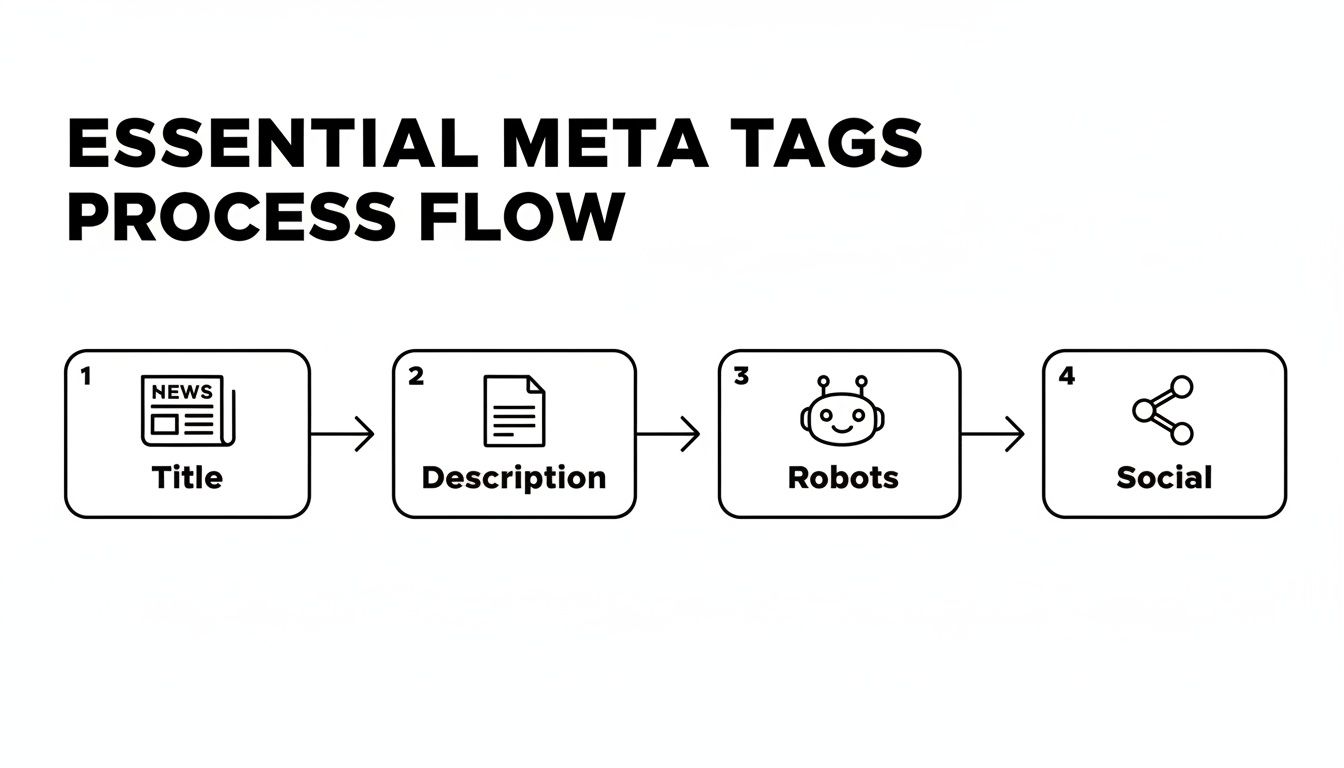
This visual is a great reminder of the workflow, making sure you hit all four of the essential tags for a fully optimized page.
Using Real-Time Feedback to Your Advantage
One of the best features of modern SEO plugins is the instant feedback. As you start typing your title and description, Rank Math analyzes them in real time, giving you a color-coded score and actionable suggestions.
It even shows you a live preview of how your snippet will look on Google, so you can see right away if your message is getting cut off. The plugin is constantly checking for key details like:
- Length: Is your title under 60 characters? Is your description hovering around the 155-character sweet spot?
- Keyword Usage: Have you woven your focus keyword naturally into both the title and description?
- Clarity: Did you include a number or a "power word" to help it stand out and get more clicks?
This real-time coaching helps you craft a snippet that's not just technically sound, but also compelling enough to make someone actually want to click on it.
A Practical Scenario: Putting Robots Tags to Work
Let's ground this in a real-world business situation. Imagine a new customer fills out a contact form on your site. Once they hit "submit," they're redirected to a "Thank You" page. You absolutely need that page for the user's experience, but you definitely don't want it showing up in Google search results.
This is the perfect job for the meta robots tag.
Inside the Rank Math panel, you'll spot an 'Advanced' tab. Click on that, and you can easily take control of the Robots Meta settings for that specific page. To keep your 'Thank You' page out of the search index, you just check the box for 'No Index.'
That one click automatically adds the noindex directive to the page's code behind the scenes. It's a simple, powerful action that prevents search engines from showing private or low-value pages, keeping your public search presence clean and professional.
And just like that, you’ve turned a technical SEO concept into a two-second task.
Writing Meta Descriptions That Convert
The technical rules get your meta tags on the page, but great copywriting is what actually gets someone to click. Your meta description is so much more than a summary; it's your 155-character sales pitch to a searcher. This is where you stop just checking boxes and start persuading people that your page has the exact answer they’re looking for.
You need to shift from simply describing what's on the page to selling the value it offers. Think less like a librarian cataloging content and more like a marketer crafting a compelling ad.
From Bland to Persuasive
Let’s take a local Kansas City plumber. Their old meta description was probably something like this: "We offer plumbing services in Kansas City, MO. Our services include drain cleaning, pipe repair, and water heaters." It’s accurate, sure, but it’s completely uninspired. It won't stand out.
Now, let's inject some proven copywriting techniques to give it life:
- Before: "Plumbing services in Kansas City, MO. We do drain cleaning, pipe repair, and water heaters."
- After: "Need an emergency plumber in Kansas City? Get 24/7 service for burst pipes & clogged drains. Fast, reliable repairs to get your life back to normal. Call now!"
The "after" version is a game-changer. It uses an active voice, targets an urgent pain point (an emergency!), and makes a compelling promise ("get your life back to normal"). That small change can have a massive impact on clicks because it speaks directly to a user in distress. Understanding these nuances is crucial when you learn how to write website copy that converts and ranks.
The decline of meta keywords didn't diminish meta tags' overall clout; instead, it spotlighted their powerhouse role in driving user engagement. In one 30-day showdown, an optimized meta description vaulted CTR from a measly 2.1% to a robust 3.4%, a 62% improvement. That translated to 401 clicks versus 260—a 54% surge—while holding a steady search position.
Core Elements of a High-Converting Description
To write meta descriptions that consistently perform, you really only need to focus on a few key ingredients.
First is your unique selling proposition (USP). What makes you different? Is it your 24/7 availability, free shipping, or a 100% money-back guarantee? Whatever it is, put that front and center.
Next, sprinkle in some power words to trigger an emotional response. Words like "instantly," "guaranteed," "proven," and "exclusive" can make your snippet feel more urgent and valuable.
Finally, wrap it up with a clear, direct call to action (CTA). Tell people exactly what to do next. "Shop Now," "Learn More," or "Get a Free Quote" are simple, effective, and leave no room for confusion.
For a deeper dive into crafting snippets that truly compel action, explore comprehensive guides on how to write meta descriptions that drive clicks. These resources offer even more examples and frameworks for different industries. Building this skill is a direct investment in your organic traffic.
Meta Description Templates for Your Business
Feeling stuck? No problem. You can quickly generate an effective meta description by adapting these proven templates for different business models.
| Business Type | Meta Description Template |
|---|---|
| Local Service | "Need [Service] in [City]? We offer [USP] for [Problem]. Get fast, reliable service. [CTA] for a free estimate!" |
| E-commerce | "Shop the latest [Product Category] at [Your Brand]. Enjoy [USP] on all orders. [CTA] to find your perfect [Product] today!" |
| SaaS | "The best [Software Category] for [Audience]. [Benefit 1], [Benefit 2], and [Benefit 3]. [CTA] for a free 14-day trial!" |
| Blog/Info | "Looking for [Topic]? Our in-depth guide covers [Key Point 1] & [Key Point 2]. [CTA] to get expert advice and practical tips." |
These templates give you a solid starting point. Just fill in the blanks with your specific details, and you'll have a compelling, click-worthy meta description ready to go.
How to Test and Validate Your Meta Tags
So, you've generated your meta tags and pushed them live. Time to sit back and relax, right? Not quite.
Your job isn’t done until you measure what’s working. Otherwise, you’re just guessing. This is the part of the process where you close the loop, turning your one-off effort into a repeatable system for getting more clicks.
The best free tool for this job is, without a doubt, Google Search Console (GSC). It gives you unfiltered, direct-from-the-source data on how your pages are performing in search. By digging into this data, you can pinpoint exactly which meta tags are hitting the mark and which ones are falling flat.
Finding Opportunities in Google Search Console
Once you’re inside GSC, head straight for the “Performance” report. This is where you’ll find a list of every page on your site getting impressions and clicks from Google. Your goal is to hunt for pages with a high number of impressions but a frustratingly low click-through rate (CTR).
This is your low-hanging fruit.
A high impression count means Google is showing your page to plenty of people. But a low CTR is a clear sign that your meta tag snippet isn't compelling enough to earn the click. These are the pages practically begging for a rewrite. For a step-by-step walkthrough, check out our guide on how to set up Google Search Console.
This data-driven approach is what separates the pros from the amateurs. In fact, well-optimized metas have been shown to correlate with some serious click boosts, sometimes as high as 54%. In competitive markets, where even small improvements matter, a weak meta tag can make you invisible.
Previewing Your Snippets Before You Go Live
One of the most common—and avoidable—mistakes is publishing a meta tag only to see it get awkwardly cut off in the search results. You can easily prevent this with a quick preview before you hit publish. This simple check ensures your carefully crafted message shows up exactly as you planned.
Several free tools and browser extensions let you simulate how your snippet will look on the Google search results page (SERP):
- Rank Math: The plugin has a built-in snippet preview right in the WordPress editor that updates in real-time as you type.
- Online SERP Simulators: Websites like SERPSim let you paste in your title and description to see a live preview on both desktop and mobile.
- Browser Extensions: Tools like the "SEO Pro Extension" let you check the live meta tags of any page on the web, including your own, with a single click.
By combining GSC data to find underperforming pages with preview tools to perfect your new copy, you create a powerful cycle. You're no longer just writing meta tags; you're engineering clicks based on real-world feedback.
Common Questions About Generating Meta Tags
Once you start getting your hands dirty with meta tags, a few questions almost always bubble up. Getting these sorted out early can save you a ton of headaches and help you sidestep some of the classic mistakes I see business owners make. Let's tackle them head-on.
Does Every Page Need Unique Meta Tags?
Absolutely. 100% yes. Every single page on your website that you want to see in search results needs its own unique title tag and meta description.
Think of it this way: each page has a specific job. For an e-commerce store, a unique meta description lets you highlight a product's specific features and speak directly to what a buyer is looking for. This kind of precision helps search engines understand the unique value of every page and keeps your site from looking repetitive or thin.
What Happens If I Leave a Meta Description Blank?
If you don't write a meta description, Google will just grab a snippet of text from the page that it thinks is relevant and create one for you. This is a huge gamble.
More often than not, the auto-generated text is clunky, gets cut off mid-sentence, or completely fails to grab a user's attention. When you write your own, you stay in the driver's seat. You get to craft a compelling, persuasive reason for someone to click your link instead of a competitor's.
Leaving your meta description blank is like letting a stranger write the ad copy for your most important products. You have the opportunity to control the first impression—always take it.
How Often Should I Update Meta Tags?
You definitely don't need to be tweaking them constantly. A smart, efficient approach is to hop into Google Search Console every 6 to 12 months and review your key pages.
What you're looking for are your golden opportunities: pages that get a ton of impressions but have a really low click-through rate (CTR). These are the pages where a quick rewrite of the title and meta description can give you a significant traffic boost with minimal effort.
Can I Use AI to Generate My Meta Tags?
AI tools are fantastic for knocking out a solid first draft, especially if you're managing a massive site with hundreds or thousands of pages. They can save you an incredible amount of time.
But—and this is a big but—you should never just copy and paste what an AI spits out. Always, always review and edit the output. Infuse it with your brand's unique voice, double-check that every detail is accurate, and add a persuasive call-to-action that a machine is likely to miss.
Use AI as a powerful assistant, not as a replacement for your own strategy and insight.
Ready to take control of your website's first impression and drive more qualified traffic? At Website Services-Kansas City, we specialize in creating and optimizing WordPress websites with powerful SEO strategies that get results. Let us handle the technical details so you can focus on running your business. Learn more about our professional website development and SEO solutions.
