
Here's the thing: the choice between a website builder and WordPress boils down to a single, fundamental trade-off. Do you want a simple, all-in-one solution that gets you online fast, or do you need unlimited control and long-term scalability?
Think of it like this: a website builder is a convenient rental apartment, while WordPress is like building your own custom home. One gets you moved in quicker, but the other offers true ownership and the freedom to build exactly what you want.
The Essential Choice: Website Builder vs. WordPress
Picking your website's foundation is one of the most critical decisions you'll make as a business owner. It's not just a technical choice; it's a strategic one that directly impacts your site's functionality, growth potential, and even your ability to rank on search engines.
The debate usually centers on two camps: all-in-one website builders (like Wix, Squarespace, or GoDaddy's builder) and the self-hosted WordPress.org platform.
Website builders are engineered for simplicity. They bundle everything—hosting, security, and a drag-and-drop editor—into one neat monthly package. This approach is perfect for anyone who needs a professional-looking site up and running quickly, without ever having to touch a line of code.
WordPress, on the other hand, is an open-source content management system (CMS) that powers an incredible 43% of all websites. It gives you complete ownership and absolute control. You choose your own hosting, get access to a massive ecosystem of over 59,000 plugins, and can customize every single pixel of your site. This freedom, however, comes with a slightly steeper learning curve and more hands-on management.
To really see how they stack up, let's break down the core differences in a way that matters for your business.
Core Differences: Website Builder vs. WordPress
This table gives you a high-level snapshot of what you're signing up for with each platform. It's a quick reference to help you start weighing the pros and cons based on what you value most.
| Decision Factor | Website Builder (e.g., Wix, Squarespace) | WordPress (.org) |
|---|---|---|
| Ease of Use | Very user-friendly with drag-and-drop interfaces; ideal for beginners. | Moderate learning curve, but made easier with modern page builders. |
| Customization | Limited to the platform's templates and pre-built features. | Highly flexible; thousands of themes and plugins for endless customization. |
| Ownership | You are "renting" the platform; you cannot move your site elsewhere. | You have 100% ownership of your files and data; complete portability. |
| SEO Control | Basic SEO tools are built-in, but advanced optimization is limited. | Comprehensive SEO control through powerful plugins like Rank Math. |
| True Cost | Fixed monthly plans that can increase as you need more features. | Varies; requires separate hosting, but often more cost-effective long-term. |
| Scalability | Limited scalability; you may outgrow the platform's capabilities. | Highly scalable to support business growth from a simple blog to a large store. |
While this summary is a great starting point, the right choice really depends on your specific business goals, technical comfort level, and long-term vision.
For a deeper look at how various platforms compare, articles like the Shopify vs WordPress vs Solo AI Website Creator can offer valuable insights. Understanding the actual steps involved is also key; you can learn more about how to create a business website to see what the process looks like, regardless of the platform.
Throughout this guide, we’ll dive into each of these factors in much greater detail to help you make a truly informed decision.
Comparing Control And Customization
The real difference between a website builder and WordPress boils down to a classic trade-off: simplicity versus flexibility. Website builders offer an incredibly straightforward path to getting online, often with drag-and-drop tools that feel empowering for anyone just starting out.
But that simplicity comes with a hidden cost—control. You’re essentially operating inside a “walled garden,” limited to the features, templates, and tools the platform decides to give you. It’s a fantastic setup for a standard, straightforward website, but it can quickly become a straitjacket as your business starts to grow.
The WordPress Flexibility Advantage
WordPress, which used to have a reputation for being complex, has completely changed the game. The old argument that you needed to be a coder to use it is just not true for most business owners anymore. This massive shift is all thanks to powerful page builder plugins that bring that same intuitive drag-and-drop functionality right into the WordPress ecosystem.
The biggest edge WordPress has today is the explosion of page builders like Elementor and Divi, which are predicted to power over 50% of all WordPress sites by 2025. Elementor alone is installed on a staggering 18.1% of all sites with a known CMS—that's more than Wix and Squarespace combined. This visual revolution directly tackles the main selling point of builders: ease of use without needing code. In fact, a massive 90% of WordPress page builder users report they can design sites faster.
This combination gives you the best of both worlds: the visual design experience of a builder paired with the limitless potential of an open-source platform.
Real-World Growth Scenarios
Let's imagine a local bakery starts out with a website builder. Their first site is simple and clean: a homepage, an "About Us" page, and a contact form. It works perfectly for the first year.
But then, the owner decides they want to offer online ordering for local delivery. Suddenly, they hit a wall. The website builder’s e-commerce plan is expensive, and worse, it doesn't integrate with their preferred local delivery service. They're stuck.
Now, picture the same bakery starting with WordPress. They begin with a simple theme and a few basic pages. When it's time to add online ordering, they can install WooCommerce, a powerful and completely free e-commerce plugin. A huge advantage of WordPress is its massive plugin ecosystem; learning how to add a plugin to your WordPress site opens the door to thousands of custom features, like specialized delivery integrations that are perfect for their business.
"Flexibility is not a 'nice-to-have' feature; it is the foundation of a scalable digital presence. Choosing a platform that can't grow with your business is like building on rented land—eventually, you will hit a boundary you cannot cross."
The ability to adapt is everything. With WordPress, your site can evolve from a basic brochure into a complex platform with functionalities like:
- Membership Portals: Create exclusive content areas for paying subscribers.
- Advanced E-commerce: Integrate with any payment gateway or shipping provider you choose.
- Booking Systems: Let clients schedule appointments directly on your site.
- Custom Databases: Build unique features tailored specifically to your business operations.
This level of customization just isn't on the table within the closed-off world of a typical website builder. While picking a theme is your first step, our guide on how to choose a WordPress theme can help you select a foundation that will support your vision for years to come.
Winning the SEO Battle: Why Your Platform Matters
When it comes to getting seen on Google, the platform you build your website on isn't just a small detail—it's a massive deciding factor. While most website builders now offer basic SEO settings like meta titles and descriptions, they often hit a hard ceiling when it comes to the advanced, needle-moving optimizations that actually win rankings.
This isn't just a minor inconvenience; it's the difference between landing on page one and getting buried on page ten.
The market data tells the same story. WordPress absolutely towers over the competition, powering a staggering 43.3% of all websites. To put that in perspective, the next biggest players, Wix and Squarespace, manage just 5.2% and 3.3% respectively. The gap gets even wider when you look at high-traffic sites where performance and SEO are non-negotiable.
The Limitations of a Closed System
Website builders offer a controlled, walled-garden environment. This makes them simple to use, but that simplicity comes at the cost of control, creating a significant SEO ceiling that can hold you back.
For a local business trying to outrank established competitors, these roadblocks can be a serious handicap.
Here are a few common frustrations you'll run into with a builder:
- Locked-in URL Structures: Many builders generate clunky, automatic URL paths that you can't fully customize. A clean, keyword-rich URL is a small but important ranking signal you have no control over.
- Schema Markup Headaches: Trying to implement advanced schema—like for a local business, specific products, or events—can be a nightmare, if not impossible. This limits your ability to earn rich results in search.
- Shared Hosting Performance: Your site is often stuck on the same server as thousands of others, which can lead to slower load times—a major ranking factor. You have no power to move to a faster host or optimize the server environment.
These issues put you at a competitive disadvantage from the very beginning. You're forced to play by the platform's rules, and those rules were not designed for aggressive, high-stakes SEO.
WordPress: The SEO Powerhouse
In the website builder vs wordpress debate, SEO is where WordPress leaves the competition in the dust. It gives you complete and total autonomy over every technical and on-page element that Google cares about. This granular control is unlocked through a massive ecosystem of specialized plugins.
A professional SEO agency, for instance, wouldn't just be tweaking meta tags. They'd be using powerful tools like Rank Math or Yoast SEO to fine-tune every single aspect of a site's visibility—something only possible on WordPress. These plugins act as a complete SEO dashboard right inside your website.
The ability to directly influence technical SEO factors like site speed, schema, and crawlability is not a luxury; it's a necessity for competitive rankings. WordPress provides an open toolkit, while builders often present a locked box.
With WordPress, you can execute sophisticated tactics that are often out of reach on a builder platform:
- Optimize for Core Web Vitals: You can choose high-performance hosting, install caching plugins, and optimize images to fly past Google's critical speed and user experience tests.
- Implement Advanced Schema: Easily add detailed structured data for products, reviews, FAQs, and local business info to make your listings stand out in the search results.
- Control Indexing and Crawling: You get full control over your
robots.txtfile and sitemaps, allowing you to tell search engine bots exactly how to crawl your site for maximum efficiency.
This level of control means a WordPress site can be continuously fine-tuned to adapt to algorithm updates and outmaneuver the competition. Our detailed guide on how to improve website SEO covers many of these advanced strategies that are most effectively implemented on a flexible platform like WordPress.
Understanding the True Cost of Ownership
When you’re weighing a website builder vs. WordPress, the sticker price can be seriously misleading. Those low monthly fees from builders look like a bargain at first, but the real cost of ownership tells a completely different story down the road.
That initial simplicity gets expensive fast as your business starts to grow. Features that are standard or completely free in the WordPress ecosystem often require you to jump to a pricier plan on a builder platform. Want to start selling products? That'll be a higher tier. Need to get their logo out of your footer? You'll have to pay up for that, too.
These little costs pile up, but they also hide a much bigger financial difference: the concept of digital rent versus a digital asset.
The Hidden Cost of Digital Rent
Using a website builder is a lot like renting a storefront. You pay your monthly fee for the space, and sure, it's convenient and easy to get started. But you’re stuck with the landlord's rules, you can't knock down any walls, and most importantly—when you stop paying rent, you walk away with nothing but your inventory.
It’s exactly the same with a website builder. You’re just paying for access. If you decide to move to a more powerful or flexible platform, you can't take your website with you. The design, the structure, and all that hard work are gone. You have to start from scratch, losing your entire investment of time and money.
Choosing a website builder means you are building your online presence on borrowed land. True ownership, the ability to move and adapt without penalty, is only possible when you control the underlying files and data, which is the core strength of WordPress.
WordPress as a Digital Asset
A WordPress website, on the other hand, is a true digital asset you own completely. The core software is free, and while you pay for hosting, you have 100% ownership of every file, image, and line of code.
This ownership gives you some critical long-term advantages:
- Complete Portability: If you're unhappy with your hosting provider's performance or price, you can pack up your entire website and move to a new host whenever you want, without losing a thing.
- Protected Investment: Every dollar and hour you sink into customizing your design, creating content, and dialing in your SEO is protected because you own the asset itself.
- Uncapped Value: As your site grows in traffic and authority, its value as a business asset actually increases. You can even sell a WordPress site, which is practically impossible with one built on a rental platform.
Understanding the different hosting options is key to managing your WordPress costs effectively. To get a better grasp, you can learn more about how to choose web hosting and find a plan that fits your budget and performance needs.
Projected 3-Year Website Cost Analysis
To make this tangible, let's project the cumulative costs for a typical small business website over three years. This comparison reveals how the initial affordability of a builder can be deceiving as your needs evolve.
| Cost Item | Website Builder (Mid-Tier Plan) | Self-Hosted WordPress |
|---|---|---|
| Initial Setup Fee | $0 (DIY) | $0 (DIY) |
| Hosting & Platform Fees (Annual) | ~$250/year (increases likely) | ~$150/year (for quality shared hosting) |
| Domain Name | Often free for 1st year, then ~$20/year | ~$15/year |
| Premium Theme | Included in plan | ~$60 (one-time) |
| E-commerce Functionality | Upgrade to a ~$350/year plan | Free (WooCommerce plugin) |
| Advanced SEO Tools | Limited built-in tools | Free (Rank Math/Yoast) |
| Removing Platform Branding | Included in paid plans | Not applicable (full ownership) |
| Total 3-Year Projected Cost | ~$1,090+ | ~$545+ |
This analysis shows that while WordPress may have a small upfront cost for a premium theme, its long-term operational costs, especially when adding e-commerce, are significantly lower. The true value, however, lies in the fact that after three years, the WordPress user owns a valuable, portable asset, while the builder user has simply paid rent.
How to Choose the Right Platform for Your Business
Making the final call in the website builder vs. WordPress debate can feel like a huge decision, but it gets a lot simpler when you stop comparing features and start looking at your own business goals. The right platform is the one that actually supports your long-term vision, not just the one with the flashiest sales pitch.
This decision really comes down to where you see your business in the next three to five years. Are you just putting up a simple online brochure, or are you laying the foundation for a scalable business engine? Your answer to that question will point you straight to the right choice.
Scenario-Based Decision Making
Let's ditch the generic advice and walk through a few practical, real-world scenarios. This framework will help you figure out your own needs and confidently pick the platform that truly aligns with where you're headed.
-
For the Freelance Photographer: A photographer needs a visually stunning portfolio to show off their work. It's all about aesthetics and speed. A website builder like Squarespace is often the perfect fit here, offering gorgeous templates and easy gallery management without a hint of technical headache. The goal is to get a professional site live, fast, and a builder is built for that.
-
For the Local Service Business: A plumbing company in Kansas City has a completely different job to do. Their website's main goal is to generate leads by dominating local search results. This requires advanced SEO, custom landing pages, and integrations with booking software. WordPress is the clear winner here, hands down. It provides the deep technical SEO control needed to outrank competitors in a crowded local market.
-
For the Ambitious E-commerce Brand: An online store with big growth plans needs a platform that won't become a bottleneck. While a builder can get you off the ground, you’ll eventually need custom shipping rules, complex inventory system integrations, and advanced marketing automation. WordPress with WooCommerce provides an open, scalable foundation that can handle that kind of complexity without locking you into expensive, restrictive subscription plans.
This diagram really drives home the core difference in website ownership between the two paths.
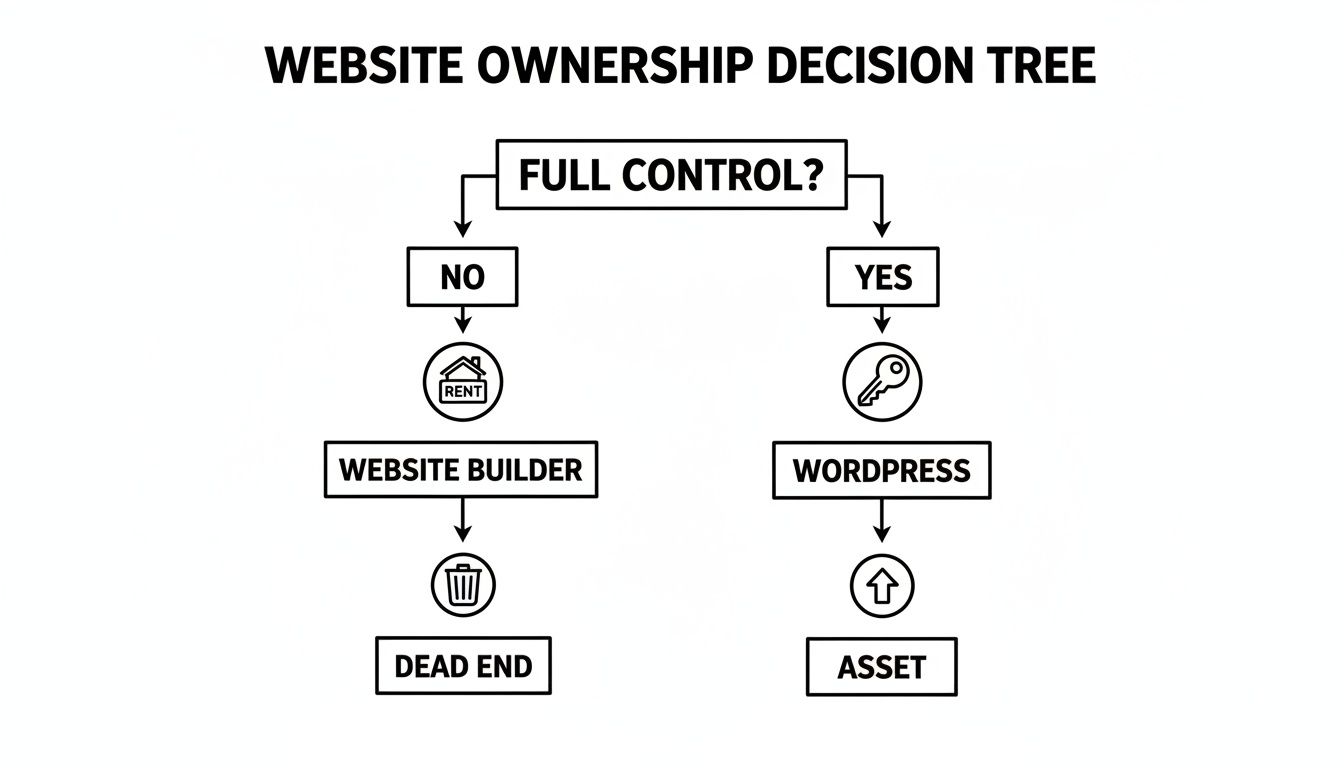
As you can see, a website builder is a temporary rental. A WordPress site, on the other hand, is a permanent business asset that you own and control outright.
Key Questions to Guide Your Choice
To lock in your decision, ask yourself these tough questions. Your answers will tell you whether the short-term convenience of a builder is worth sacrificing the long-term power of WordPress for your specific situation.
- What are my real growth plans? If you think you'll eventually want to add complex features like a membership portal, online courses, or a custom client dashboard, WordPress is built to grow with you. A builder will almost certainly hit a functional wall.
- How critical is SEO to my business? If your entire business model depends on organic traffic to find new customers, you need the granular control over technical and on-page SEO that only WordPress can provide. It's not even a fair fight.
- Do I need to integrate with specialized software? If your daily operations rely on a specific CRM, accounting software, or some other third-party tool, WordPress's massive plugin library and open-source DNA make those integrations not just possible, but reliable.
Your website platform isn't just a tool; it's a long-term business investment. Choosing a platform that limits your future growth for the sake of short-term simplicity is a strategic mistake that can be costly to correct later on.
Ultimately, the choice hinges on your vision. For those planning a strategic launch, understanding the entire process is critical. You can learn more about the steps involved by reading our guide on how to launch a new website successfully. This will help you prepare, no matter which platform you end up choosing.
Got Questions? We’ve Got Answers.
Choosing between a website builder and WordPress always brings up a few practical, "what if" questions. Getting clear, honest answers is the final step to making a decision you won't regret later. Here are some of the most common questions we hear from business owners.
Can I Switch From a Website Builder to WordPress Later?
Yes, but it's not a simple flip of a switch. You can migrate your content—your text and images—but the entire website has to be rebuilt from scratch on WordPress. The design, structure, and any special features from the builder are completely lost.
This process is essentially starting over and can be a serious investment in both time and money. It really highlights why picking the right platform from the start is so important for protecting your initial investment.
Is WordPress Secure Enough for an E-commerce Business?
Absolutely. When managed correctly, WordPress is an extremely secure platform trusted by major global brands for their e-commerce operations. Its security isn't a single feature but a combination of smart practices.
Strong security for a WordPress store really comes down to:
- Quality Hosting: Picking a reputable hosting provider that has built-in security features from day one.
- Trusted Plugins: Using well-coded, reputable plugins like WooCommerce and established security tools.
- Good Habits: Enforcing strong passwords and keeping all your themes, plugins, and core software up to date.
With a professional setup, a WordPress e-commerce site is as robust and reliable as they come.
The old myth that WordPress is inherently insecure is just that—outdated. Security vulnerabilities almost always come from poor maintenance, weak passwords, or outdated, low-quality plugins, not the core platform itself.
Do I Need to Know How to Code to Use WordPress?
Nope. Coding is no longer a requirement for using WordPress effectively. The rise of intuitive, visual page builders like Elementor and Divi has completely changed the game, bringing a drag-and-drop design experience to the platform.
For day-to-day business tasks—like publishing a blog post, updating a service page, or adding new products—you won't need to touch a single line of code. This accessibility makes modern WordPress just as user-friendly as many all-in-one builders for most common activities.
Which Platform Is Cheaper in the Long Run?
While website builders often tempt you with low initial monthly fees, WordPress is typically more cost-effective over the long term. The "all-in-one" builder plans often require expensive upgrades for essential features like e-commerce functionality or even just removing their branding from your site.
With WordPress, you pay for hosting and a domain, but key functionalities like e-commerce (via WooCommerce) and advanced SEO tools are free. This lets you build a more powerful site without being forced into pricey subscription tiers, making it a smarter financial asset as your business grows.
Ready to build a powerful WordPress site that drives real results? The team at Website Services-Kansas City specializes in professional WordPress development and SEO strategies designed to help your business dominate the search rankings and attract more customers.
