
Before you can even dream about ranking on the first page, Google has to know your website exists. Think of it like this: Google runs the world's biggest library, and indexing is the process of getting your book officially added to their catalog. If you're not in the system, nobody can find you.
For any business, especially a local one, this is step zero. It’s the foundation for everything that comes next. You have to open up a direct line of communication with Google, and the only way to do that is through Google Search Console (GSC). It's a free, non-negotiable toolkit that shows you exactly how Google sees your site.
Laying the Groundwork for Google Indexing
Your first move is simple: you have to prove to Google that you actually own your website. This is the barrier to entry, and without it, you're essentially invisible to Google's most important diagnostic tools.
Verifying Your Website in GSC
Google Search Console offers a few ways to get this done, like adding a small piece of code (an HTML tag) to your site's header or uploading a specific file to your server. It sounds technical, but it’s usually a straightforward process.

Once you're verified, you unlock a treasure trove of data. This is where you’ll submit your sitemap, check for indexing errors, and see exactly which search queries are bringing people to your site. It all starts here.
Of course, this assumes you have a live website. A crucial part of this groundwork is making sure you choose a web hosting provider that's fast and reliable, as this has a massive impact on how easily Google's crawlers can access your pages. And if you're just starting out, our guide on what to do after buying a domain can help you with those initial steps.
Key Takeaway: Verifying your site in Google Search Console isn't a suggestion—it's the mandatory first step. Without it, you're flying blind and hoping Google stumbles upon you by accident.
To understand why this is so critical, just think about the scale we're talking about. Google's search index is home to over 100 million gigabytes of data, and it handles an mind-boggling 190,000 searches every second. While its bots are constantly looking for new content, you have to make sure your site is technically sound and accessible to even get a look-in. For new websites, proactively submitting your site through GSC is the best way to cut through the noise and get on the map.
Creating Your Website's Roadmap for Google
Once your site is hooked up to Google Search Console, the next job is to hand Google a clean, efficient map of your website. This map is an XML sitemap. Think of it as a table of contents that lists every important page you want Google to discover and, eventually, index.
Without a sitemap, Google’s crawlers have to find your pages by following links one by one. This can be painfully slow, especially for a new site with few internal links or backlinks pointing to it. Submitting a sitemap is like telling Google directly, "Hey, here are my most valuable pages; please take a look."

Generating and Submitting Your Sitemap
For anyone using WordPress, this whole process is ridiculously simple. SEO plugins like Rank Math or Yoast SEO automatically generate and update your XML sitemap for you. You don’t have to touch a single line of code.
Your sitemap URL is almost always found at yourdomain.com/sitemap_index.xml. To get it submitted:
- Log into your Google Search Console account.
- Find the 'Sitemaps' section in the menu on the left.
- Paste your sitemap URL into the 'Add a new sitemap' field and hit Submit.
That's it. Google will now use this file as a primary reference for crawling your site. This simple step is fundamental, as a well-organized sitemap goes hand-in-hand with a logical site layout. You can find more information in our guide about how to plan your website structure to ensure your pages are organized in a way that makes sense.
Your Website's Rulebook The Robots.txt File
While a sitemap tells Google where to go, another critical file, the robots.txt, tells it where not to go. This simple text file acts as a rulebook for search engine crawlers, and a small mistake here can have catastrophic consequences for your indexing efforts.
For example, a misconfigured robots.txt file might accidentally block Google from crawling important sections of your site—or even your entire website.
Actionable Tip: A common mistake is a line like
Disallow: /, which blocks every single page on your site. Always double-check yourrobots.txtfile to ensure you're not unintentionally hiding valuable content from Googlebot. You can test your file using Google's own Robots.txt Tester tool to see if important pages are blocked.
You can find and edit this file in the root directory of your website. A typical robots.txt for a WordPress site allows access to most content while blocking backend areas like the admin login page. Making sure this file is set up correctly is a key part of learning how to get indexed on Google.
Optimizing Pages for Crawlers and Humans
Getting Google to find your pages is one thing. Getting it to value them is a completely different ballgame.
Indexing isn't just about ticking off a technical checklist. It’s about making sure the pages that get into Google’s library are high-quality, relevant, and compelling enough to eventually rank. This is where on-page optimization shifts from a "nice-to-have" to a critical piece of the indexing puzzle.
High-quality content that directly answers a user's question is exactly what Google wants to see. This means creating pages that provide genuine solutions and insights, not just pages stuffed with keywords. Google’s algorithms are more than smart enough to spot thin or unhelpful content, and they might just decide not to index it at all—even if it's technically perfect.

Hunting for Indexing Roadblocks
One of the most common—and frustrating—reasons a page won't get indexed is a rogue noindex meta tag. This tiny piece of code in your page’s HTML explicitly tells Google, "Do not include this page in your search results." It’s amazing how often these tags get left behind by mistake during development or activated by a random plugin setting.
Practical Example: In WordPress, a common culprit is the "Discourage search engines from indexing this site" checkbox found under Settings > Reading. If this box is checked, it adds a noindex tag to your entire website. Always ensure this is unchecked once your site is live.
You can quickly check for this yourself. Just view the page source in your browser (usually by right-clicking and selecting "View Page Source") and search for "noindex." If you find one on a page you want indexed, it has to go.
Another huge piece of the puzzle is internal linking. This is simply the practice of linking from one page on your site to another relevant page. For a service business, this could be linking from your homepage to a specific service, then from that service page to a related case study. This creates a logical path that helps both users and Google crawlers discover all of your important content. Understanding the basics here is key, and you can learn more about what on-page optimization is in our detailed guide.
Pro Tip: A strong internal linking structure does more than just improve crawlability. It also distributes "link equity" or authority throughout your site, signaling to Google which pages you consider the most important.
The quality of your content directly impacts both indexing speed and ranking potential. This is even more true when you consider the sobering fact that 96.55% of content gets no organic traffic from Google, often because it stumbles on these basic optimization and indexing hurdles.
Regularly using an AI crawl checker is a smart move. It helps ensure search engine bots can effectively access and understand your website's content, which is a key step to joining the small percentage of pages that successfully drive traffic. By focusing on creating valuable, easily discoverable content, you're telling Google that your pages are absolutely worth a spot in its index.
Using GSC to Speed Up Indexing and Fix Errors
Waiting for Google to get around to finding your new content can be frustrating. It’s especially true when you’ve just published a timely article or made a crucial update to a service page. You need a way to give Google a nudge, and that's exactly what the URL Inspection Tool in Google Search Console is for.
This tool is your best friend for getting a real-time diagnostic on any page. Just paste a URL from your site into the search bar at the top of GSC, and you’ll get an instant report card. It tells you if the page is indexed, if it’s mobile-friendly, and if Google ran into any snags the last time its bots came crawling.
Requesting Indexing for Priority Pages
The real power of the URL Inspection Tool is the "Request Indexing" button. After you inspect a URL that isn't on Google yet, you’ll see this option. Clicking it puts your page into a priority queue for Google's crawlers.
This is incredibly useful in a few specific situations:
- Brand New Content: You just hit "publish" on a new blog post and want it seen ASAP.
- Major Updates: You've overhauled a service page with new info, pricing, or details.
- Error Fixes: You’ve just corrected a critical issue—like removing a stray
noindextag—and you need Google to re-evaluate the page quickly.
A common myth is that hitting the "Request Indexing" button over and over will make Google crawl your page faster. It won't. Google has confirmed that submitting a URL once is all you need; hammering the button doesn’t give it any extra priority.
If you're just getting your feet wet with GSC, our in-depth guide on how to set up Google Search Console will walk you through the essential first steps to get this powerful tool up and running.
Adding Context with Structured Data
Beyond manually asking Google to come take a look, you can give it a huge helping hand by using structured data, also known as Schema markup. This is basically a special vocabulary of code you can add to your site to label your content and tell search engines exactly what it is.
Think of it like adding descriptive tags to a photo. You can explicitly tell Google things like:
- "This chunk of text is a recipe with these ingredients."
- "This is our company's official address and phone number."
- "This number here is the price of the product on this page."
For a local business in Kansas City, this is a game-changer. By marking up your name, address, and phone number (NAP) with LocalBusiness schema, you make it dead simple for Google to understand who you are and where you operate. This directly fuels your local SEO and boosts your chances of showing up in the coveted map pack when people search for services nearby. It’s a proactive way to clarify your page's purpose, which can lead to faster, more accurate indexing.
Monitoring Your Indexing and Long-Term Health
Getting your pages into Google’s index isn't a one-and-done job. Think of it more as ongoing maintenance. Your website's health can change, and new technical gremlins can pop up out of nowhere, stopping new content from ever being found.
This is where regular check-ins become absolutely essential. Your best friend in this process is the Page Indexing report right inside Google Search Console. This dashboard gives you a crystal-clear overview of which pages Google knows about and, more importantly, which ones it has decided not to index. It’s your early warning system for spotting problems before they cause a real drop in traffic.
Decoding GSC Indexing Statuses
When you first dive into the Page Indexing report, you'll see a handful of statuses that can look a little confusing. Getting a handle on what they mean is the key to figuring out your next move.
Two of the most common statuses you'll run into are:
- Crawled – currently not indexed: This means Googlebot paid your page a visit but ultimately decided it wasn't worth adding to the index. This is almost always a content quality issue—the page might be too thin, a duplicate of another page, or just doesn't satisfy a clear user intent.
- Discovered – currently not indexed: This one tells you that Google knows your URL exists, likely from your sitemap or a link, but it just hasn't gotten around to crawling it yet. This can happen if your site has a low crawl budget or if Google's crawlers were simply overloaded when they tried to stop by.
This flowchart can help you map out a simple decision-making path for diagnosing these common indexing issues right in Google Search Console.
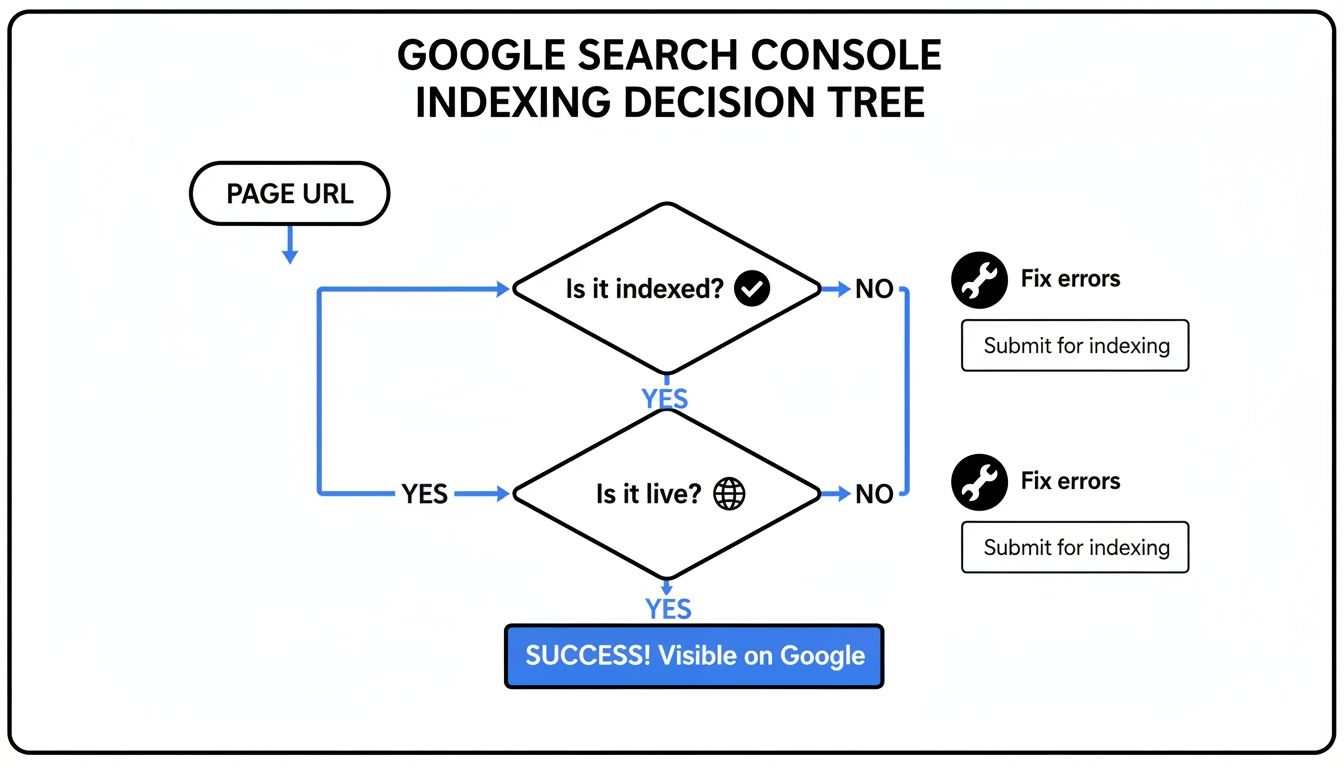
It’s a great visual guide that helps you quickly figure out if a page is indexed, if it's live, and what steps to take if you find any errors, which really streamlines the whole troubleshooting process.
Maintaining Technical Site Health
Looking at reports is one thing, but proactively maintaining your site’s technical health is what really guarantees long-term indexing success. Things like your site speed and mobile-friendliness directly impact how Google perceives and interacts with your entire site.
A slow website doesn't just frustrate users; it can actually discourage Google from crawling it frequently. If Googlebot consistently struggles to access your pages quickly, it might slash your site’s crawl budget, which means it will simply visit your site less often.
Simple, actionable steps can make a massive difference here. Optimizing your images to cut down file sizes, using browser caching, and making sure your site is fully responsive on mobile devices are all foundational tasks you can't ignore. For instance, using a free tool like TinyPNG can reduce image file sizes by over 70% without losing quality, dramatically improving your page load times.
These efforts keep you in good standing with Google and help ensure your new content gets the attention it deserves. Keeping an eye on these metrics is a key part of learning how to track your website traffic and its performance over the long haul.
Frequently Asked Questions About Google Indexing
Even after you've checked all the boxes, a few questions about indexing can still linger. It’s one of those areas that trips up a lot of people, especially if you’re new to the game. Let's clear up some of the most common queries we run into.
How Long Does It Take for a New Site to Get Indexed?
This is the million-dollar question, and the honest answer is: it depends. The time it takes for Google to find and index a brand-new website can be anywhere from a few days to several weeks.
A few key things really influence this timeline. The authority of your domain (which is zero for a new site), the quality of the content you launch with, and whether you’ve already submitted a sitemap through Google Search Console all play a big part. Patience is a virtue here, but following the steps in this guide will definitely help Google discover your site much faster.
My Page Says 'Crawled – Currently Not Indexed.' What Does That Mean?
Seeing this status in Google Search Console can feel like a gut punch, but it’s actually a really valuable clue. It means Google’s bots have visited your page but ultimately decided not to add it to the index. In almost every case, this is a signal of a content quality issue.
Google might have looked at the page and decided the content was too thin, a duplicate of another page (either on your site or somewhere else), or just not valuable enough for searchers.
Actionable Insight: To fix this, your job is to improve the page itself.
- Add more unique insights, data, or commentary.
- Expand on the topic to make it more comprehensive and useful.
- Make sure it’s well-written and serves a very clear purpose for the reader.
Once you’ve made significant improvements, you can head back to the URL Inspection tool and ask Google to give it another look.
Will Requesting Indexing Multiple Times Speed It Up?
Nope. Jamming the "Request Indexing" button over and over for the same URL won't speed anything up. It's a common misconception, but it just doesn't work that way.
Google has been very clear that multiple submissions for the same URL do not give it any kind of higher priority. Use the feature once for a brand-new page or after a major update.
After that first request, you should shift your focus to things that naturally encourage Google to come back and crawl your site. This means creating more great content, building out your internal linking structure, and earning quality backlinks from other reputable websites.
Can a Page Get Indexed If It's Not in My Sitemap?
Yes, a page can absolutely be discovered and indexed even if it's missing from your XML sitemap. Google finds new content in all sorts of ways, but the most common is by following links—both internal links from other pages on your own site and external links pointing in from other websites.
However, leaving important pages out of your sitemap is just bad practice. Including all your key pages is a fundamental SEO best practice because it gives Google a clear roadmap of all the content you want indexed. It makes its job of crawling your website much more efficient.
At Website Services-Kansas City, we turn these indexing challenges into growth opportunities. If you're struggling to get your business seen on Google, our SEO and web development experts can build a powerful online presence that gets you noticed. Let's get your site indexed and ranking—learn more at https://websiteservices.io.
