
In the simplest terms, schema markup is a special kind of code you add to your website to help search engines like Google understand your content on a much deeper level. Think of it as a secret language that lets you whisper hints to Google, turning your webpage's information into something it can easily read and categorize.
For a local business, this isn't just a technical tweak—it's a competitive advantage. This simple act makes your site eligible for eye-catching search results called rich snippets, which can make a huge difference in whether a customer in Kansas City clicks on your link or a competitor's.
What Is Schema Markup And Why It Matters
Imagine your website is a book, and Google is a librarian trying to figure out what it's about. Without any help, the librarian has to read every single page from cover to cover just to get the gist of it.
Schema markup is like adding a super-detailed table of contents, an index, and clear chapter titles. It explicitly tells the librarian: "This chapter is a recipe for Kansas City-style ribs," "this page lists our business hours for our Overland Park location," and "this section right here contains customer reviews."

This "translation" is the whole point of schema markup in SEO. Instead of just letting Google guess what your content means, you're spoon-feeding it specific context. This clarity allows search engines to do more than just index your words; it lets them understand the meaning and relationships behind the information.
From Words to Meaning
Without schema, a search engine sees a string of numbers like "(816) 555-1234" and correctly identifies it as a phone number. That's pretty smart.
But with LocalBusiness schema, it understands this is the specific phone number for your Kansas City office. That small distinction is critical because it transforms raw data into useful, structured information that Google can act on. This kind of enhanced understanding is a core part of any strong on-page optimization strategy.
To really see the difference, let’s look at how Google understands your content with and without schema.
How Google Understands Your Content With And Without Schema
This table breaks down the difference between a standard search result and one that’s been enhanced with schema markup. It’s a clear look at how this code changes what a user sees.
| Element | Without Schema Markup (Standard Search Result) | With Schema Markup (Rich Snippet) |
|---|---|---|
| User Sees | A plain blue link with a title and a short text description. Functional, but not very engaging. | The same link, but now with star ratings, review counts, cooking time, or other helpful details. |
| Google Sees | "This page has text about a recipe." It understands the words but misses the full context. | "This is a Recipe for 'Apple Pie' with a 4.8-star rating from 150 reviews, and it takes 1 hour to bake." |
As you can see, schema gives search engines the specific, structured data they need to create a much more informative and appealing entry on the search results page.
The Real-World Impact on Your Visibility
So, why does any of this matter for your business? It all comes down to gaining a competitive edge.
When your search result shows up with star ratings, event times, or product prices right there on the results page, it immediately stands out from the sea of plain blue links. It grabs attention.
By providing this extra context, you're not just improving how search engines see your site—you're directly improving how potential customers see your brand before they even click.
This powerful first impression can dramatically increase clicks and drive more qualified traffic to your site. What started as a niche technical practice has become a standard for top-performing websites.
Today, schema markup in SEO shapes how over 45 million web domains present their information to search engines, representing about 12.4% of all registered domains. It's a fundamental piece of modern SEO.
How Schema Drives More Clicks and Builds Trust
Let’s connect the dots between this special "translator" code and actual business growth. While schema isn't a magic button that rockets you to the #1 spot, it’s one of your best tools for winning the click-through battle right on the search results page.
Rich snippets—the flashy, enhanced results that schema creates—make your listings far more informative and eye-catching. Instead of a plain old blue link, you can show off star ratings, product prices, or event dates. This extra bit of information helps your entry pop off the page and grab a searcher's attention instantly.
This boost in visibility almost always leads to a higher Click-Through Rate (CTR), which is just the percentage of people who see your result and actually click on it. A better CTR sends a powerful, positive signal to Google, telling the algorithm that your page is a highly relevant and valuable answer to what the user was looking for.
Turning Clicks Into Customers
The most tangible reason schema markup matters in SEO is its direct line to a better CTR and more engaged users, which ultimately means more leads and revenue. Industry analyses consistently show that pages with rich results can see a 20–40% higher CTR than their plain blue-link counterparts.
This isn't just about getting more clicks; it's about getting the right clicks. When a user sees your price or your 5-star rating before they even visit your site, they're already pre-qualified. They are far more likely to be a serious customer because the rich snippet has already answered some of their initial questions and started building a foundation of trust.
Building Instant Authority and Trust
Think about your own search habits for a second. When you're looking for a local service and see one result with a 4.8-star rating from 150 reviews and another with just a title, which one do you instinctively trust more? The answer is obvious.
Schema markup allows you to present social proof and key information directly within the search results, establishing credibility before a user even lands on your page. This is a massive competitive advantage.
This pre-click trust is invaluable. It’s similar to how a well-written meta description can convince someone to click, but with an added layer of verifiable data like reviews or prices. To truly see its impact, you can monitor how your snippets appear using a custom SERP results checker.
By building authority at the earliest possible touchpoint, you encourage qualified customers to choose you over a competitor every single time. And if you're looking to optimize every part of your search appearance, you should also learn how to write a great meta description in our guide.
The Most Valuable Schema Types For Your Business
With a whole library of schema types out there, figuring out where to even start can feel like a chore. But here’s the good news: you don’t need to master every single one. Not even close.
For most local businesses, service providers, and e-commerce stores, focusing on a handful of high-impact types will get you 90% of the results. Think of this as your cheat sheet for prioritizing what really moves the needle.
We’re going to skip the dense technical jargon and break down the essential schema types that directly fuel business growth. Each one helps you stand out in the search results in a slightly different, but powerful, way.
This simple diagram shows how adding a small piece of code (that’s the schema) can lead to more eye-catching results (we call those rich snippets), which in turn drives more clicks and builds the kind of trust that wins customers.
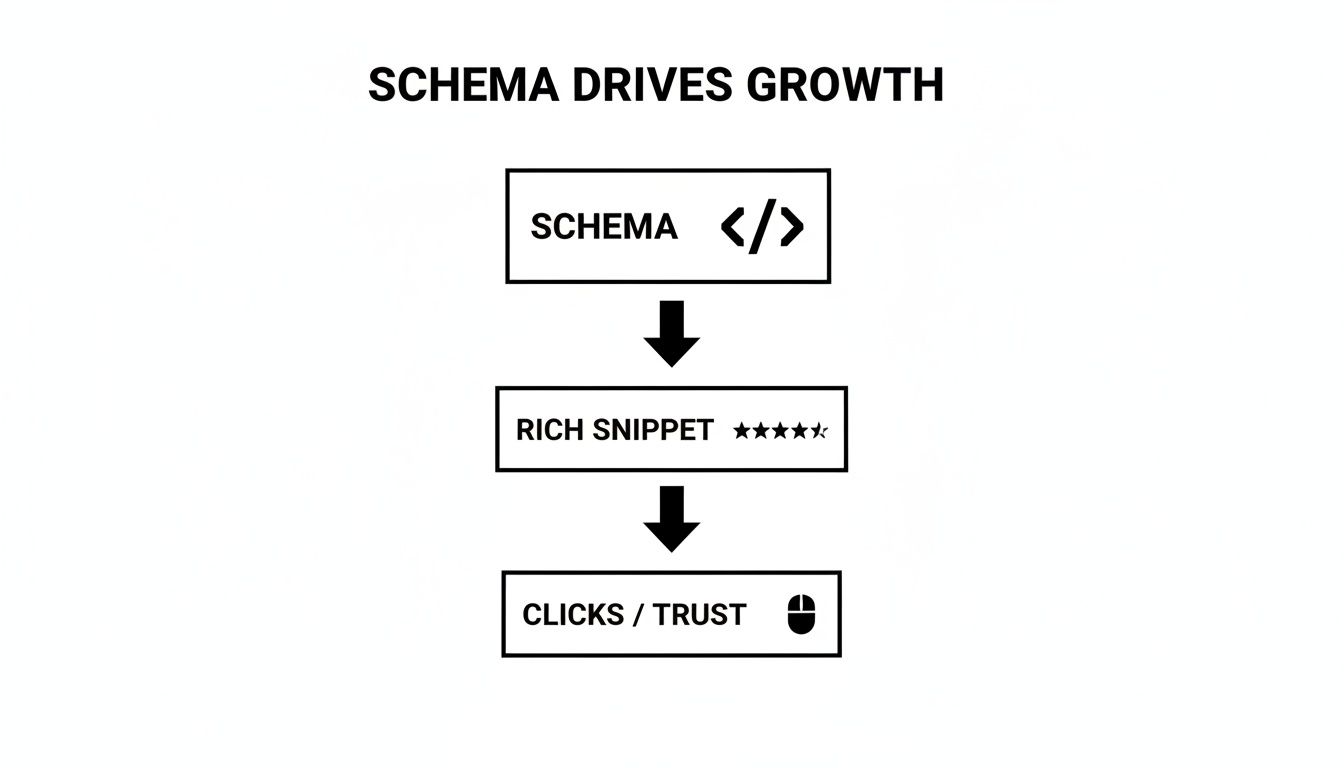
Ultimately, the goal is to transform a standard, boring search listing into a powerful, information-rich advertisement for your business—all without paying for an ad.
Essential Schema Types For Business Growth
To make this even easier, here’s a quick-reference table. It covers the schema types we're about to dive into, showing you exactly what they're for and the key info you'll need to get them working.
| Schema Type | Best For | Key Information Needed |
|---|---|---|
| LocalBusiness | Any business with a physical address or service area. | Business Name, Address, Phone, Hours, Business Type |
| Product & Offer | E-commerce sites and anyone selling products directly. | Product Name, Price, Availability, SKU, Currency |
| Review | Any business that collects customer ratings. | Aggregate Star Rating (e.g., 4.8), Total Review Count |
| FAQPage | Pages with a question-and-answer format. | A list of questions and their corresponding answers |
Think of these as your foundational four. Getting these right will give you a serious leg up on the competition.
LocalBusiness Schema
For any company with a physical location or a defined service area, LocalBusiness schema is completely non-negotiable. It’s how you explicitly tell Google your address, phone number, operating hours, and exactly what kind of business you are (like "Plumber," "Restaurant," or "Law Firm").
This is the information that helps power how you show up in local search results, on Google Maps, and in the Knowledge Panel.
Getting this right is a cornerstone of local SEO. It reinforces the exact same details found in your Google Business Profile and other online directories. Keeping this data consistent everywhere is a huge part of building local authority, which you can learn more about by understanding what a local citation is.
Product & Offer Schema
If you sell anything online, Product schema is your most powerful tool. It lets you display critical purchasing information like price, availability ("In Stock" or "Out of Stock"), and even special offers right there in the search results.
This instantly turns a simple blue link into a mini-product listing that attracts qualified buyers who are ready to make a decision.
By showing the price and stock status upfront, you’re pre-qualifying your visitors. You attract serious customers who are ready to buy, which means higher-quality traffic and, ultimately, better conversion rates.
Review Schema
Let’s be honest: social proof is everything. And Review schema puts your hard-earned reputation front and center. This markup is what displays that aggregate star rating and the total number of reviews directly under your search result.
That little row of orange stars is one of the single most effective ways to grab a searcher's attention and build instant trust. A high rating can dramatically increase your click-through rate, as people are naturally drawn to businesses that are already loved by their customers.
FAQPage Schema
Does your page answer a list of common customer questions? The FAQPage schema is your best friend. It allows you to display those questions and answers in a slick, expandable list directly in the search results.
This rich snippet not only makes your listing physically larger and more prominent on the page, but it also immediately positions you as a helpful authority on the topic. It’s a fantastic way to dominate more search real estate while providing real value.
Adding Schema Markup To Your WordPress Site
Getting schema onto your website might sound like a job for a developer, but if you're on WordPress, you have some surprisingly simple options that don't require touching a single line of code. For most business owners, this is something you can absolutely handle yourself with the right tools.
We'll walk through the two most common ways to get it done. The first uses a popular SEO plugin to automate most of the heavy lifting. The second involves manually adding a code snippet, which gives you more granular control if you need it.

This screenshot shows a perfect example of how user-friendly this can be. Inside a typical WordPress plugin, you're just a few clicks away from selecting and adding different types of schema to your pages or posts. It’s designed to turn a complex task into a simple choice.
Method 1 Using An SEO Plugin Like Rank Math
For the vast majority of WordPress users, an SEO plugin is the fastest and safest road to take. Tools like Rank Math or Yoast SEO have schema features baked right in, turning a technical SEO task into a simple fill-in-the-blanks process.
I highly recommend this approach because the plugin handles the tricky part: generating the correct JSON-LD code (Google's preferred format) and injecting it into the right place on your site. All you have to do is feed it the right information.
Here’s a quick look at how you'd do it with Rank Math:
- Install and activate the plugin. Once it’s running, head over to the page or post you want to add schema to.
- Find the Rank Math SEO settings. This panel usually lives right inside the WordPress editor.
- Click on the "Schema" tab. This opens up the Schema Generator, where you can choose from a whole list of pre-built schema types like 'Article,' 'Product,' or 'LocalBusiness.'
- Fill in the required fields. For 'LocalBusiness' schema, it will ask for your business name, address, phone number, and hours. The plugin then writes the code for you behind the scenes.
Using a plugin like Rank Math streamlines the entire process, minimizing the risk of syntax errors that could invalidate your schema. It's the go-to method for business owners who want the benefits without the coding headache.
For those looking to get the most out of this tool, our guide on a comprehensive SEO tune-up using Rank Math provides deeper insights and actionable steps. On WordPress sites, you can also often implement specific schema types directly through page builder widgets, such as when implementing FAQ schema using an Elementor widget.
Method 2 Manually Adding a JSON-LD Snippet
If you're someone who likes more direct control or you're not using an SEO plugin with robust schema features, you can always add the code yourself. This method involves generating the schema code and then pasting it into your site's header. It gives you complete control over every single detail.
First, you'll need to create your code using a free tool like Google’s Structured Data Markup Helper or Merkle's Schema Markup Generator. You just input your business details, and the tool spits out a ready-to-use JSON-LD script.
Here's a practical, real-world example for a fictional Kansas City plumbing company:
{
“@context”: “https://schema.org”,
“@type”: “Plumber”,
“name”: “KC Quality Plumbing”,
“image”: “https://yourwebsite.com/logo.jpg”,
“@id”: “https://yourwebsite.com”,
“url”: “https://yourwebsite.com”,
“telephone”: “+18165551234”,
“priceRange”: “$$”,
“address”: {
“@type”: “PostalAddress”,
“streetAddress”: “123 Main St”,
“addressLocality”: “Kansas City”,
“addressRegion”: “MO”,
“postalCode”: “64101”,
“addressCountry”: “US”
},
“openingHoursSpecification”: {
“@type”: “OpeningHoursSpecification”,
“dayOfWeek”: [
“Monday”,
“Tuesday”,
“Wednesday”,
“Thursday”,
“Friday”
],
“opens”: “08:00”,
“closes”: “17:00”
},
“areaServed”: [
{
“@type”: “City”,
“name”: “Kansas City”
},
{
“@type”: “City”,
“name”: “Overland Park”
}
]
}
Once you have your code, you just need to insert it into the <head> section of your website's HTML. Many WordPress themes have a dedicated area for adding header scripts, often found under "Theme Options" or "Customize."
Testing Your Schema To Ensure It Works
Adding schema markup to your site is a fantastic step, but there's one final, crucial part of the process that far too many people skip: validation. You absolutely have to make sure search engines can actually read and understand your new code.
Think of it as proofreading a critical report before sending it to your boss. You put in all that hard work; this final check ensures it actually pays off.
Fortunately, Google gives us a free and incredibly easy-to-use tool for this exact purpose: the Rich Results Test. This tool scans your page, finds the schema you've added, and tells you flat-out if it's eligible to show up as a rich result in search. It completely removes the guesswork.
Using The Rich Results Test
The testing process is refreshingly straightforward and only takes a moment. You definitely don't need to be a developer to understand the results and confirm your setup is good to go.
- Head to the Tool: Go directly to Google's Rich Results Test website.
- Enter Your URL: Copy the full URL of the page where you added the schema and paste it into the test field.
- Run the Test: Just click the "Test URL" button and let Google's bot do its thing. It'll crawl your page and analyze the code.
Within a minute or two, you'll get a clear, simple report. The tool shows you exactly what structured data it detected and, most importantly, whether it's valid.
This screenshot shows you exactly what you're hoping to see.
That green checkmark next to "Page is eligible for rich results" is your confirmation. It means Google has successfully found and validated your schema markup. Mission accomplished.
Interpreting the Results
After running the test, you’ll see one of two main outcomes: a green checkmark showing valid items, or red warnings that highlight errors. If you see green, pop the champagne! Your schema is implemented correctly. If you find errors, don't sweat it—the tool gives you specific details on what needs to be fixed.
Beyond the immediate win of getting rich snippets, schema is now deeply tied to overall search visibility. A 2025 SEO data set shows that 72% of first-page Google results use some form of schema, which tells you structured data has become standard practice for top-ranking sites. You can discover more insights about these benefits of schema markup on SchemaApp.com.
You can also keep an eye on your schema's performance right inside Google Search Console. Once it's set up, the "Enhancements" report will show you which rich result types Google has found across your entire site and flag any sitewide errors that pop up. For a full walkthrough, check out our guide on how to set up Google Search Console.
Common Questions About Schema Markup
Even as you get comfortable with the idea of schema, a few practical questions always pop up. Think of this section as a quick FAQ, designed to give you clear, straightforward answers to the most common sticking points so you can move forward with confidence.
Does Schema Markup Directly Improve My Google Rankings?
The short answer is no, schema itself isn't a direct ranking factor like a backlink or using a keyword in your title. But its impact on your rankings is undeniable.
Schema is what helps you earn those eye-catching rich snippets that make your search result stand out. A listing with star ratings is just far more clickable than a plain blue link. This drives up your click-through rate (CTR), which is a powerful signal to Google that your content is valuable and relevant.
Over time, this positive user engagement can absolutely contribute to better rankings. It’s like making your storefront more attractive; it doesn't change your store's location, but it definitely brings more people inside.
Can I Use Multiple Schema Types On The Same Page?
Yes, and you absolutely should when it’s appropriate. A single webpage can describe multiple things, and your schema should reflect that reality.
For instance, a single product page could use:
- Product Schema: To detail the item's price, availability, and SKU.
- Review Schema: To display the aggregate star rating and review count from customers.
- FAQPage Schema: For a Q&A section answering common questions about the product.
As long as each schema type accurately describes a piece of content that is physically on the page, layering them gives search engines a much more complete and useful picture. This helps them understand every part of your page in greater detail.
The key is to be accurate. Don't add review schema if there are no reviews on the page. Match your markup to your on-page content, and you’ll provide Google with the rich, layered context it loves.
What Is The Difference Between Schema and Structured Data?
This is a common point of confusion, but a simple analogy makes it crystal clear.
Think of Schema.org as a specific vocabulary—it provides all the official terms and definitions you can use (like LocalBusiness or Person).
Structured data is the broader concept, like grammar. It's the act of organizing your site's information into a format that search engines can easily understand. You use a specific format (like JSON-LD) to apply the schema vocabulary to your content.
In short, you use the schema vocabulary to create structured data.
My Competitors Aren't Using Schema. Should I Bother?
Absolutely. This is a golden opportunity to gain a huge competitive advantage. If your local competitors' search listings are just plain blue links, your result with star ratings, prices, or event times will immediately stand out.
Implementing schema now is a powerful way to differentiate your business, claim more visual real estate on the search results page, and attract clicks before it becomes standard practice in your market. It’s a chance to get ahead, not just keep up.
Ready to stand out in search results and attract more customers? The team at Website Services-Kansas City specializes in implementing powerful SEO strategies, including schema markup, to get your business noticed. Get your free SEO audit today.
