
If you're wondering how to check the ranking of my website, your first and most important stop is Google Search Console. It's a free tool straight from Google, giving you the most accurate, foundational data on your site's average position for specific keywords. No guesswork, no third-party filters—just the raw truth.
Your Starting Point for Checking Website Rankings
For any business owner, knowing where your website ranks on Google isn't just a vanity metric; it's a direct measure of how visible you are to potential customers.
Think of it this way: if a customer in Kansas City searches for "best local bakery," showing up on the first page is the digital equivalent of having a prime storefront on the busiest street in town. If you're buried on page five, you might as well be hidden in a back alley where no one can find you.
Understanding your position helps you make smarter business decisions. It shows you which marketing efforts are actually working and where you need to focus your energy next. This data is the first step in turning your website from a simple online brochure into a powerful tool that generates leads and sales. If you want to get deeper into the mechanics, you can learn more about what page ranking is and why it's such a crucial metric for success.
Key Methods for Rank Checking
There are really three main ways to go about checking your rankings, and each one gives you a slightly different piece of the puzzle.
-
Google Search Console (GSC): This is your non-negotiable starting point. GSC provides unfiltered performance data directly from Google, showing you exactly how the search engine sees your site. It’s the ground truth.
-
Dedicated SEO Tools: Platforms like Semrush or Ahrefs automate the heavy lifting. They track specific keywords for you daily and, more importantly, give you competitor insights that you just can't get from GSC.
-
Manual Verification: This means doing the searching yourself (the right way, of course) to see what a real user sees. It's perfect for spot-checking your tool's data and getting a feel for the search results page in real-time.
You'll get the clearest picture by using a combination of all three. Here’s a quick breakdown of how they stack up.
Three Core Methods for Checking Website Rank
This table gives you a quick overview of the main ways to check your website's keyword rankings, comparing their purpose, cost, and best use case for a local business.
| Method | Primary Tool | Cost | Best For |
|---|---|---|---|
| Google Search Console | Google Search Console | Free | Getting foundational, accurate ranking data directly from Google. |
| SEO Software | Semrush, Ahrefs, Moz | Paid (Freemium available) | Daily rank tracking, competitor analysis, and broader keyword research. |
| Manual Search | Incognito Browser | Free | Spot-checking specific keywords and seeing what real users see. |
As you can see, each method serves a different purpose, moving from broad, accurate data to specific, automated tracking and finally to real-world verification.
This diagram offers a simple visual summary of how these three core methods work together to give you a complete view of your website's performance.
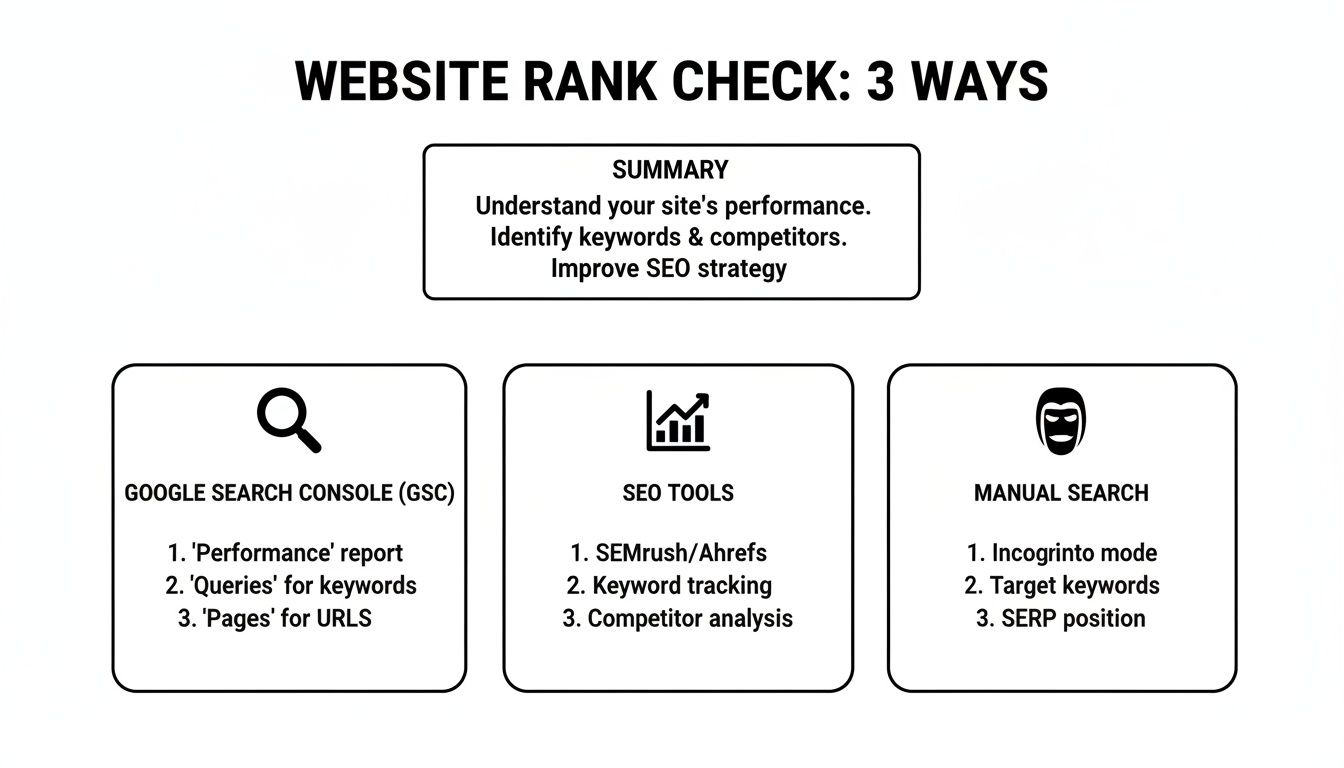
Each of these approaches—GSC, specialized tools, and manual checks—offers a different lens through which to view your website's performance. By combining them, you get the full story.
Using Google Search Console for Foundational Rank Data

While many tools can estimate your rankings, Google Search Console (GSC) is your direct line to the source. It’s a free, powerful platform that shows you exactly what Google sees, providing the foundational data you need to understand your performance without any guesswork.
Before you can dive into the data, you need to have your site connected. If you haven’t done this yet, it’s your first and most critical step. You'll need to add a DNS record or upload an HTML file to your server to prove you own the site.
Once you’re set up, the real work begins inside the Performance report. This is the dashboard where you’ll spend most of your time checking your website’s ranking.
Interpreting Your Core Performance Metrics
Inside the Performance report, you’ll see a graph and a table with several key metrics. By default, GSC shows you Clicks and Impressions. You’ll want to click the boxes at the top to also enable Average CTR and Average position to get the full picture.
Here’s what each metric tells you:
- Clicks The total number of times a user clicked through to your site from a Google search result. This is your actual organic traffic from search.
- Impressions How many times a link to your site appeared in a search result for a user. High impressions mean Google sees you as relevant, even if you’re not ranking high enough to get clicks.
- Average Position This is your average ranking for a specific keyword over a period of time. A position of 5.2 means your site usually appeared in the fifth spot, but sometimes a little higher or lower.
Practical Example: Imagine a local Kansas City roofing company checks their GSC report. They discover their site received 1,500 impressions for the query "hail damage roof repair kansas city" but their average position is 18.4. This tells them they're consistently appearing on the second page of Google—a huge opportunity that is just out of reach. This insight signals that their content is relevant, but it likely needs more on-page optimization or backlinks to crack the first page.
Your GSC data is a goldmine of these opportunities. It reveals keywords you're ranking for that you may not even be actively targeting, showing you where to focus your SEO efforts for the biggest impact.
Filtering Your Data for Deeper Insights
The true power of GSC comes from its filtering capabilities. You can move beyond general performance and drill down into specific areas to get actionable information.
You can filter your report by:
- Queries See the exact search terms people are using to find you.
- Pages Analyze which of your pages are performing best in search.
- Countries Isolate your performance for users specifically in the United States.
- Devices Compare your rankings on desktop versus mobile.
Practical rank checking often combines GSC’s data with other methods. While GSC shows you an average position, third-party tools can provide daily snapshots from specific locations. Since the number one organic result captures a significant portion of all clicks, moving up just a few spots can dramatically increase your traffic. Discover more insights about how click-through rates vary by position. Using these filters helps you identify which pages need a small boost to climb into those top positions.
Automating Your Rank Tracking with SEO Tools
While Google Search Console gives you a solid, accurate average position over time, it’s not built for the daily, granular tracking you need to make quick SEO decisions. It's like having a weather report that tells you the average temperature for the month—useful, but not what you need when you're deciding what to wear today.
This is where dedicated rank tracking tools come in. They fill the gap by giving you precise, daily updates on your keyword performance, what your competitors are up to, and—most importantly for a local business—hyper-specific results based on geography.
These platforms move past broad averages to show you exactly where you stand at any given moment. For a local Kansas City business, that level of detail is everything. GSC might tell you your average position for "BBQ catering near me" is #5, but a dedicated tool can show you that you're actually ranking #3 for users in Overland Park but are way down at #9 for those searching from the River Market district.
Going Hyperlocal with Your Tracking
This ability to drill down into specific zip codes, cities, or even neighborhoods is something GSC simply can't do. It’s the difference between knowing you’re in the game and knowing exactly where you need to adjust your strategy on the field.
Practical Example: Imagine you run a local coffee shop in Brookside. You aren't just competing with every coffee shop in the metro; you're fighting for foot traffic within a few square miles. Using a tool like Semrush or Ahrefs, you can track your rank for high-intent keywords like "best latte near me" or "coffee shop with patio" specifically for users searching within the 64113 zip code. That data is invaluable for fine-tuning your local SEO and Google Business Profile optimizations.
A good rank tracker's dashboard visualizes key metrics like your visibility percentage and average position, allowing you to spot trends at a glance and see how your efforts are paying off over time.
Key Features to Look for in a Rank Tracker
When you're trying to figure out how to check the ranking of my website with a paid tool, it’s easy to get overwhelmed by all the bells and whistles. Most platforms offer a huge suite of services, but for rank tracking, you should focus on a few core functions that deliver the most value.
- Competitor Tracking: The ability to plug in your top local competitors and see how you stack up against them for the same keywords. This turns your raw data into actionable competitive intelligence.
- SERP Feature Monitoring: Modern search results are a lot more than just ten blue links. A good tool will show you if you're appearing in the Local Map Pack, Featured Snippets, or image carousels—features that often get the lion's share of clicks.
- Automated Reporting: Look for tools that can email you weekly or monthly reports. This keeps you in the loop without you having to log in every day, saving you valuable time while still highlighting any significant ranking shifts.
- Historical Data: Seeing your rank today is useful, but seeing its journey over the past six months is powerful. Historical data is what helps you connect the dots between your SEO activities and actual results.
Choosing the right tool comes down to your budget and goals. Many platforms offer free trials or limited free versions, which are perfect for a small business to test the waters and see the value firsthand before committing to a subscription.
Ultimately, automating your rank tracking frees you up to focus on what actually moves the needle: improving your SEO strategy. By combining the foundational data from GSC with the daily precision of a dedicated tool, you get a complete and actionable view of your website's real performance in search.
How to Perform Accurate Manual Rank Checks
Automated tools and Google Search Console are fantastic for tracking trends, but they don't show you exactly what a potential customer sees the moment they search. Just Googling your business from your office computer is a classic mistake; Google personalizes your results based on your browsing history and location, giving you an inflated, inaccurate sense of where you actually stand.
To really get the ground truth on your visibility, you need to step into your customer's shoes and see the search results through a completely neutral lens. It’s the ultimate reality check for your SEO.
The first and most critical step is to always use an incognito or private browsing window. This simple action strips away your personal search history, giving you a much cleaner, more objective view of the results.
Simulating Different Locations and Devices
For a local Kansas City business, where a customer is searching from changes everything. Your rank for "plumber near me" can be wildly different for someone in Lee's Summit versus a searcher in downtown KC. To get this level of insight, you need to simulate their location.
Here are a few practical ways to do this:
- Use a VPN (Virtual Private Network): A VPN is a great tool that lets you change your computer's perceived location. You can set it to a specific city or even a particular neighborhood to see how your site ranks for users right there.
- Google's Ad Preview Tool: While it’s built for advertisers, this free tool is a bit of a hidden gem for SEO. It lets you specify a location (down to the zip code) and device type to see an unbiased search results page.
- Browser Developer Tools: Most modern browsers have built-in tools that can mimic different mobile devices. This allows you to quickly check how your site appears and ranks on various screen sizes, which is essential in a mobile-first world.
Manually checking your rank from different locations helps you spot-check the data from your automated tools. If your rank tracker says you're #3 in a specific zip code, a quick manual check can confirm that you're actually appearing in the coveted Local Pack for that area.
Search results are more localized and device-dependent than ever. For a Kansas City business, running keyword checks with a specific geotarget is crucial, as tests show ranking positions can differ by 5–20 positions between cities for the exact same query.
And don't forget mobile. With mobile traffic often making up 60%–80% of visits for local businesses, checking your mobile vs. desktop rank isn't optional—it's critical. You can learn more about these kinds of important website statistics and trends on UserGuiding.com.
By combining incognito browsing with location and device simulation, you get a real-world snapshot of your performance. This helps you move beyond generic data and start making smarter, more targeted adjustments to your local SEO strategy.
Turning Ranking Data into Actionable SEO Insights
Checking your website's rankings is just the first step. The real value comes when you turn that raw information into a clear action plan. Data without interpretation is just noise, after all. Your goal is to translate those numbers into strategic moves that boost your visibility and drive more traffic.
This whole process begins with diagnosing the normal ups and downs. When a keyword drops a few spots, your first instinct might be to panic, but context is everything. Was it a minor dip because a competitor published a new blog post, or a more significant slide after a known Google algorithm update? You have to understand the "why" behind the change before you can figure out the "what" of your response.
More importantly, your ranking data is a treasure map. It shows you exactly where to dig for gold. And the most valuable insights are almost always found on the edge of success.
Spotting Your Biggest Opportunities
Your biggest growth opportunities often lie with keywords ranking on the cusp of the first page. These are your "striking distance" terms—the ones typically ranking in positions 11 through 20. When a page is in this range, Google already sees it as relevant. It's just missing that final push it needs to start earning significant clicks.
Actionable Insight: Imagine your landscaping company in Kansas City sees its page for "landscaping services Kansas City" sitting at position 11 in Google Search Console. You are one small jump away from capturing a huge volume of high-intent local traffic. This is where you should focus your immediate energy.
A keyword moving from position 11 to position 6 can result in a traffic increase of over 500%. Don't chase brand new keywords when you have assets this close to paying off. Prioritize improving what's already working.
Creating Your SEO Action Plan
Once you've identified a page hovering on the brink of page one, it's time to build a targeted action plan to push it over the edge. Don't try to do everything at once. Instead, just focus on a few high-impact tasks.
Here are the concrete next steps I'd take:
-
Improve On-Page SEO: Revisit the page's content. Can you add more detail, answer a few related questions, or include more helpful images and examples? Make sure your primary keyword is naturally integrated into your title tag, headings, and the introductory paragraph.
-
Strengthen Internal Linking: Find other relevant pages on your website and add links that point to your target page. Use descriptive anchor text like "our landscaping services in Kansas City" instead of a generic phrase like "click here." This passes authority and signals relevance to Google.
-
Earn Local Backlinks: A single link from another respected local business or publication is a powerful vote of confidence. Think about sponsoring a local event, joining the Chamber of Commerce, or partnering with a non-competing business in your area to earn a valuable backlink.
Taking these steps transforms your rank report from a simple scorecard into a strategic guide. For a deeper dive into specific tactics, check out our complete guide on how to improve website SEO. By focusing on these low-hanging-fruit opportunities, you can methodically turn your near-misses into major wins.
Frequently Asked Questions About Website Ranking
Even with the right tools in hand, you're bound to have questions pop up as you start digging into your website's performance. It’s completely normal. Let's walk through some of the most common queries I hear from business owners who are just learning the ropes.
How Often Should I Check My Rankings?
For most local businesses, checking in once a week is the sweet spot. This rhythm helps you spot real trends and react to any significant drops without getting bogged down by the minor, day-to-day jitters that are a normal part of SEO.
The exception? If you’ve just launched a brand-new site or a big SEO campaign, you’ll probably want to keep a closer eye on your top 5-10 keywords daily for the first couple of weeks. Once you see things start to level out, you can ease back into a weekly check-in with your rank tracker.
Why Are My Rankings Different on Mobile and Desktop?
This is not only normal, but it's something you should absolutely expect. Google now operates on mobile-first indexing, which is a fancy way of saying it primarily uses the mobile version of your site to determine its rankings for both mobile and desktop search.
Rankings can swing pretty wildly between devices because of a few key factors:
- Page Speed: How fast your site zips along on a mobile connection versus a desktop one.
- User Experience: How easy it is to tap, scroll, and navigate on a tiny screen.
- SERP Features: Mobile search results are often packed with different elements like huge map packs or swipeable image carousels that can push traditional blue-link results way down the page.
Because of this, you have to track both device types separately. No exceptions. You need the complete picture to know what’s really going on.
A classic mistake is to only check desktop rankings and just assume mobile is the same. Considering mobile traffic often makes up over 60% of a local business’s website visits, ignoring that data means you're flying blind to more than half of your audience.
What Should I Do If My Website Is Not Ranking at All?
First off, don't panic. If your site is brand new, the simple answer is that it just takes time for Google to find, crawl, and make sense of it. If you're wondering about the typical timeline, our guide on how long it takes to rank on Google breaks it all down.
For any site—new or old—your first move is to make sure it's properly set up in Google Search Console and that there are no glaring crawl errors holding it back. If the site has been around for a while, it’s time for a back-to-basics SEO check. Are your title tags and meta descriptions unique? Is your content genuinely useful and relevant to your target keywords? And is your site technically sound—fast, secure, and mobile-friendly? Sometimes, just building a few high-quality local citations is all it takes to give Google the signal it needs to get you on the board.
Ready to stop guessing and start growing? The experts at Website Services-Kansas City can provide a comprehensive SEO audit to identify your biggest opportunities and build a strategy that gets you seen by more local customers. Get your free consultation today.
