
Knowing how to check my site ranking isn't just about stroking your ego. It’s about having a real-time diagnostic tool for your entire SEO strategy. It lets you spot growth opportunities before your competitors do and gives you the hard data to prove your marketing efforts are actually paying off.
Why Accurate Rank Tracking Is Non-Negotiable

Tracking your spot on a Search Engine Results Page (SERP) is the first step toward actually controlling your organic traffic. Think of it as a vital sign for your website's health. Without this data, you’re flying blind, unable to connect your actions to tangible results like more traffic and qualified leads.
One of the most common mistakes is assuming a quick Google search from your own computer gives you the real picture. It doesn't. Search results are heavily personalized based on your location, your search history, and a dozen other factors. What you see is almost never what a potential customer in Kansas City—or anywhere else—is going to see. This is exactly why you need a systematic, unbiased approach.
The Direct Link Between Rankings and Revenue
The relationship between your rank and your website traffic is brutally direct. The higher you rank, the more clicks you get. The drop-off after the first few spots is severe.
For any business, whether you're a local Kansas City service provider or a national e-commerce store, this has a direct impact on lead generation and, ultimately, your bottom line.
Your SERP position is one of the strongest predictors of organic traffic. Pages in the first position on Google capture a median click-through rate (CTR) between 28% and 32%, while positions 2–10 typically drop to single-digit CTRs.
Think about that for a second. It means that jumping from position 11 into the top 10 can boost organic clicks by more than 200% for the exact same search. Understanding what page ranking is and how it shapes your visibility is a foundational concept for any site owner.
Spotting Opportunities and Threats
Consistent rank tracking isn't just about celebrating your wins; it's also a critical early-warning system.
A sudden drop in your rankings can signal a technical problem, a Google algorithm update, or a competitor launching an aggressive new campaign. For instance, if your Kansas City law firm's page for "car accident lawyer" suddenly drops from position 4 to 12, it's an immediate signal to investigate. Did a competitor just publish a more comprehensive guide? Did your page speed slow down? Catching these shifts early lets you react quickly, fix what's broken, and defend your market share before you lose significant traffic. It’s what turns reactive panic into proactive strategy.
Using Google Search Console for Free Rank Insights
While paid tools offer daily updates and fancy features, your most reliable source of ranking data comes straight from the source: Google itself. And it’s completely free.
Google Search Console (GSC) is the single source of truth for how your site actually performs in search. It cuts through all the noise of personalized results and third-party estimates to give you a raw, authentic view of your organic visibility.
Forget the guesswork. GSC is where you go to see the real numbers behind your SEO efforts.
If you haven't set it up yet, that’s your first priority. For a straightforward walkthrough, check out our guide on how to set up Google Search Console before diving into the data. Once you're in, the 'Performance' report is where all the action is.
This report is your window into the keywords driving traffic to your site, showing you total clicks, impressions (how many times your site appeared in search), average click-through rate (CTR), and, most importantly, your average position.
Uncovering Your Biggest Opportunities
The real power of GSC isn’t just looking at the top-line numbers; it’s in the filtering. You can slice and dice your performance data by specific queries, individual pages, countries, and even devices. This is how you answer the critical questions about your site's ranking.
Actionable Insight: Let’s say a Kansas City plumbing service filters for queries containing "emergency pipe repair." They might discover they have a ton of impressions for that term but a low average position of 12.5.
This is a classic "striking distance" keyword—a term where you're ranking just off the first page. These are your golden opportunities because a small on-page optimization push can often nudge them into the top 10, dramatically increasing clicks. To act on this, you would analyze the top 10 results for that query. Do they have a FAQ section? Do they mention specific KC neighborhoods? Adding these elements to your page could be the push you need.
This screenshot shows the main dashboard of Google Search Console, where you can get a quick overview of your site's performance.
From here, you can click into the "Performance" report to access the detailed data on your search queries, pages, and average positions.
From Insights to Action
Identifying high-impression, low-click queries is one of the most valuable things you can do in GSC. It’s a direct signal from Google that it sees your content as relevant enough to show to users, but your page title and meta description aren't compelling enough to actually earn the click.
This is where you can make a huge impact without any complex, technical SEO work.
Actionable Insight: A Kansas City marketing agency finds their blog post about "social media marketing trends" gets 5,000 impressions a month but only a 1% CTR. Their current title is "Social Media Trends." By rewriting the title to "10 Actionable Social Media Trends for KC Businesses [2024]" and adding a meta description like "Dominate local social media. Discover trends Kansas City businesses are using to drive real results. Get the list.", they could significantly boost their CTR.
Industry analyses show that sites that actively use GSC to identify low-CTR queries with high impressions and then iterate on title/meta descriptions can raise CTR by 5–15 percentage points within 30–90 days.
This translates directly into more organic traffic without needing new backlinks or major site changes.
For example, if a page gets 100,000 monthly impressions and has a 1.5% CTR (1,500 clicks), just raising that CTR to 3.0% through some simple snippet optimization would double your clicks to 3,000. You can find more data on how top websites achieve this by reviewing global traffic statistics.
Automating Your Rank Tracking with SEO Tools
While Google Search Console gives you the hard truth about your site's historical performance, the data can be a day or two behind. For the kind of day-to-day, competitive insights you need to react quickly, you really need to bring in an automated rank tracking tool.
Platforms like Semrush and Ahrefs are the industry standard here, moving you from analyzing what happened to actively monitoring what’s happening right now.
These tools let you check your site ranking with a level of precision GSC simply wasn't built for. You can track your most important keywords daily, keep a close eye on your competitors, and even get alerts when things change. This is how you shift your SEO strategy from being reactive to truly proactive.
Kickstarting Your First Tracking Project
Getting an automated tool set up is pretty straightforward. You’ll start by creating a "project" for your domain. After that comes the important part: adding a curated list of your most critical commercial and informational keywords.
This isn’t about throwing every possible keyword into the tool. It's about being strategic. Focus on the high-value terms that actually drive your business—the ones that lead directly to sales calls, form fills, or sign-ups.
Actionable Insight: For our Kansas City SEO agency, we wouldn't just track "SEO." We would zero in on high-intent terms like "Kansas City SEO services," "local SEO KC," and "SEO expert in Kansas City." These have commercial intent and are far more valuable to track daily than broad, generic phrases.
Why Local and Device-Specific Tracking Is a Must
One of the most powerful features of these tools is the ability to configure location-specific tracking. If you run any kind of local business, this is non-negotiable.
It allows you to see exactly how you rank for someone searching from right inside the Kansas City metro area, not some vague national average that doesn't mean anything for your bottom line.
You can—and absolutely should—also track your rankings separately for desktop and mobile devices. Search results and user behavior can be wildly different between the two, and with mobile searches dominating the landscape, you have to know how you’re performing on smaller screens. This approach provides a much clearer view of how to check the keyword ranking from your actual customer's perspective.
The process below shows how you can use GSC's foundational data to figure out which keywords are worth adding to your automated tracking tools for daily monitoring.
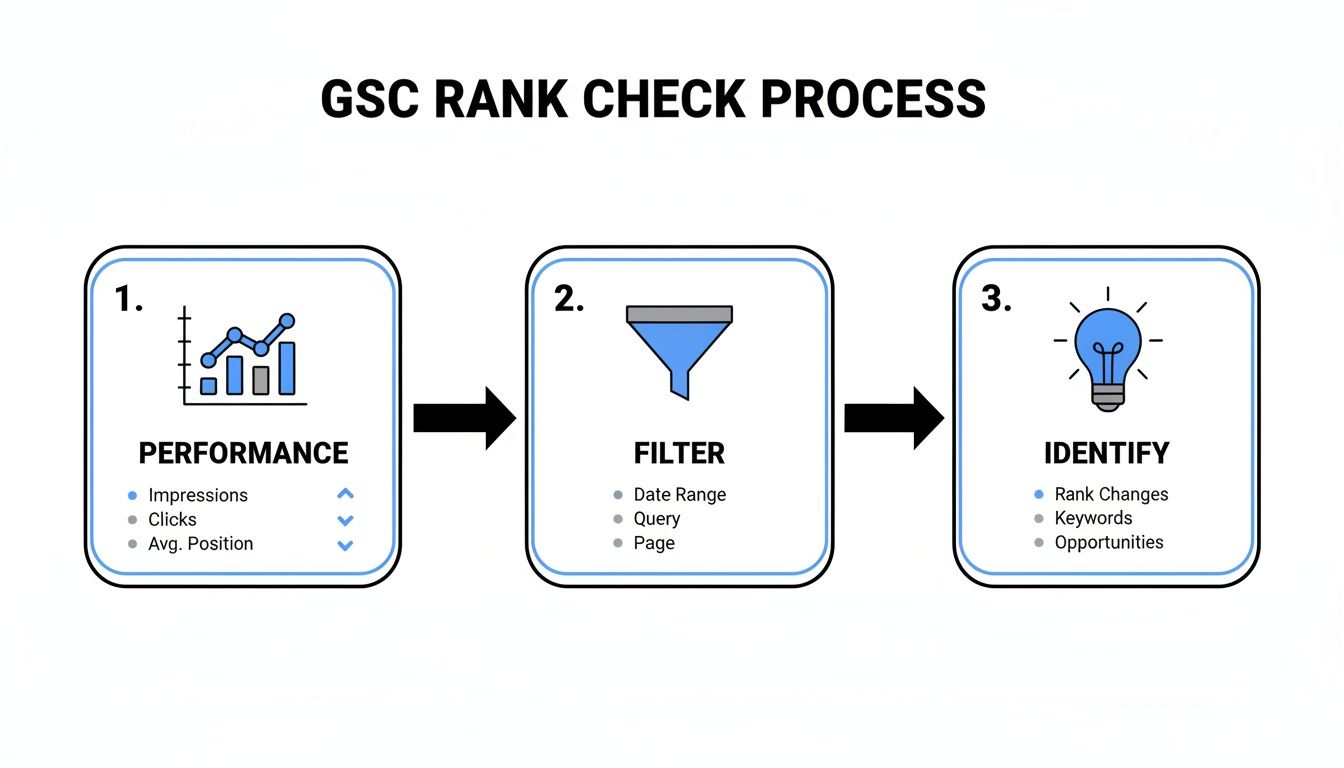
This simple workflow helps you sift through GSC to find high-potential keywords that you can then pop into a dedicated tool for that crucial daily oversight.
Manual Checks vs Automated Rank Trackers
Choosing between a quick manual check and a dedicated tracking tool comes down to your goals. Here’s a quick comparison of the pros and cons of each approach.
| Feature | Manual Checks (Incognito Mode) | Automated Rank Trackers |
|---|---|---|
| Cost | Free | Paid subscription |
| Speed | Instant for a single keyword | Provides data over time |
| Data Accuracy | Prone to personalization, location bias | Unbiased, location-specific data |
| Scalability | Not scalable; tedious for many keywords | Tracks thousands of keywords daily |
| Competitor Data | None | In-depth competitor benchmarking |
| Historical Data | None; just a snapshot | Detailed history and trend analysis |
Ultimately, while manual checks are fine for a quick spot-check, a dedicated tool is essential for anyone serious about building a real SEO strategy.
Interpreting Data and Keeping Tabs on Competitors
Once your project is up and running, you’ll start seeing daily fluctuation charts. These graphs show the natural ebb and flow of your rankings in the search results. My advice? Don't freak out over small, day-to-day dips. Instead, keep an eye out for sustained trends that last a week or more.
One of the biggest wins with automated tools is competitor benchmarking. You can plug your top three competitors right into your project and get a side-by-side view of your keyword visibility. This shows you exactly where they're beating you and where you have an opportunity to steal some ground.
Actionable Insight: Set up automated alerts. A good rule of thumb is to create an email or Slack alert for any of your top-10 keywords that drop more than three positions. This lets you investigate potential problems—like a technical glitch or a competitor pushing out new content—the moment they happen, before a small slip becomes a major slide. This kind of constant vigilance is what it takes to protect and improve your rankings in a market that never stops moving.
Performing Manual Spot-Checks the Right Way
While automated tools give you the full story, sometimes you just need a quick, gut-check answer on where you stand right now. That's what manual spot-checks are for.
But there’s a massive pitfall here, and almost everyone falls into it.
Simply opening your browser and typing your keyword into Google is the absolute wrong way to do it. The results you see are heavily skewed by your personal search history, your physical location, and every click you’ve ever made. What you’re looking at is a personalized bubble, not the objective search results your actual customers are seeing.
Escaping the Personalization Bubble
To get a much cleaner, less biased view, your first move should always be to pop open your browser's Incognito or Private mode. This simple action strips away most of the personalization tied to your Google account and browsing habits.
It’s a quick-and-dirty method, for sure, but it gives you a significantly more accurate snapshot than a standard search. For any quick manual check, opening an Incognito window should be an automatic reflex. It's the baseline for getting a more neutral result without any special tools.
This helps you see something much closer to what a brand-new visitor would see, giving you a better sense of your true position on the results page.
The Professional Method for Manual Checks
For an even more reliable and powerful manual check, there's a pro-level tool that’s completely free: Google’s Ad Preview and Diagnosis tool. Yes, it's designed for Google Ads users, but anyone can use it to get an incredibly accurate, non-personalized view of the organic search results.
This tool is a game-changer for a few key reasons:
- Location Simulation: You can simulate a search from practically anywhere. A business in downtown Kansas City can see exactly how they rank for someone searching in Overland Park or Lee's Summit.
- Device Targeting: It lets you specify whether the search is coming from a desktop, mobile phone, or tablet. This is crucial, since rankings can vary significantly across devices. For more detail, you can read our guide on how to optimize your website for mobile.
- Unbiased Results: The tool is built to show a clean, neutral SERP without any of your personal data clouding the outcome.
By using the Ad Preview tool, you are essentially looking over Google's shoulder to see a pure, unfiltered version of the search results for a specific audience. It's the most accurate way to perform a manual spot-check, period.
This method removes all the guesswork. Instead of wondering if your location or search history is messing with what you see, you get a definitive look at the SERP for the exact audience you're targeting. For a quick check, this is the gold standard.
Looking Beyond Rankings to Drive Real Growth
Getting that top spot on Google feels great, but a top ranking is just an outcome. The smartest SEO strategies don't fixate on the position itself. Instead, they focus on improving the core website metrics that produce those high rankings in the first place.
Instead of only asking how to check my site ranking, the better question is this: what foundational health signals does my site need to earn that top spot? This simple shift moves your focus from a lagging indicator (your rank) to the leading indicators you can actually control.
Ultimately, it all boils down to the two pillars supporting every high-ranking page: off-page authority and on-page experience.
Gauging Your Site’s Authority
A huge chunk of your site's authority comes from its backlink profile—the quantity and quality of other websites linking to you. Google sees every one of these links as a vote of confidence. A strong profile sends a clear signal that your content is trustworthy and valuable, which makes it much easier to rank.
Large-scale studies consistently prove this connection. One analysis across millions of URLs found that 96% of pages in Google’s top 10 had backlinks from over 100 unique domains. That’s a pretty direct line between a diverse backlink profile and top-tier visibility. You can find more details in recent studies about website performance trends.
Actionable Insight: Use a backlink analysis tool (like the free versions of Ahrefs or Semrush) to compare your domain's authority score to your top Kansas City competitors. If their authority is significantly higher, focus on local link-building opportunities like sponsoring a local charity event, guest posting on a KC business blog, or getting featured in the local news.
Think of it this way: your content is the engine, but backlinks are the fuel. Without enough fuel, even the best engine can't win the race. Monitoring your authority is just as crucial as monitoring your rank.
Prioritizing On-Page Experience
Even with great authority, a clunky user experience will hold you back every time. This is where technical on-page factors, especially Google’s Core Web Vitals, come into the picture. These metrics are all about measuring how users perceive the speed, responsiveness, and visual stability of your pages.
A page that loads at a snail's pace or has elements that jump all over the screen is frustrating for users and sends negative signals to Google. If your page takes too long to show its main content (Largest Contentful Paint) or suffers from jarring layout shifts (Cumulative Layout Shift), you could find yourself stuck on page two, no matter how amazing your content is.
Actionable Insight: Use Google's PageSpeed Insights tool. Enter your most important page URL. If your Core Web Vitals are in the red ("Poor"), the report will give you specific recommendations, such as "Compress images" or "Reduce unused JavaScript." Addressing these directly can lead to quick ranking improvements. Optimizing your site for a smooth user journey is a core part of using SEO for lead generation.
At the end of the day, by monitoring and improving these foundational health metrics, you're not just chasing a number. You're building a fundamentally stronger website that Google wants to reward with higher rankings.
Got Questions About Checking Site Rankings? We've Got Answers
Even when you've got the best tools lined up, tracking your website's performance can feel a bit like solving a puzzle. It's totally normal for questions to pop up, especially when you see your rankings bounce around.
Let's clear the air and tackle some of the most common questions I hear from clients when they first start digging into their SEO performance.
Why Do My Rankings Change on Different Devices or Locations?
You've probably seen this happen. You check your keyword on a desktop and you're sitting pretty at #3, but then you look on your phone and you've dropped to #5. This isn't a bug—it’s actually Google working exactly as intended.
Search results are heavily personalized based on a user's device, their physical location, and even their past search history. Someone searching for "plumbers near me" in Kansas City is going to see a completely different, locally-focused list of results than someone searching from the next state over.
That’s precisely why a quick search from your own computer is one of the least reliable ways to check your true position. To get an unbiased view, you have to use tools that strip out that personalization, like an automated rank tracker or Google's own Ad Preview tool.
How Often Should I Check My Website Ranking?
Obsessively checking your rankings every day is a recipe for anxiety, but ignoring them completely is just as bad. The real key is finding a practical rhythm that keeps you informed without driving you crazy.
Here’s the approach I recommend to my clients:
- For your critical, money-making keywords: It's smart to track these daily or at least weekly with an automated tool. This lets you catch a significant drop the moment it happens, so you can react before it starts to hurt your business.
- For everything else: A bi-weekly or monthly check-in using Google Search Console is perfect. This helps you monitor long-term trends and see the big picture, without getting bogged down by the minor day-to-day fluctuations that are completely normal.
My Site Is Ranking but I Get No Traffic. Why?
This is one of the most frustrating problems in SEO. Seeing your site on the first page of Google but getting barely any clicks usually points to one of two culprits.
First, you might be ranking for a keyword that has very low—or even zero—search volume. Simply put, people just aren't looking for that specific term. The second, and far more common issue, is that your page title and meta description aren't compelling enough to convince someone to actually click on your link.
Your Google Search Console 'Performance' report is your best friend here. If you see a page with a ton of impressions but a rock-bottom click-through rate (CTR), that's a massive red flag. It’s your sign to get in there and rewrite that search snippet to be more engaging and better match what the searcher is looking for.
What Is the Best Free Way to Check My Site Ranking?
Hands down, the single most valuable free tool for checking your rankings is Google Search Console. The data is the most accurate you can possibly get because it comes straight from the source: Google itself.
GSC will show you the average position for every single keyword your site has ranked for over the past 16 months. While it's not a real-time, up-to-the-minute tracker, the historical depth and sheer volume of keyword data it provides are completely unmatched by any other free tool out there. It’s the absolute foundation for any serious SEO work.
Ready to stop guessing and start growing? The team at Website Services-Kansas City provides expert SEO audits and strategies to help your business climb the rankings and attract more customers. Get your free consultation today!
