
Trying to nail down the exact cost of a new website is a lot like asking, "How much does a car cost?" Well, are you looking for a reliable daily driver, a heavy-duty work truck, or a luxury sports car? The answer is a spectrum, not a single number.
A professional website build can run anywhere from $1,000 to over $15,000, and some highly custom projects can easily top $50,000. For most small businesses, though, a solid, professional site typically lands somewhere between $2,500 and $7,500. That initial investment covers the essential design and development you need to build a real digital presence.
Understanding Website Cost Estimates
The cost of a website is driven entirely by its features, complexity, and what you need it to accomplish for your business. The initial build is usually a one-time project cost, but what you get for that budget can vary wildly.
A simple "brochure" site with just a handful of pages will sit at the low end of the spectrum. An e-commerce platform with custom features, on the other hand, is going to be a much bigger investment.
Initial Budgeting Benchmarks
So, where should you even start? Let's look at some real-world data. A comprehensive survey from GoodFirms found that about 60% of web development companies charge between $1,000 and $7,000 for a basic site. For more advanced projects, 36% charge anywhere from $7,000 to over $15,000.
This data makes one thing crystal clear: what your website does is the biggest factor in what it costs. Before you can set a realistic budget, you need a clear plan. For a complete walkthrough on figuring this out, check out our guide on how to create a business website.
A website is not just an expense; it's an investment in your company’s digital storefront. The initial cost reflects the foundation you're building for your online growth, customer engagement, and brand reputation.
To give you a clearer picture, I've put together a table breaking down typical one-time build costs based on common website types. Use this as a starting point to match your needs with a practical budget.
Estimated Website Build Costs by Type
This table summarizes typical one-time build costs for different types of websites, helping you quickly identify a budget range that makes sense for your project.
| Website Type | Typical Cost Range (One-Time) | Best For |
|---|---|---|
| Basic Brochure Website | $2,500 – $7,500 | Small businesses, startups, and professionals needing a simple online presence with 5-10 pages. |
| Small Business Website | $7,500 – $15,000 | Growing businesses requiring features like lead generation forms, blog integration, and basic SEO setup. |
| E-commerce Storefront | $10,000 – $25,000+ | Businesses selling products online, needing payment gateways, product catalogs, and inventory management. |
| Custom Web Application | $25,000 – $100,000+ | Companies needing unique functionality, such as a client portal, booking system, or SaaS platform. |
Think of these numbers as a guide. Your final cost will always come down to the specific features and level of customization your business needs to succeed online.
What Goes Into the Cost of a Website?
Every website project, whether it’s a simple one-page portfolio or a sprawling online store, is a sum of its parts. Understanding these individual pieces is the key to managing your budget and making sure you’re actually getting what you pay for.
Think of it like building a house. You wouldn’t just get a single price for "a house." You’d see separate costs for the architectural plans, the foundation, the framing, the electrical, and the interior finishes. A website is no different.
Each element has its own price tag based on the time, skill, and complexity involved. Knowing this helps you have smarter conversations with developers and agencies, because you can see exactly where your money is going. When you understand the line items, you can make better decisions about your investment.
To give you a clearer picture, this infographic breaks down the typical budget tiers for website projects—from a small “digital business card” site to larger, more complex platforms.
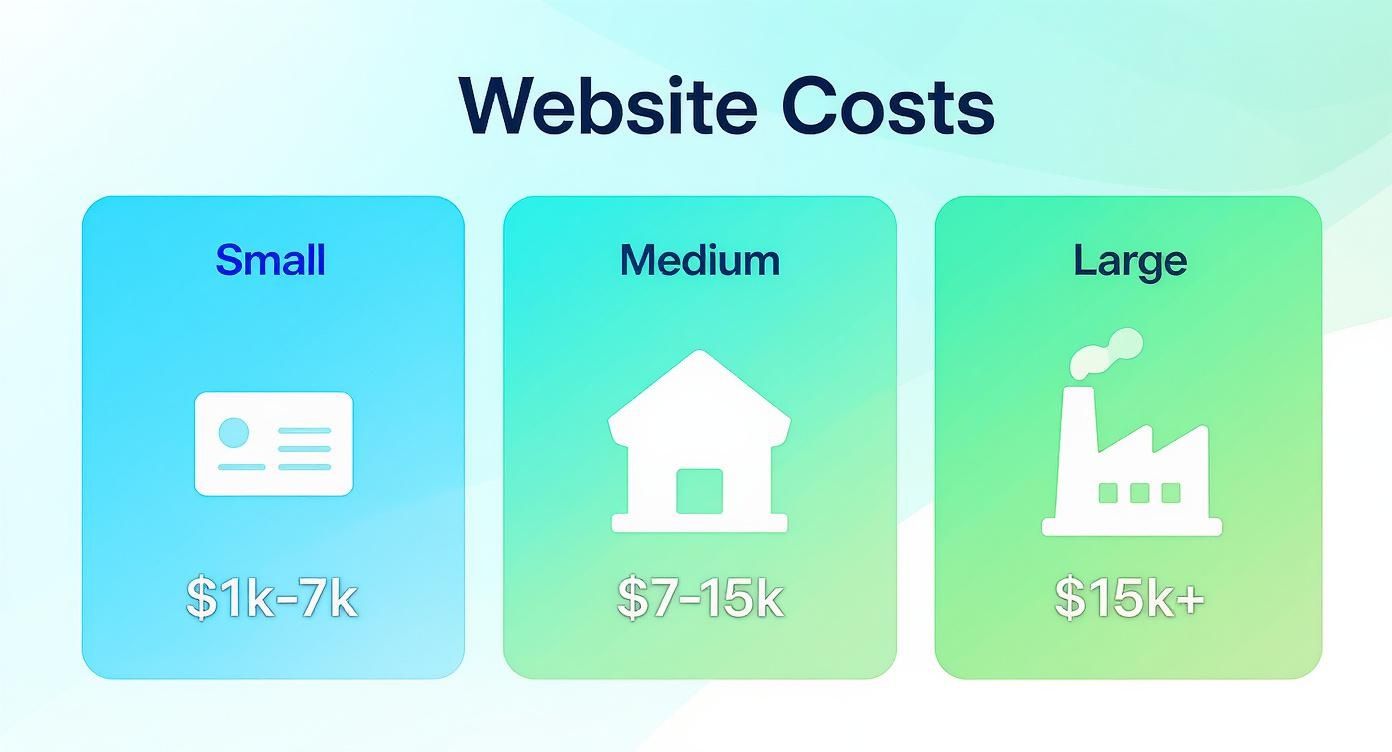
As you can see, the jump from a basic site to a medium or large one is all about adding more sophisticated features and custom work, which directly drives up the cost. Let's dig into the specific services that make up these totals.
To make things even clearer, here’s a table that breaks down how a typical website budget is allocated across different services.
Itemized Website Development Cost Breakdown
| Service Component | Typical Cost Range / Percentage of Budget | What This Includes |
|---|---|---|
| UI/UX Design | 20-30% | Wireframing, mockups, prototyping, user flow planning. |
| Front-End Dev | 25-35% | Coding the visual, interactive elements of the site (HTML, CSS, JS). |
| Back-End Dev | 30-40% | Building the server-side logic, database, and admin functions. |
| Content Creation | 5-15% | Copywriting, photography, video production, graphic design. |
| Project Management | 10-15% | Planning, communication, quality assurance, and team coordination. |
This breakdown shows that the bulk of your investment goes into the actual design and development—the skilled labor required to bring your vision to life.
The Foundation: Domain and Hosting
Before a single pixel is designed or a line of code is written, your website needs an address and a place to live on the internet. These are two separate but absolutely essential foundational costs.
- Domain Name ($10 – $20 per year): This is your website's address (like
yourbusiness.com). It's a small but vital recurring fee that secures your unique spot on the web. - Web Hosting ($10 – $100+ per month): This is the service that stores your website's files and makes them available to the world. Costs vary wildly based on the type of hosting—shared, VPS, or dedicated—and the resources you need. Making the right choice is critical for site speed and reliability. You can learn more about how to choose web hosting to find the best fit for your budget and performance needs.
The Blueprint: UI/UX Design
Great websites don’t just happen; they’re built on a solid strategic and visual foundation. This phase is all about planning the user experience (UX) and creating the visual user interface (UI). It’s where we figure out the look, feel, and flow of your site before a single line of code gets written.
UX/UI design is not just about making a website look pretty. It's about creating an intuitive, seamless experience that guides visitors toward a specific goal, whether that's making a purchase, filling out a form, or contacting your business. A good design can significantly boost conversion rates.
This stage usually involves creating wireframes (basic layouts), mockups (detailed visual designs), and prototypes (interactive models). The cost here is driven by the level of customization. Using a pre-made template is always the cheaper route, while a fully custom design tailored to your brand will require a larger investment but will deliver a unique and far more effective result.
A simple design phase might cost $750, while a complex, multi-page custom design can easily exceed $5,000.
The Construction: Front-End and Back-End Development
Once the design blueprint is approved, the developers step in to bring it to life. This process is split into two distinct parts that have to work together perfectly to create a functional website.
- Front-End Development: This is the "client-side" of your website—everything your visitors see and interact with in their browser. Developers use languages like HTML, CSS, and JavaScript to build the visual elements from the design mockups, ensuring the site looks great and works flawlessly on all devices.
- Back-End Development: This is the "server-side" that powers the website from behind the scenes. It includes the server, the database, and all the application logic. If your site needs a user login, a contact form that saves data, or an e-commerce shopping cart, that’s all handled by the back-end.
The complexity of these two areas is a primary driver of the average cost to build a website. A simple, static site with minimal back-end needs is far less expensive than a dynamic one with a custom content management system (CMS) or integrations with other software.
How Website Complexity Drives Your Final Price
The single biggest factor that shapes the average cost to build a website isn't the color scheme or the clever domain name—it’s complexity. Think of it like this: a simple garden shed and a custom-built home are both structures, but the blueprints, materials, and labor involved are worlds apart. The exact same principle applies to websites.
A basic five-page "brochure" website for a local Kansas City plumber has a clear, straightforward job to do: display services, show contact info, and build credibility. It’s the digital equivalent of a high-quality business card. But a custom e-commerce marketplace? That's a completely different beast, needing a robust back-end, secure payment processing, user accounts, and inventory management.
Each one of those features is like adding another room to the house, complete with its own plumbing and electrical. It simply requires more time, more specialized skills, and a bigger budget. Understanding this link between features and cost is the key to matching your business goals with a realistic budget, ensuring you invest in the functionality you actually need to grow without overpaying for bells and whistles that won't deliver a return.
From Simple Brochure Sites to Complex Platforms
The journey from a simple site to a complex one is all about adding dynamic features and custom functionality. Let's break down how this progression really impacts your final price tag.
A basic website is mostly static, meaning it presents information that doesn't change very often. It’s your foundational online presence and usually includes:
- A Homepage: Your digital front door.
- An About Us Page: To tell your brand's story.
- Services/Products Pages: Outlining what you offer.
- A Contact Page: With a simple form and a map.
This type of site requires minimal back-end development, making it the most affordable way to get online. It's the perfect solution for establishing a professional digital footprint quickly and efficiently. But as your business needs grow, you'll want your website to do more. And that’s where complexity—and cost—begins to scale.
The Features That Add to Your Bill
Every new feature adds layers of development hours, and that directly inflates the overall investment. A feature that seems simple on the surface, like adding a "login" button, requires a ton of unseen back-end work to manage user data securely and effectively.
Here are some of the most common features that ramp up a website's complexity and cost:
- E-commerce Functionality: This isn't just a feature; it's an entire engine built into your site. It includes product catalogs, shopping carts, secure payment gateway integration (like Stripe or PayPal), and full inventory management systems.
- User Accounts and Profiles: Letting customers create accounts, save their information, and view order history demands a secure database and a rock-solid authentication system.
- Custom Forms and Calculators: A simple contact form is standard. But a multi-step mortgage calculator or a detailed project quote form requires custom logic and coding to work correctly.
- Third-Party API Integrations: Need your site to sync up with your CRM, your email marketing platform, or an external booking system? Connecting these systems requires specialized development work to make sure they talk to each other flawlessly.
- Advanced Search and Filtering: For sites with tons of content, like a real estate listing site or a large blog, custom search filters (e.g., filter by price, location, category) add significant development time.
A website's price is a direct reflection of the time and expertise needed to build its features. A simple feature request can often involve hours of unseen back-end development, security hardening, and testing to ensure it works flawlessly for every user.
A Look at Development Hours and Regional Costs
Ultimately, the cost of these features is calculated in development hours—and those hours have a price. A recent 2025 regional cost analysis for website development shows just how much rates can vary based on geography. In North America, web development rates average between $132 and $140 per hour.
That means a full-scale project can run anywhere from $46,200 to $237,600. On top of that, ongoing SEO services to make sure the site gets found can add another $750 to $2,000 per month. You can discover more insights about these regional web development costs and see how market demand impacts pricing.
For Kansas City businesses, this really highlights the value of working with local or national agencies that can offer competitive rates without cutting corners on quality. The key is to get a detailed proposal that breaks down the estimated hours for each feature. That way, you can see exactly where your investment is going, helping you make informed decisions about which features are essential for launch and which can be added down the road.
Uncovering the Hidden and Ongoing Website Costs
Launching your new website is an exciting milestone, but it's really just the finish line of the first lap, not the end of the race. A lot of business owners get tunnel vision on the upfront build price, only to get blindsided by the recurring expenses needed to keep their site online, secure, and actually doing its job. The initial investment is just one part of the Total Cost of Ownership (TCO).
Thinking of your website like a new car helps make this crystal clear. The sticker price is your initial build cost. But to keep that car on the road, you have to pay for insurance, gas, and regular oil changes. Neglecting these ongoing costs for your website is just as risky—it always leads to bigger, more expensive problems down the road.
Core Recurring Expenses Every Site Needs
At a bare minimum, every single website has a few non-negotiable fees that form the foundation of its online existence. These aren't optional add-ons; they're the digital equivalent of paying rent and utilities for a physical storefront.
These essential costs include:
- Domain Name Registration ($10 – $20 per year): This is the annual fee you pay to own your website's address (like
yourkansascitybusiness.com). It's a small but absolutely critical expense. For a little guidance on what comes next, you might be interested in what to do after buying a domain name. - Web Hosting ($10 – $100+ per month): This is the service that stores all your website files and makes them accessible to the world. Costs swing wildly based on your traffic and performance needs, from basic shared hosting to more powerful dedicated servers.
- SSL Certificate ($0 – $100+ per year): An SSL certificate encrypts the data between your site and its visitors, which is essential for security and building trust. Many hosting plans now include a basic SSL for free, but more advanced certificates come with a yearly fee.
The Critical Cost of Ongoing Maintenance
Beyond the absolute basics, the most significant—and most often overlooked—ongoing expense is website maintenance. This isn't just about fixing things when they break; it's proactive work to prevent problems, tighten security, and ensure everything runs smoothly.
It's just like your smartphone’s operating system. It needs regular updates to patch security holes and add new features, and so does your website’s software. This is especially true for platforms like WordPress, which rely on themes and plugins that require constant updates to stay safe.
A website maintenance plan is not an expense; it's insurance. The modest monthly cost is a fraction of what you'd pay to recover from a hack, fix a major crash, or rebuild a site that has fallen into disrepair.
A typical maintenance plan from an agency here in the Kansas City area might run anywhere from $50 to $500+ per month, depending on your site's complexity and the level of support you need. This service generally covers:
- Software Updates: Keeping the core CMS, plugins, and themes up to date.
- Security Scans: Regularly checking for malware and vulnerabilities.
- Regular Backups: Creating copies of your site in case of disaster.
- Performance Monitoring: Making sure your site stays fast and responsive.
A comprehensive analysis found that the median monthly cost of owning a website is around £15.90, while the average climbs to about £68.25. The web design industry is labor-intensive, with wages making up a huge chunk of company revenue, which directly influences these support costs. You can read the full research about website ownership statistics to see the full breakdown. Budgeting for these recurring fees ensures your initial investment is protected and your website remains a valuable asset for years.
Choosing Your Build Path: DIY vs. Freelancer vs. Agency
Figuring out who will actually build your website is just as important as deciding what it needs to do. This one choice has a massive impact on your final cost, how long it takes to launch, and the quality of the finished product. You really have three main paths you can take: rolling up your sleeves and doing it yourself (DIY), bringing in a freelance developer, or partnering with a full-service agency.
Each option has its own set of trade-offs, and there's no single "right" answer. The best choice for your business comes down to your budget, your technical skills, how much time you can personally sink into the project, and your goals for the future.
Let’s break down what each path really looks like so you can make a smart decision.
The DIY Approach: Building It Yourself
These days, Do-It-Yourself (DIY) website builders like Wix, Squarespace, or Shopify have made it possible for just about anyone to get a decent-looking site online without touching a line of code. They give you drag-and-drop tools and a library of pre-made templates, which makes them a go-to for anyone with a tight budget and simple needs.
But make no mistake, this path demands a huge investment of your time. You’re not just the business owner anymore; you're the designer, the developer, the content writer, and the project manager, all rolled into one.
- Cost: This is the cheapest way to get online, with subscriptions usually running between $20 to $60 per month.
- Time: Expect a very high time commitment. You'll need to set aside dozens of hours to learn the platform, build your pages, and troubleshoot the inevitable hiccups.
- Quality: The final quality is capped by your own design sense and the platform's limitations. The templates look great out of the box, but getting a truly custom or unique feel can be a real struggle.
- Best For: Hobbyists, solo freelancers, or tiny businesses with basic needs and more time than money.
Hiring a Freelance Developer
Working with a freelancer is the perfect middle ground between the all-in DIY route and the full-service agency. You get to tap into the specialized skills of a professional designer or developer without having to pay for the overhead of a big firm. This is a fantastic option for businesses that need a custom site but are working with a moderate budget.
The key to success here is finding the right person. Platforms like Upwork or Toptal can be good places to start, but getting a referral from someone you trust is often the best way to go. Make sure you vet their portfolio carefully and get a feel for their communication style. Our guide on how to hire a web developer gives you a full playbook of steps and questions to ask.
When you hire a freelancer, you're not just buying their technical skills; you're investing in a one-on-one partnership. Clear communication and a well-defined project scope are essential for success.
- Cost: Moderate. A small to medium-sized custom site will typically run you anywhere from $3,000 to $10,000.
- Time: This is a low time commitment for you. The freelancer takes care of the technical heavy lifting, which frees you up to focus on running your business.
- Quality: The quality can be incredibly high, depending on the freelancer's skill level. You can get a fully custom, professional site that meets your exact needs.
- Best For: Small to medium-sized businesses that need a professional, custom website but don't require the broad strategic support of a full agency.
Partnering with a Web Design Agency
Going with a web design agency is the all-inclusive, end-to-end solution. An agency brings an entire team of experts to your project—strategists, UI/UX designers, front-end and back-end developers, copywriters, and SEO specialists. It's the most expensive path, but it also delivers the highest level of strategic thinking, service, and quality.
For businesses here in Kansas City, partnering with a local agency like Website Services-Kansas City means you get a team that genuinely understands the local market. They handle everything, from the initial market research and strategy all the way through to post-launch support and marketing.
- Cost: This is the highest investment, with projects typically starting at $10,000 and often climbing past $25,000 for more complex websites.
- Time: The time commitment from you is minimal. The agency is built to manage the entire project from start to finish, keeping you in the loop without bogging you down.
- Quality: Exceptional. You get a strategic, high-performing, and fully scalable website built by a coordinated team of experts.
- Best For: Established businesses, well-funded startups, and any company looking for a long-term growth partner, not just a one-off website build.
Ways to Manage and Reduce Your Website Costs
Building a professional website is a major investment, but it doesn't have to break the bank. With a smart approach, you can manage the average cost to build a website and make sure every dollar you spend is working toward your business goals. It’s all about making deliberate choices that save you money now without creating expensive headaches later.

One of the most effective strategies is to launch in phases, often called a Minimum Viable Product (MVP) approach. Instead of building every feature you can dream of from day one, you start with the absolute essentials needed to get online and serve your customers.
Actionable Insight: For a local service business in Kansas City, an MVP could be a 5-page site with a Homepage, About Us, Services, Testimonials, and a Contact page with a simple quote request form. Phase two, three months later, could add a blog for local SEO and an integrated booking calendar.
By launching with core features first, you focus your initial budget on what matters most. This approach prevents overspending on complex functionalities before you've proven the business case for them.
Smart Choices for Long-Term Savings
The decisions you make before a single line of code is written can have the biggest impact on your final bill. Being prepared and picking the right tools are critical for keeping costs under control.
- Provide a Detailed Project Brief: The number one cause of budget overruns is "scope creep"—when new feature requests pop up mid-project. A clear, detailed brief that outlines all your requirements upfront prevents costly surprises and keeps everyone on the same page.
- Choose the Right CMS: Opting for a widely-used Content Management System (CMS) like WordPress can slash long-term costs. Its massive ecosystem means plugins for new features are often cheap or free, and finding developers for support is both easy and affordable.
- Use a Premium Template: While a fully custom design is unique, a high-quality premium template can give you a professional, polished look for a fraction of the price. A good developer can customize a template to fit your brand, giving you a semi-custom feel without the custom price tag.
By planning carefully, you can bring the final price down significantly. Even small optimizations add up. For example, you can learn how to improve website loading speed with efficient tools instead of paying for extensive custom code. These practical steps put you in control, helping you build a powerful website that fits your budget.
Common Questions About Website Costs
Even with a detailed breakdown, a few questions about the average cost to build a website always seem to pop up. Getting these final details clear is what helps you budget with confidence and move forward without second-guessing yourself. Let's tackle some of the most frequent queries we hear from business owners.
Can I Build a Website for Free
Technically, yes, you can. But for any serious business, it’s a non-starter. Those "free" website builders come with some major trade-offs that end up costing you in credibility and growth.
These platforms usually slap their own ads on your site, stick you with a clunky, unprofessional domain name (like yourbusiness.wixsite.com), and offer a tiny feature set. Even worse, their SEO capabilities are often weak, making it incredibly hard for customers to find you on Google. For any business that wants to attract clients and build a real brand, investing in a proper domain, hosting, and professional build is non-negotiable.
How Long Does It Take to Build a Website
The timeline is tied directly to the site's complexity. A simple brochure website with just a handful of pages can often be designed, built, and launched in 4 to 6 weeks.
A more involved small business site, maybe with a blog or lead generation forms, is more likely to take 8 to 12 weeks. For large e-commerce stores or fully custom web applications, the timeline can easily stretch to 4 to 6 months or even longer. The best way to keep a project on track? Provide clear requirements from the start and give prompt feedback along the way.
The biggest factor in a project's timeline isn't the developer's speed—it's the clarity of the initial vision and the efficiency of communication between the client and the build team.
Why Is Custom Web Design More Expensive Than a Template
The price difference all comes down to labor and uniqueness. A template is a mass-produced product, a pre-built design sold to thousands of people. It gives you a fast, cheap starting point, but you're stuck working within its rigid design and functional limits.
Custom web design, on the other hand, is a completely bespoke service. It involves a team of strategists, designers, and developers building a website from scratch, tailored specifically to your brand, your audience, and your business goals. The higher price tag reflects the hundreds of hours of expert work needed to create a unique, high-performing digital asset that’s truly one-of-a-kind and engineered to get results.
Ready to get a clear, no-surprise quote for your website project? The team at Website Services-Kansas City specializes in creating high-performance WordPress sites that drive growth for businesses just like yours. Contact us today for a free consultation and let's build something great together.
